Data lakes rarely come in flat structures. In practice, data is organized across multi-level folder hierarchies, partitioned by date, region, source system, or business unit. Previously, shortcut transformations processed files at a single folder level, requiring users to set up separate transforms for each subdirectory.
Moving forward, nested folders support in shortcut transformations will enable recursive discovery and transformation of files across your entire directory hierarchy, automatically.
This builds on the recently announced shortcut transformations (Generally Available) for structured file formats (CSV, Parquet, JSON), extending the zero-ETL model to work with hierarchical folder structures out of the box.
Why this matters
Consider a typical data lake layout: sales data partitioned by year, then quarter, then month, with new folders appearing as time progresses. Previously, transforming this data required targeting each leaf folder individually, or flattening your storage structure to work within the single-level constraint.
Neither approach scales well, nor both add manual overhead that shortcut transformations were designed to eliminate.
Nested folders support removes this limitation. You point a shortcut transformation at a top-level folder, and the system takes care of the rest, discovering files across all subdirectories, detecting changes incrementally, and applying transformations consistently across the entire hierarchy.
Key capabilities
Nested folders support extends shortcut transformations with capabilities designed for hierarchical data layouts.
Recursive change detection
The system automatically discovers files across all subdirectories within the target folder. When new files land in any subfolder, they are detected and processed incrementally. No manual intervention, no missed files buried three levels deep.
Automatic partition pickup
This is particularly powerful for data lakes with continuous ingestion patterns. When new partitions appear over time (for example, a new month or region folder), they are picked up automatically without requiring reconfiguration.
Directory structure preservation
The transformed output maintains the relative folder hierarchy of the source. If your source data lives in sales-data/2026/Q1/jan/transactions.csv, the transformed Delta table preserves that path structure. This ensures traceability, downstream compatibility, and logical organization of transformed data.
Safety and cycle prevention
Shortcuts nested inside the target folder are not traversed, only physical folders and files are processed. This prevents infinite recursion, cyclic dependencies, and unexpected data duplication.
Consistent transformation across all levels
The same transformation logic, delimiter settings, header configuration, and schema inference applies uniformly to every file discovered across the folder tree. One configuration covers the entire hierarchy.
Getting started
Select a top-level folder as your shortcut target
In your Lakehouse, create a new table shortcut and browse to the folder that contains your hierarchical data. Select the top-level folder rather than individual subfolders.
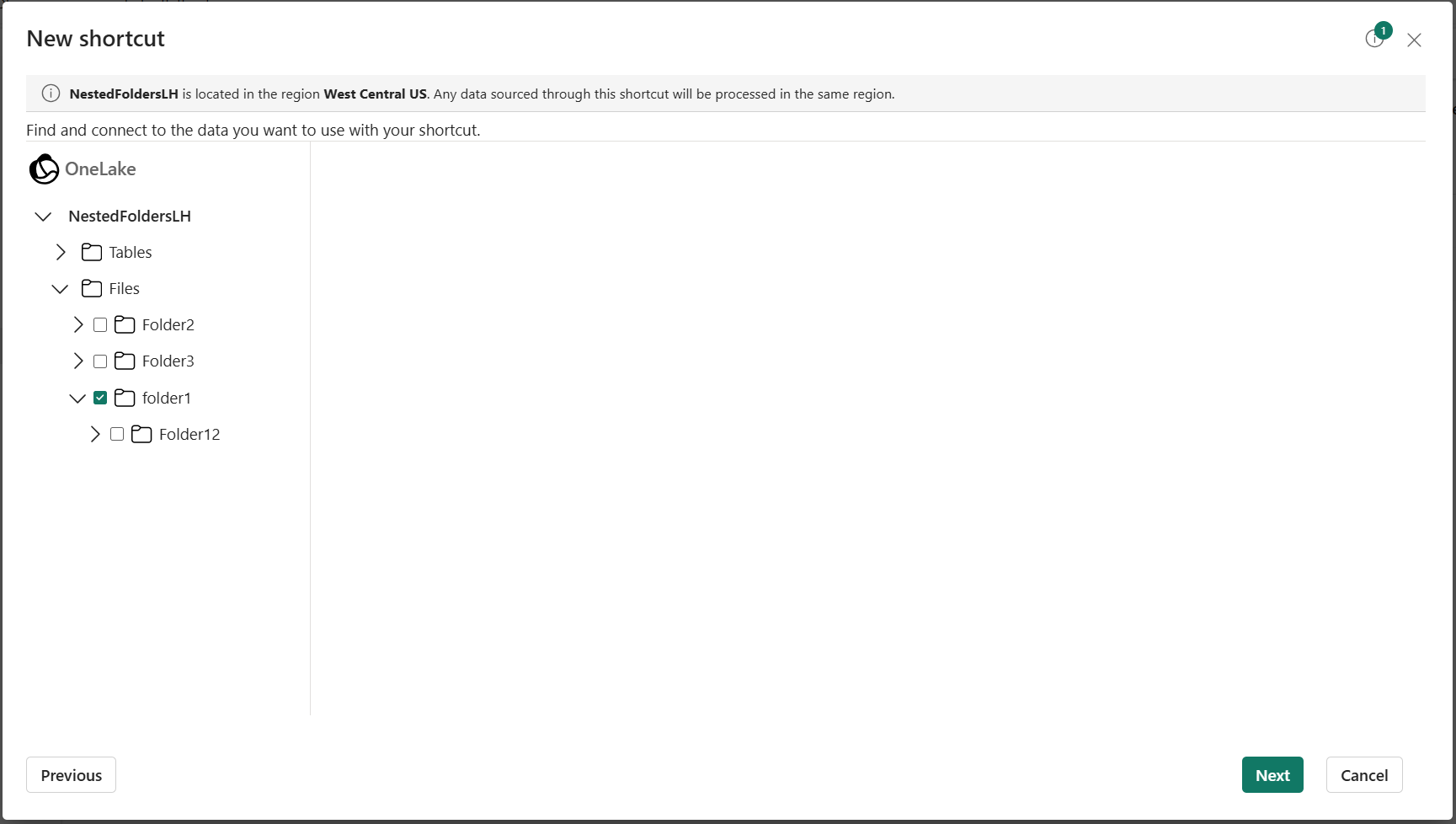
Figure: Selecting a source folder in the OneLake shortcut creation wizard in Microsoft Fabric.
Enable subfolder processing
The “Include subfolders” option is enabled by default; the system is designed to work recursively out of the box. If you need single-level behavior for a specific shortcut, you can opt out by unchecking this option.
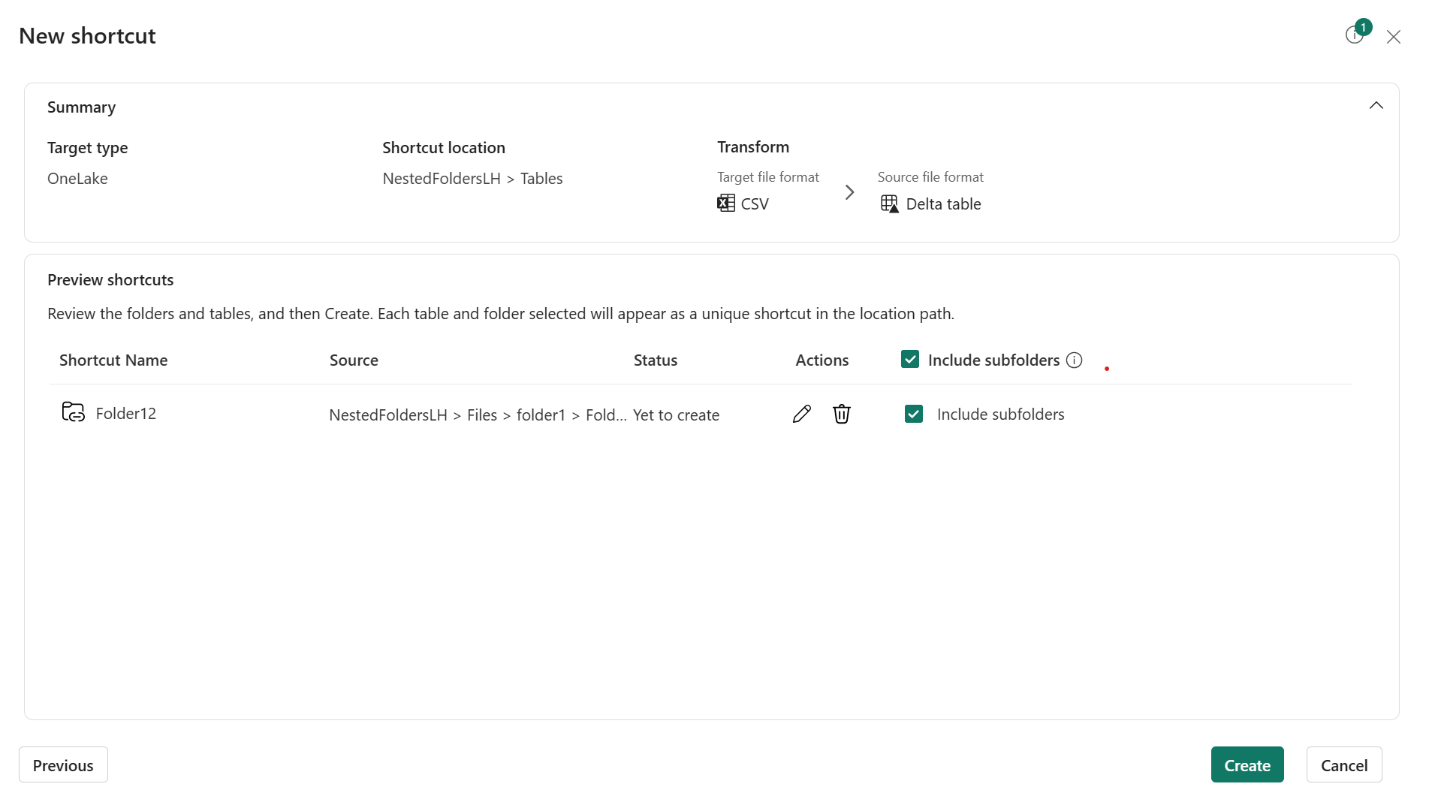
Figure: Subfolder option during shortcut creation.
Configure and create
Set your transformation options (delimiter, headers, table name) and create the shortcut. Fabric will discover all files across the folder hierarchy and begin transforming them into a Delta table.
Managing nested folder shortcuts
Shortcut properties clearly indicate whether subfolder transformation is enabled, providing clear visibility into which shortcuts are processing recursively:
- Existing shortcuts created before this feature will show subfolder transformation as “No”.
- New shortcuts with subfolders enabled will show “Yes”.
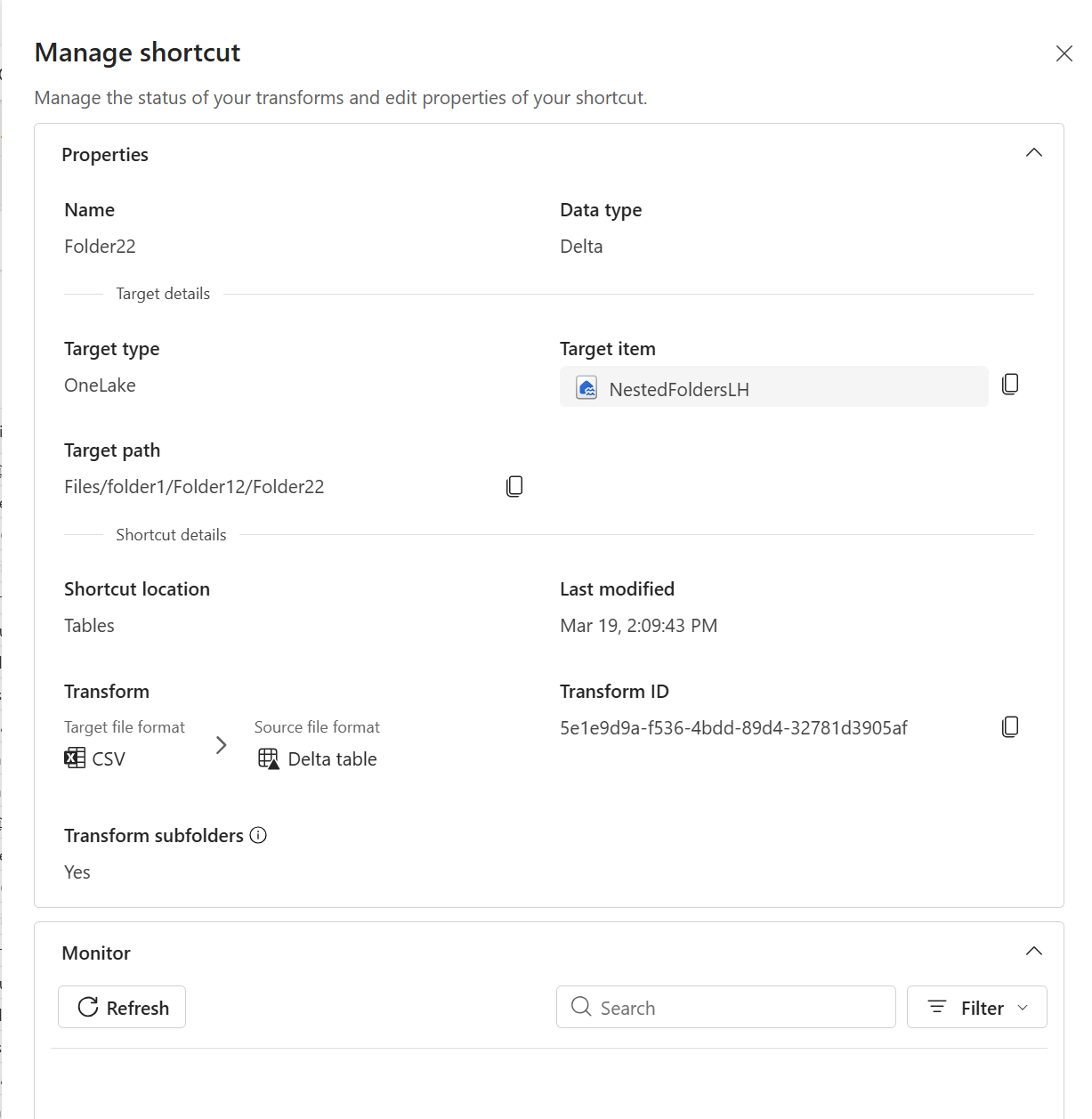
Figure: Shortcut properties showing subfolder inclusion status.
Resources
To learn more about nested folders support, configuration options, and how shortcut transformations work with hierarchical data, refer to transform structured files into Delta tables.
We would love to hear your feedback. What folder structures are you working with? What additional controls would be most valuable? Your input directly shapes what we build next. Let us know in the Fabric Ideas forum!
Related blog posts
Nested folders support in shortcut transformations (Generally Available)
Resource instance rules for OneLake in Microsoft Fabric (Preview)
As enterprises adopt OneLake as their unified data lake for analytics, securing how external services access data in OneLake becomes increasingly important—especially in environments where public internet access must be tightly controlled. Today, we’re introducing resource instance rules for OneLake in preview. This new capability allows workspace admins to explicitly allow inbound access from trusted … Continue reading “Resource instance rules for OneLake in Microsoft Fabric (Preview)”
Cross-workspace logging for MLflow in Microsoft Fabric: Build MLOps workflows with confidence (Generally Available)
Machine learning teams need more than a great model — they need a reliable way to move that model from experimentation to production. Cross-workspace logging for MLflow in Microsoft Fabric, is a capability that enables you to build end-to-end MLOps workflows using the standard MLflow APIs you already know. Figure: Animated gif of Log ML … Continue reading “Cross-workspace logging for MLflow in Microsoft Fabric: Build MLOps workflows with confidence (Generally Available)”
Microsoft Fabric
Accelerate your data potential with a unified analytics solution that connects it all. Microsoft Fabric enables you to manage your data in one place with a suite of analytics experiences that seamlessly work together, all hosted on a lake-centric SaaS solution for simplicity and to maintain a single source of truth.
Get the latest news from Microsoft Fabric Blog
This will prompt you to login with your Microsoft account to subscribe
Visit our product blogs
View articles by category
- Activator
- AI
- Announcements
- Apache Iceberg
- Apache Spark
- Community
- Community Challenge
- Data Engineering
- Data Factory
- Data Lake
- Data loss prevention
- Data Science
- Data Warehouse
- Databases
- Developer
- Fabric IQ
- Fabric ML
- Fabric platform
- Fabric Public APIs
- Fabric Workload
- Information protection
- Lakehouse
- Machine Learning
- Microsoft Fabric
- Monthly Update
- OneLake
- Power BI
- Power BI reports
- Real-Time Intelligence
- Roadmap
- Security and Compliance
- semantic model
- Uncategorized
View articles by date
- April 2026
- March 2026
- February 2026
- January 2026
- December 2025
- November 2025
- October 2025
- September 2025
- August 2025
- July 2025
- June 2025
- May 2025
- April 2025
- March 2025
- February 2025
- January 2025
- December 2024
- November 2024
- October 2024
- September 2024
- August 2024
- July 2024
- June 2024
- May 2024
- April 2024
- March 2024
- February 2024
- January 2024
- December 2023
- November 2023
- October 2023
- September 2023
- August 2023
- July 2023
- June 2023
- May 2023
- April 2023
- March 2023
- February 2023
- January 2023
- December 2022
- November 2022
- October 2022
- September 2022
- August 2022
- July 2022
- June 2022
- May 2022
- April 2022
What's new
- Microsoft 365
- Games
- Surface Pro 9
- Surface Laptop 5
- Surface Laptop Studio
- Surface Laptop Go 2
- Windows 11 apps
Microsoft Store
Education
- Microsoft in education
- Devices for education
- Microsoft Teams for Education
- Microsoft 365 Education
- Office Education
- Educator training and development
- Deals for students and parents
- Azure for students
Business
- Microsoft Cloud
- Microsoft Security
- Azure
- Dynamics 365
- Microsoft 365
- Microsoft Advertising
- Microsoft Industry
- Microsoft Teams
Developer & IT
- Developer Centre
- Documentation
- Microsoft Learn
- Microsoft Tech Community
- Azure Marketplace
- AppSource
- Microsoft Power Platform
- Visual Studio
Company
- © 2026 Microsoft