If you haven’t already, check out Arun Ulag’s hero blog “FabCon and SQLCon 2026: Unifying databases and Fabric on a single, complete platform” for a complete look at all of our FabCon and SQLCon announcements across both Fabric and our database offerings.
Capacity overage, is a new opt‑in capability in Microsoft Fabric designed to help organizations keep their workloads running—even during unexpected compute spikes. Now available in preview, this feature allows for automatic billing for excess capacity usage, based on limits you set, instead of throttling operations, ensuring smoother experiences when workloads exceed the limits of your purchased capacity.
Why capacity overage?
Fabric capacities have built‑in tools—bursting, smoothing, and throttling—to balance performance and capacity utilization limits. Under sustained high load, capacities may enter throttling phases, causing delays or rejected operations.
Capacity overage prevents these disruptions by automatically “paying off” compute overages in real time, clearing accumulated capacity debt and lifting the workloads back out of throttling. No jobs are paused or terminated—your operations continue normally. This option is billed at 3x the pay-as-you-go rate, making it suitable for occasional spikes to ensure availability. For prolonged excess usage, either performing further optimizations or moving up to the next higher sized capacity is recommended.
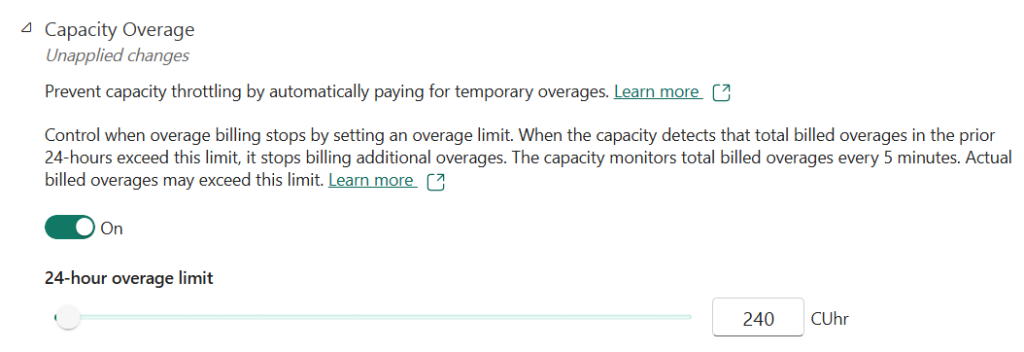
How capacity overage billing works
Fabric capacity admins are able to opt-in to this feature on a per-capacity basis, and set limits of how much overage they are willing to incur within a 24-hour period. If your billed overage reaches the set limit, Fabric will revert to normal throttling behavior. Interactive delays or job rejections may occur until the window resets or unless you increase the limit further. This prevents delays and keeps workloads running without interruption.
We also will soon be rolling out updates to the capacity metrics app to allow customers to view their overage billing utilization to ensure transparency. This information is also available through capacity events in real-time hub.
Learn more
Learn more in Capacity overage in Microsoft Fabric.
Related blog posts
Introducing capacity overage: Flexibility when you need it most (Preview)
Mastering monitoring in Microsoft Fabric Data Warehouse
Modern analytics workloads demand more than fast queries — they demand observability.
Unlocking financial insights with Capital Markets DataHub workload—A partner-led innovation in Microsoft Fabric (Preview)
We are releasing the preview of a domain‑native data solution built as a workload in Fabric to power analytics and AI-enabled use-cases for capital markets and hedge fund customers in the finance industry. Financial institutions are moving fast to modernize their analytics stack and accelerate AI adoption, however in capital markets, data complexity remains the single biggest blocker to achieving that goal.
Microsoft Fabric
Accelerate your data potential with a unified analytics solution that connects it all. Microsoft Fabric enables you to manage your data in one place with a suite of analytics experiences that seamlessly work together, all hosted on a lake-centric SaaS solution for simplicity and to maintain a single source of truth.
Get the latest news from Microsoft Fabric Blog
This will prompt you to login with your Microsoft account to subscribe
Visit our product blogs
View articles by category
- Activator
- AI
- Announcements
- Apache Iceberg
- Apache Spark
- Community
- Community Challenge
- Data Engineering
- Data Factory
- Data Lake
- Data loss prevention
- Data Science
- Data Warehouse
- Databases
- Developer
- Fabric IQ
- Fabric ML
- Fabric platform
- Fabric Public APIs
- Fabric Workload
- Information protection
- Lakehouse
- Machine Learning
- Microsoft Fabric
- Monthly Update
- OneLake
- Power BI
- Power BI reports
- Real-Time Intelligence
- Roadmap
- Security and Compliance
- semantic model
- Uncategorized
View articles by date
- March 2026
- February 2026
- January 2026
- December 2025
- November 2025
- October 2025
- September 2025
- August 2025
- July 2025
- June 2025
- May 2025
- April 2025
- March 2025
- February 2025
- January 2025
- December 2024
- November 2024
- October 2024
- September 2024
- August 2024
- July 2024
- June 2024
- May 2024
- April 2024
- March 2024
- February 2024
- January 2024
- December 2023
- November 2023
- October 2023
- September 2023
- August 2023
- July 2023
- June 2023
- May 2023
- April 2023
- March 2023
- February 2023
- January 2023
- December 2022
- November 2022
- October 2022
- September 2022
- August 2022
- July 2022
- June 2022
- May 2022
- April 2022
What's new
- Microsoft 365
- Games
- Surface Pro 9
- Surface Laptop 5
- Surface Laptop Studio
- Surface Laptop Go 2
- Windows 11 apps
Microsoft Store
Education
- Microsoft in education
- Devices for education
- Microsoft Teams for Education
- Microsoft 365 Education
- Office Education
- Educator training and development
- Deals for students and parents
- Azure for students
Business
- Microsoft Cloud
- Microsoft Security
- Azure
- Dynamics 365
- Microsoft 365
- Microsoft Advertising
- Microsoft Industry
- Microsoft Teams
Developer & IT
- Developer Centre
- Documentation
- Microsoft Learn
- Microsoft Tech Community
- Azure Marketplace
- AppSource
- Microsoft Power Platform
- Visual Studio
Company
- © 2026 Microsoft