If you haven’t already, check out Arun Ulag’s hero blog “FabCon and SQLCon 2026: Unifying databases and Fabric on a single, complete platform” for a complete look at all of our FabCon and SQLCon announcements across both Fabric and our database offerings.
The live connectivity in Migration Assistant for Fabric Data Warehouse lets you connect directly to your source system and migrate object metadata into a new Fabric warehouse. This preview is designed to help you accelerate the migration and reduce upfront prep by eliminating the need to generate and upload a DACPAC for the metadata step.
Key benefits
- Start faster: No DACPAC extraction or prep work required to begin metadata migration.
- Reduce complexity and risk: Fewer manual steps and less chance of schema drift.
- Keep the guided migration experience: Migration Assistant continues to provide the familiar flow for reviewing outcomes and progressing through migration stages.
What gets migrated (metadata)
Object definitions for schemas, tables, views, stored procedures, functions and security are migrated to the destination warehouse.
How to try it:
- Open the workspace > Select Migrate.
- Select the source.
- Choose the option: Connect directly to the source system.
- Provide source connection details.
- Select the destination workspace and warehouse.
- Migrate.
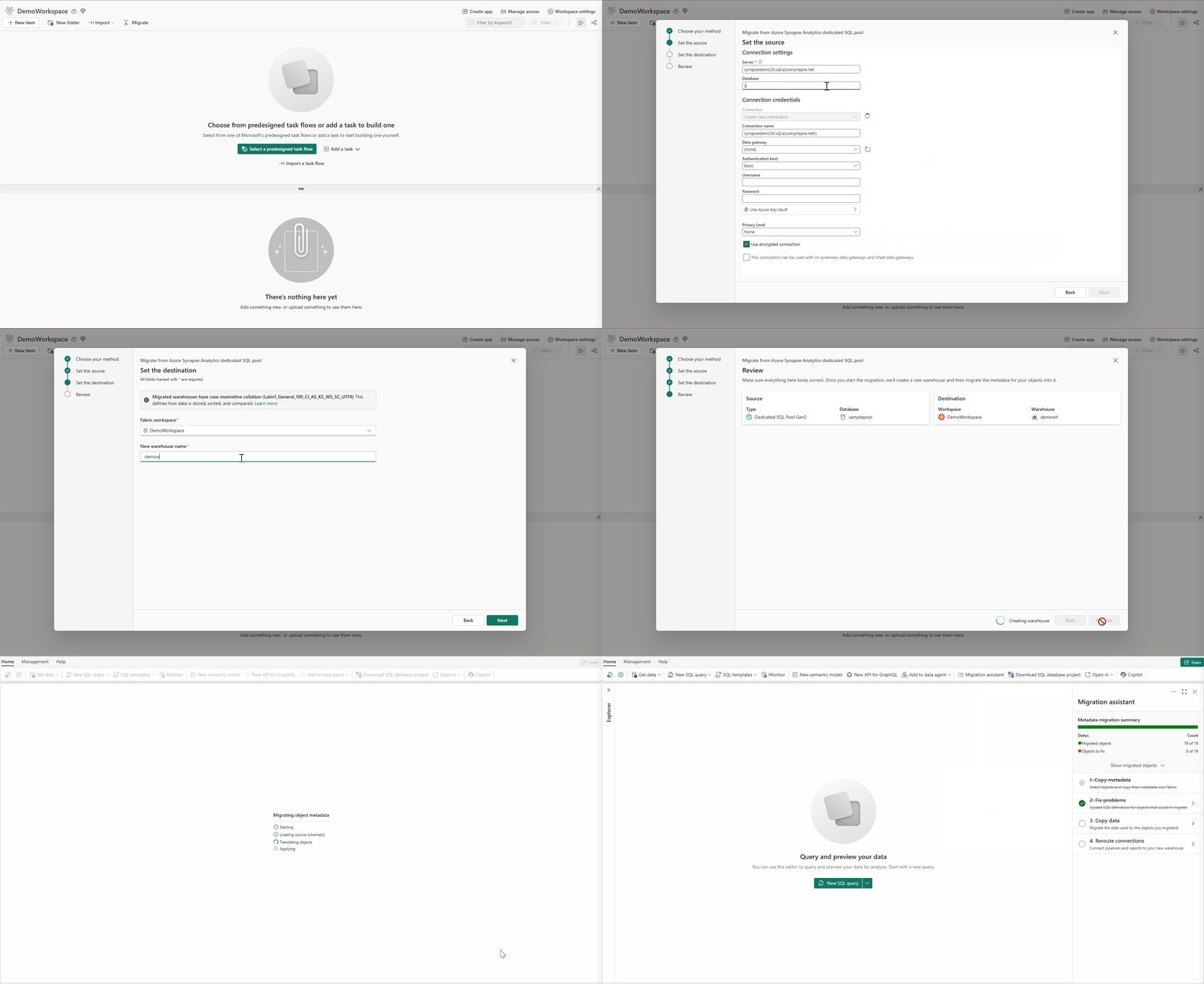
Figure 1: Connect directly to the source system.
Important considerations
- This live connectivity experience is supported for Azure Synapse Analytics Dedicated SQL Pool and SQL Server database, Azure SQL database, or Azure SQL MI used for analytics. Select SQL Server database card for on-premises or cloud SQL database like Azure SQL database or Azure SQL Managed Instance.
- On-prem SQL Server connectivity may require an on-premises data gateway. If you have existing Power BI gateway, you can leverage it.
- Metadata visibility depends on permission. If the credentials used to connect don’t have sufficient permissions to read catalog metadata, you may only see a subset of objects available for migration.
Learn more
- Migration Assistant for Fabric Data Warehouse – Microsoft Fabric | Microsoft Learn
- Submit your ideas on migration via the Fabric Ideas portal.
Related blog posts
Live connectivity in Migration Assistant for Fabric Data Warehouse (Preview)
dbt+ Microsoft Fabric: A strategic investment in the modern analytics stack
Modern analytics teams are adopting open, SQL-first data transformation, robust CI/CD and governance, and seamless integration across lakehouse and warehouse platforms. dbt is now the standard for analytics engineering, while Microsoft Fabric unifies data engineering, science, warehousing, and BI in OneLake.
Proactive and incremental statistics refresh for Fabric Data Warehouse and SQL Analytics Endpoint
In December, we released two new optimizations for statistics maintenance in the Fabric Data Warehouse and the SQL Analytics Endpoint: Proactive Statistics Refresh and Incremental Statistics Refresh. These features help keep query optimizer statistics aligned with how your data changes over time, leading to quicker query plan generation, less regressions after ingestion, and further minimizing the need for manual statistic maintenance.
Microsoft Fabric
Accelerate your data potential with a unified analytics solution that connects it all. Microsoft Fabric enables you to manage your data in one place with a suite of analytics experiences that seamlessly work together, all hosted on a lake-centric SaaS solution for simplicity and to maintain a single source of truth.
Get the latest news from Microsoft Fabric Blog
This will prompt you to login with your Microsoft account to subscribe
Visit our product blogs
View articles by category
- Activator
- AI
- Announcements
- Apache Iceberg
- Apache Spark
- Community
- Community Challenge
- Data Engineering
- Data Factory
- Data Lake
- Data loss prevention
- Data Science
- Data Warehouse
- Databases
- Developer
- Fabric IQ
- Fabric ML
- Fabric platform
- Fabric Public APIs
- Fabric Workload
- Information protection
- Lakehouse
- Machine Learning
- Microsoft Fabric
- Monthly Update
- OneLake
- Power BI
- Power BI reports
- Real-Time Intelligence
- Roadmap
- Security and Compliance
- semantic model
- Uncategorized
View articles by date
- March 2026
- February 2026
- January 2026
- December 2025
- November 2025
- October 2025
- September 2025
- August 2025
- July 2025
- June 2025
- May 2025
- April 2025
- March 2025
- February 2025
- January 2025
- December 2024
- November 2024
- October 2024
- September 2024
- August 2024
- July 2024
- June 2024
- May 2024
- April 2024
- March 2024
- February 2024
- January 2024
- December 2023
- November 2023
- October 2023
- September 2023
- August 2023
- July 2023
- June 2023
- May 2023
- April 2023
- March 2023
- February 2023
- January 2023
- December 2022
- November 2022
- October 2022
- September 2022
- August 2022
- July 2022
- June 2022
- May 2022
- April 2022
What's new
- Microsoft 365
- Games
- Surface Pro 9
- Surface Laptop 5
- Surface Laptop Studio
- Surface Laptop Go 2
- Windows 11 apps
Microsoft Store
Education
- Microsoft in education
- Devices for education
- Microsoft Teams for Education
- Microsoft 365 Education
- Office Education
- Educator training and development
- Deals for students and parents
- Azure for students
Business
- Microsoft Cloud
- Microsoft Security
- Azure
- Dynamics 365
- Microsoft 365
- Microsoft Advertising
- Microsoft Industry
- Microsoft Teams
Developer & IT
- Developer Centre
- Documentation
- Microsoft Learn
- Microsoft Tech Community
- Azure Marketplace
- AppSource
- Microsoft Power Platform
- Visual Studio
Company
- © 2026 Microsoft