If you haven’t already, check out Arun Ulag’s hero blog “FabCon and SQLCon 2026: Unifying databases and Fabric on a single, complete platform” for a complete look at all of our FabCon and SQLCon announcements across both Fabric and our database offerings.
At FabCon Atlanta, we’re doubling down on a simple truth: every successful analytics, AI, and BI initiative starts with data you can trust. Fabric Data Factory is the integration foundation of Microsoft Fabric—designed to help organizations unify their data estate, operate with confidence at scale, and turn data into AI‑ready insight faster than ever.
Built natively into Fabric and powered by OneLake, Fabric Data Factory brings together proven Azure Data Factory capabilities, modern low‑code experiences, and deep AI integration into a single, SaaS‑first platform. The result is not just easier data integration—but a more robust, secure, and enterprise‑ready foundation for everything that comes next.
This year at FabCon Atlanta, our investments focus on strengthening every pillar of Data Factory, making it resilient enough for mission‑critical workloads and flexible enough for every skill level.
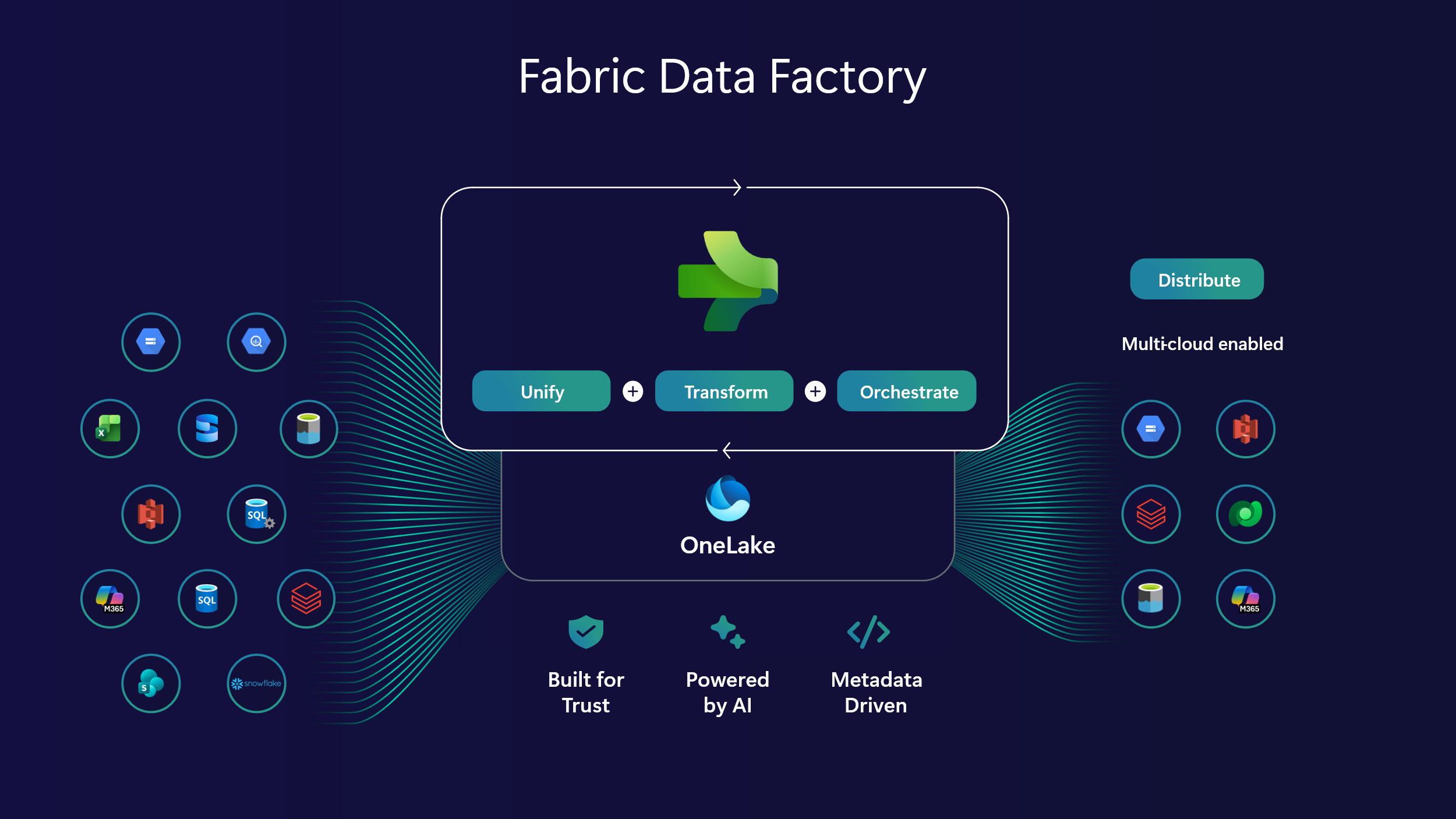
Figure 1: Microsoft Fabric Data Factory Overview
Mission critical data integration
Mission‑critical data integration provides enterprises with robust security, compliance, and governance for secure connectivity, hybrid data movement, comprehensive information protection across all data integration scenarios. Fabric Data Factory continues to raise the bar with defensive in-depth capabilities that protect your data without slowing teams down.
Outbound Access Protection (OAP) ensures that pipelines, Dataflows Gen2, and Copy jobs connect only to approved destinations, reducing the risk of data exfiltration and strengthening compliance. Combined with private endpoints and workspace‑level policies, organizations can confidently run sensitive workloads across dev, test, and production environments.
Azure Key Vault integration for VNet Gateway (Generally Available) strengthens enterprise security by centralizing connection secrets in a single, governed source of truth. Teams can eliminate credential sprawl, securely manage and rotate secrets, and connect to private, firewalled data sources—without exposing credentials or disrupting mission‑critical workloads.
Automatic updates for on‑premises data gateway reduce operational risk by ensuring gateways always run the latest supported version with critical security patches and new capabilities. Gateway administrators can trigger updates without logging into gateway machines—eliminating manual maintenance and minimizing downtime across enterprise data integration environments.
These capabilities make Fabric Data Factory a platform you can trust for regulated industries and enterprise‑scale operations—where reliability is non‑negotiable.
Unify your data estate with OneLake
Data silos slow innovation. Fabric Data Factory simplifies architecture by unifying data directly in OneLake, reducing complexity and eliminating unnecessary ETL.
We’re expanding mirroring to support even more data sources, based on your feedback, as part of core mirroring capabilities. Mirroring for Oracle, and Mirroring for SAP Datasphere are both generally available as of today.
Additionally, we are enabling Mirroring for SharePoint lists, now in preview.
As customers use Mirroring in many real‑world scenarios, a recurring question emerges: how can Mirroring be extended beyond the foundational capabilities shared by all mirrored databases? We are introducing extended capabilities in Mirroring to help you do even more with Mirrored Databases. These include:
- Change Data Feed (CDF) generation as part of mirroring into OneLake.
- Mirroring views in your data sources, starting with Snowflake.
Learn more about extended capabilities in Mirroring.
We continue to work with many partners to integrate with Fabric Open Mirroring. This enables customers with even more data sources as they unify their data estate with OneLake.
Customers can now enable Open Mirroring support for Informatica Cloud Data Ingestion and Replication™ (CDIR) capabilities with a single click while creating and maintaining mass ingestion pipelines in CDIR, thereby enabling streamlined ingestion from over 300 enterprise data sources into Microsoft Fabric mirrored databases.
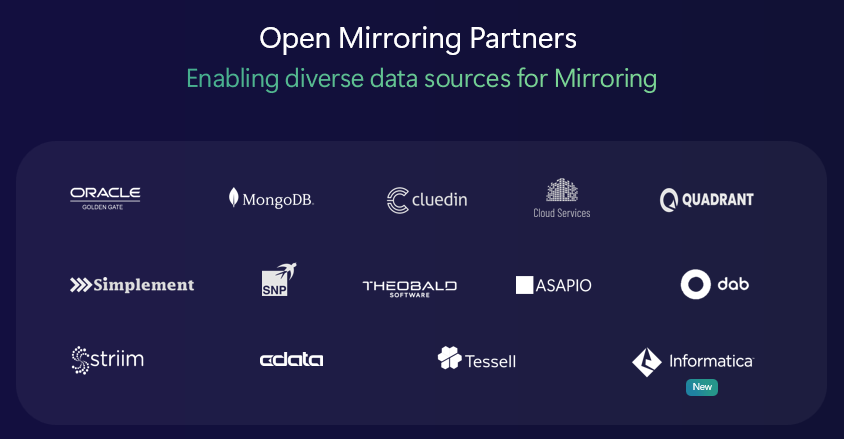
Figure 2: Open Mirroring Partners
Dataflows: self-service data transformation at scale
Preparing data for AI requires transformation and enrichment. Dataflow Gen2 makes it easy to do this at scale with self‑service experiences. Several new capabilities in Dataflow Gen2 are now generally available:
- Performance improvements with Modern Query Evaluator and Preview Only Steps.
- Support for Workspace Variables, and relative references to Fabric items.
- Dataflow refresh notification emails.
- Export Query Results in Power BI Desktop.
- Save As Dataflow Gen2, for easily migrating from Dataflow Gen1.
In addition, the following Dataflow Gen2 capabilities are in Preview:
- Making it easier for you to access your data sources with Recent Tables.
- New Data Destinations: Snowflake and Excel Files.
- Richer Dataflow diagnostic Download.
- Streaming API support for query execution .
- Enabling you to select the SharePoint site when selecting data destination.
- Validation for data destination during publishing.
Conversations with customers consistently highlight how much teams rely on Mapping Data Flows to support data integration at Spark scale in Azure Data Factory. By June 2026, we’re bringing Mapping Data Flows to Microsoft Fabric—enabling Dataflows to run natively in Fabric Data Factory as customers modernize from ADF and scale to meet growing data volumes and complexity.
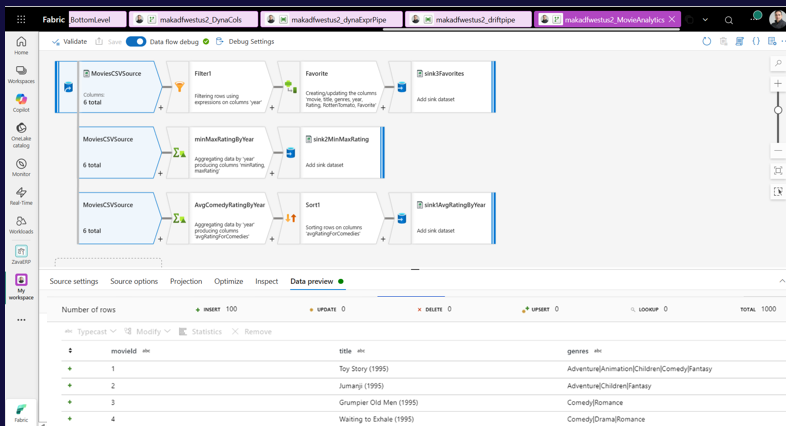
Figure 3: Dataflows Gen2 Interface
dbt enables developers to express critical business logic through SQL‑based data transformations. Since introducing dbt jobs in Public Preview in Fabric Data Factory, we’ve been learning how teams are using dbt to power SQL‑based transformations in Microsoft Fabric—and what matters most as they scale.
Based on this feedback, we’ve delivered meaningful improvements, to the next set of dbt job enhancements in Preview:
- dbt job GitHub support: Connect dbt jobs in Fabric directly to existing dbt projects hosted in GitHub, enabling seamless integration with your source‑controlled workflows.
- dbt logging enhancement: Removes the 1 MB log limit by streaming dbt job output directly to OneLake, enabling scalable logging and improved operational visibility.
- dbt public package support: Enables use of public dbt packages, making it easy to reuse community‑maintained models and accelerate development.
Enterprise grade orchestration: Low code and pro code
Fabric Data Factory brings pro‑code and low‑code orchestration together in Microsoft Fabric, giving teams the flexibility to choose the right tool for every workload—without fragmenting their orchestration strategy. At scale, this matters. Now, Fabric Data Factory powers more than 23 billion orchestration runs every month, and we continue to push the boundaries of what reliable, enterprise‑grade orchestration can deliver across data movement, transformation, and operations.
As pipelines grow in number and complexity, secure, consistent connectivity becomes non‑negotiable. To address this, we’re introducing Service Principal (SPN) and Workspace Identity (WI) as Generally Available support across all pipeline activities, enabling teams to standardize identity‑based access, reduce credential sprawl, and meet enterprise security requirements by design.
We’re also continuing to expand orchestration capabilities to support more advanced, end‑to‑end scenarios. Several new orchestration features help teams automate more, operate more efficiently, and scale with confidence all in Preview:
- SSIS Pipeline Activity
- Lakehouse Maintenance pipeline activities
- Analytics SQL Endpoint refresh pipeline activity
- Interval-based schedules (Tumbling Window Trigger)
- New Airflow REST APIs for pool and workspace management
Multi-cloud data distribution: At scale, across all clouds
As data estates grow, so does the need to move data reliably across clouds and networks. Fabric Data Factory continues to expand Copy job capabilities with broader multi-cloud connectivity, stronger incremental copy support, and enhanced CDC scenarios.
Copy job keeps data movement simple while expanding support for multi‑cloud sources and incremental copy at cloud scale. New capabilities that extend incremental copy scenarios in Copy Job are generally available:
- 10+ new connectors for incremental copy: Google Cloud Storage, DB2, ODBC, Fabric Lakehouse tables, folders, Azure Files, SharePoint Lists, SharePoint Online File, Amazon RDS for SQL Server, Amazon RDS for Oracle, and Azure Data Explorer.
- Support for more watermark column types.
- Support for incremental copy (ROWVERSION, date, string).
- Enabling users to specify database queries when using full & incremental Copy.
- Enabling users to truncate data in data destinations before full copy to avoid duplicates.
Thanks to your feedback, we’re constantly expanding the capabilities of Copy job, all available for preview in Copy job.
- Support for Slowly Changing Dimension Type 2 (SCD2)
- Support Audit columns
- Column Mapping improvements when using copy job for replication
- Support for Workspace Identity & SPN support when using copy job activity
- Multi-cloud data distribution to new data destinations: MySQL, PostgreSQL
- Support for SharePoint file-based incremental copy
AI-powered data integration and Data Factory MCP Server: Enabling developers to use active metadata for AI
AI is no longer an add‑on—it is a foundational requirement. Fabric Data Factory has Copilot experiences built in, to support you where it matters most.
From using AI to quickly get up to speed with the business logic and data transformation in Dataflow Gen2 and pipeline, to deep insights on errors when things go wrong, Fabric Data Factory continues to innovate on AI-powered data integration experiences and using active metadata.
Pipeline Expression Copilot and AI Powered Transforms are now generally available:
- Pipeline Expression Copilot: With pipeline expression copilot, users no longer need to master complex expression grammar. Instead, they can simply use natural language to describe their business needs and collaborate with Copilot to generate expressions automatically. Copilot also helps bridge understanding by explaining expressions in natural language, making them easier to read, learn, and confidently use.
- AI-powered Transform with a prompt: In Dataflow Gen2, users can now create new columns by using natural language to describe the data transformation needed, using the context from the other columns in each row. This makes it easy to tap into the power of large language models to transform data—no code required.
A key building block for many of these agentic experiences is the Model Context Protocol (MCP). Using a standardized protocol, MCP enables agents to interact seamlessly with external tools and resources. Over the past year, we have seen how developers are using MCP in rich, interactive, agentic experiences that reason and complete tasks.
The Fabric Data Factory MCP (Preview) is available now as a developer-focused MCP Server for Data Integration that enables agents to use Fabric Data Factory capabilities with many agentic tools (e.g. Github Copilot, Claude and more).
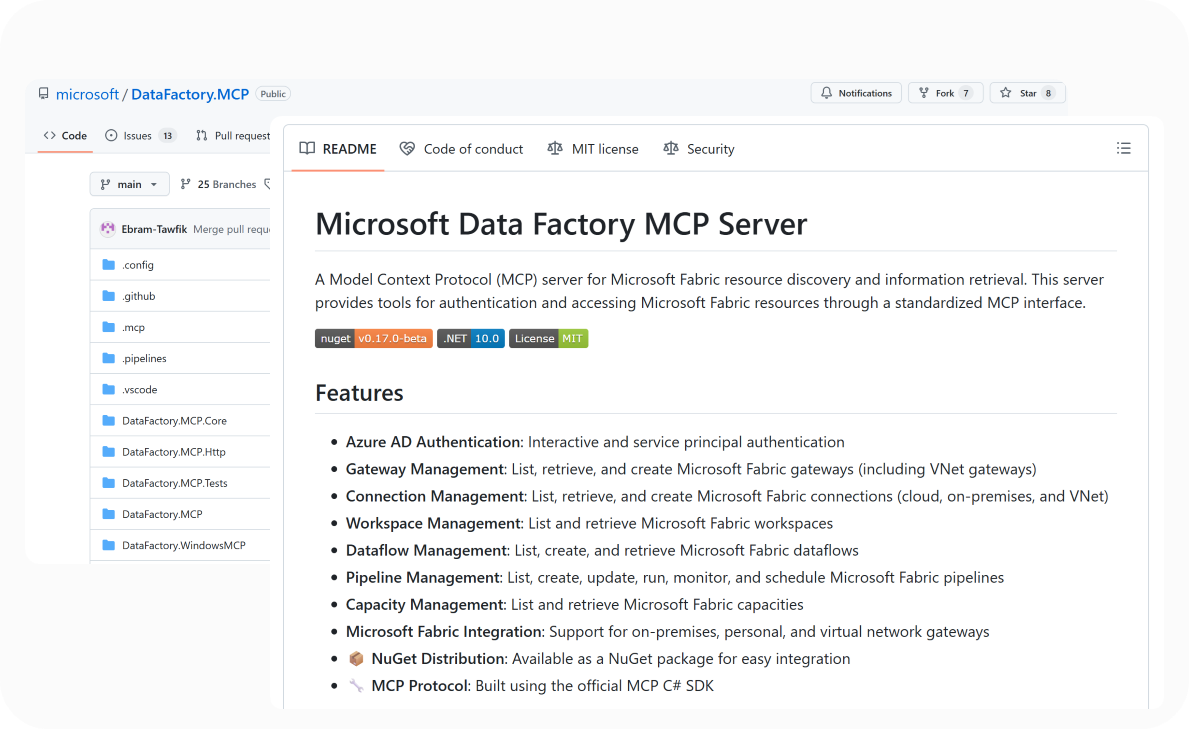
Figure 4: Microsoft Data Factory MCP Server
Factory Data Factory MCP server supports:
- Authentication: Interactive Azure AD sign-in, service principal auth for automated scenarios, session status, token retrieval, and sign-out—all through Microsoft Entra ID.
- Dataflow Gen2: Supports the full lifecycle of using Dataflow Gen2; create dataflows, add connections, write and update M (Power Query) queries, save definitions, trigger background refreshes, and monitor status. With execute query (Preview), you can run an M expression against your live data sources and get results back inline in chat.
- Pipeline Management: Supports creation of pipelines, update activity definitions, start the runs of pipeline, monitor pipeline running status, schedule recurring pipeline runs (with time zone support).
- Gateway Management: List all on-premises, personal, and VNet gateways; retrieve gateway details; understand the gateway status/ health.
- Connection Management: Discover supported connections, and creating new cloud, on-premises, or VNet connections.
We’re just getting started with the Fabric Data Factory MCP Server—and the real innovation begins with what you build next using agentic‑driven data integration.
Migration to Fabric Data Factory simplified
Fabric Data Factory brings the best of Microsoft’s data integration into a single, modern experience—designed to meet both citizen developers and data engineers where they are. By unifying Azure Data Factory and Power Query, it gives teams a consistent, end‑to‑end way to move, orchestrate, and transform data at scale.
Beyond consolidation, Fabric Data Factory lets you do more with simpler, purpose‑built experiences. Copy job streamlines multi‑cloud data movement and distribution, supporting batch and incremental loads, change data capture, and more—without the overhead of traditional pipelines. Teams can start with low‑code pipelines and Dataflow Gen2, then seamlessly move to code‑first orchestration and transformation with dbt and Apache Airflow as complexity grows.
For organizations currently running on Azure Data Factory, migration to Fabric represents the next step in their journey. Today, I’m excited to announce the Migration Assistant for Data Factory that that make efforts to migrate from Azure Data Factory and to Microsoft Fabric seamless. With feature‑rich parity, modern capabilities, and a seamless migration experience, Fabric Data Factory is ready for customers to confidently adopt as their next‑generation data integration platform. Learn more in the migration blog.
Curious about Microsoft Fabric but not ready to migrate? You can mount your existing ADF into a Fabric workspace and explore without changing anything about how your pipelines run today.
Figure 5: Migration Assistant for Data Factory
A stronger foundation for what’s next
Fabric Data Factory is more than a collection of features—it’s a robust, end‑to‑end data integration platform built for the realities of modern enterprises. With continued innovation across security, unification, transformation, orchestration, distribution, and AI, Data Factory provides the trusted foundation organizations need to power analytics, AI, and business intelligence at scale.
We’re excited to share these innovations at FabCon Atlanta and can’t wait to see what you build on top of Fabric Data Factory.
Learn more:
- Learn more about Data Factory in Microsoft Fabric
- Get Started with Microsoft Fabric
- What’s new and planned for Data Factory in Microsoft Fabric
- Read other in-depth, technical blogs on the Microsoft Fabric Updates Blog
Related blog posts
Fabric Data Factory at FabCon Atlanta: Built for modern data integration
The power of the Microsoft Fabric ecosystem: ISVs building natively on Fabric
If you haven’t already, check out Arun Ulag’s hero blog “FabCon and SQLCon 2026: Unifying databases and Fabric on a single, complete platform” for a complete look at all of our FabCon and SQLCon announcements across both Fabric and our database offerings. At Microsoft, we’ve always believed that platforms win when ecosystems thrive. Each year, … Continue reading “The power of the Microsoft Fabric ecosystem: ISVs building natively on Fabric”
Introducing Planning in Microsoft Fabric IQ: From historical data to forecasting the future
If you haven’t already, check out Arun Ulag’s hero blog “FabCon and SQLCon 2026: Unifying databases and Fabric on a single, complete platform” for a complete look at all of our FabCon and SQLCon announcements across both Fabric and our database offerings. For years, organizations have invested heavily in analytics to understand what happened in … Continue reading “Introducing Planning in Microsoft Fabric IQ: From historical data to forecasting the future”
Microsoft Fabric
Accelerate your data potential with a unified analytics solution that connects it all. Microsoft Fabric enables you to manage your data in one place with a suite of analytics experiences that seamlessly work together, all hosted on a lake-centric SaaS solution for simplicity and to maintain a single source of truth.
Get the latest news from Microsoft Fabric Blog
This will prompt you to login with your Microsoft account to subscribe
Visit our product blogs
View articles by category
- Activator
- AI
- Announcements
- Apache Iceberg
- Apache Spark
- Community
- Community Challenge
- Data Engineering
- Data Factory
- Data Lake
- Data Science
- Data Warehouse
- Databases
- Developer
- Fabric IQ
- Fabric ML
- Fabric platform
- Fabric Public APIs
- Lakehouse
- Machine Learning
- Microsoft Fabric
- Monthly Update
- OneLake
- Power BI
- Power BI reports
- Real-Time Intelligence
- Roadmap
- semantic model
- Uncategorized
View articles by date
- March 2026
- February 2026
- January 2026
- December 2025
- November 2025
- October 2025
- September 2025
- August 2025
- July 2025
- June 2025
- May 2025
- April 2025
- March 2025
- February 2025
- January 2025
- December 2024
- November 2024
- October 2024
- September 2024
- August 2024
- July 2024
- June 2024
- May 2024
- April 2024
- March 2024
- February 2024
- January 2024
- December 2023
- November 2023
- October 2023
- September 2023
- August 2023
- July 2023
- June 2023
- May 2023
- April 2023
- March 2023
- February 2023
- January 2023
- December 2022
- November 2022
- October 2022
- September 2022
- August 2022
- July 2022
- June 2022
- May 2022
- April 2022
What's new
- Microsoft 365
- Games
- Surface Pro 9
- Surface Laptop 5
- Surface Laptop Studio
- Surface Laptop Go 2
- Windows 11 apps
Microsoft Store
Education
- Microsoft in education
- Devices for education
- Microsoft Teams for Education
- Microsoft 365 Education
- Office Education
- Educator training and development
- Deals for students and parents
- Azure for students
Business
- Microsoft Cloud
- Microsoft Security
- Azure
- Dynamics 365
- Microsoft 365
- Microsoft Advertising
- Microsoft Industry
- Microsoft Teams
Developer & IT
- Developer Centre
- Documentation
- Microsoft Learn
- Microsoft Tech Community
- Azure Marketplace
- AppSource
- Microsoft Power Platform
- Visual Studio
Company
- © 2026 Microsoft