Data is a critical asset for organizations, providing the insights needed to inform and accelerate business decisions. In today’s fast-paced environment, access to real-time data is increasingly essential. The data is generated across many areas of the business, including IoT device telemetry, application monitoring, and financial transactions. As the volume of real-time data continues to grow, protecting sensitive information becomes especially important—particularly in highly regulated industries such as banking, finance, and telecommunications, where strict security and compliance requirements are mandatory.
Real-Time Intelligence Eventstream is designed to ingest real-time data from a wide range of sources, apply transformations as needed, and efficiently route data to multiple destinations. The messaging streaming connectors service that underpins Eventstream plays a key role in acquiring data from these sources. When data sources reside in private network environments (such as cloud virtual networks or on-premises infrastructure) the messaging connectors service must use secure connectivity mechanisms to safely transfer data from these environments into Eventstream.
How it works: Secure bridge via Azure virtual network
Real-Time Intelligence thrives on timely access to operational data, yet many high-value sources reside in private networks (on-premises or cloud virtual network). Eventstream’s approach establishes a secure, managed bridge using your Azure virtual network and vNet injection, allowing streaming connectors to run inside your Azure virtual network and reach private sources without opening them to the public internet. Real-Time Intelligence thrives on timely access to operational data value sources reside in private networks.
To facilitate data transfer from a source within a private network to Eventstream, it is essential to configure an Azure virtual network as an intermediary bridge, as depicted in the following diagram. The Azure virtual network should be connected to the private network that hosts the data source using suitable connectivity options, such as VPN or ExpressRoute for on-premises environments, and private endpoints or network peering for Azure-based sources. Following this, the Eventstream streaming connector instance will be provisioned within this virtual network via vNet injection, ensuring secure communication between the connector and the data source inside the private network.
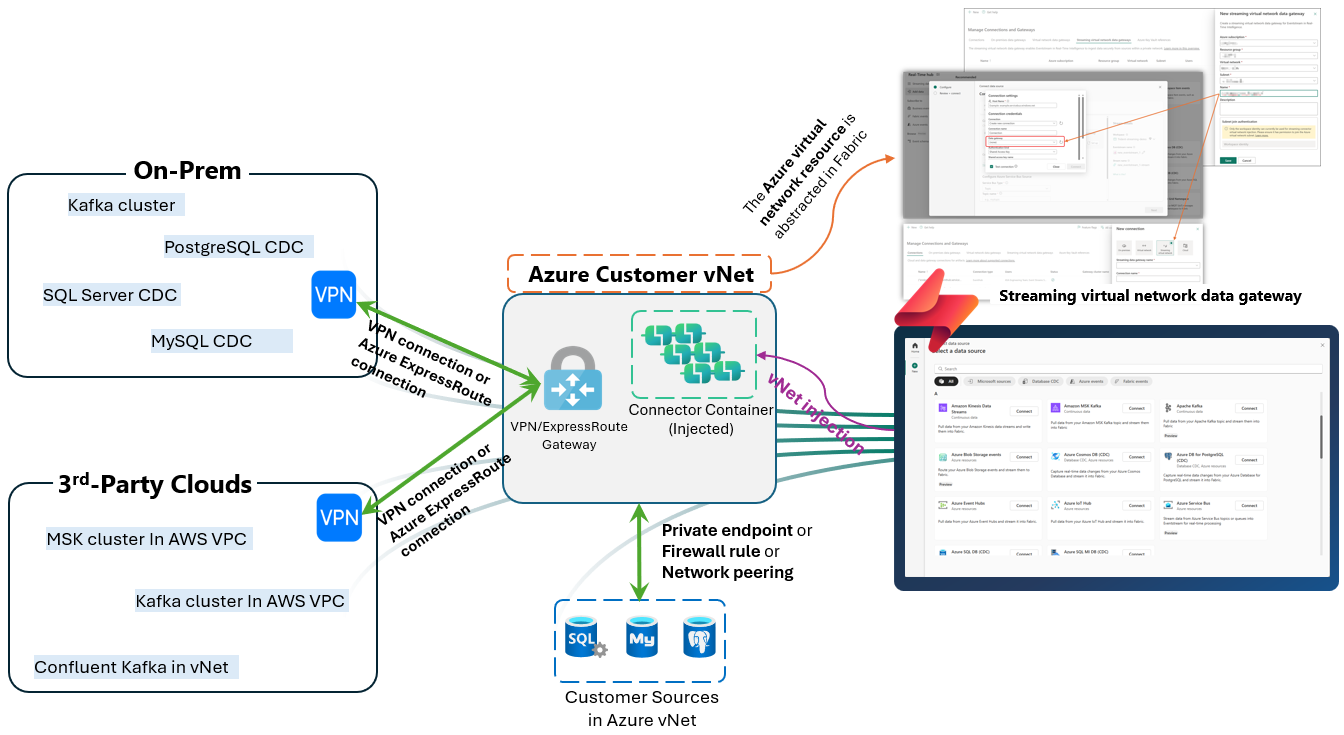
Figure: architecture illustration
To abstract the bridge Azure virtual network and subnet resource within Fabric, a new concept has been introduced: Streaming virtual network data gateways. This enables the bridge virtual network and subnet resource to be provided to Eventstream’s streaming connector service to inject connector into this bridge virtual network.
Getting started: What you need and how to begin
Get ready to implement secure, real-time data streaming with Fabric. Having reviewed the solution, you are now equipped to dive in. The following provides all necessary information and outlines the essential steps for enabling seamless and private network streaming using Fabric Eventstream connectors.
Prepare prerequisites
Before you begin in Fabric, make sure you have the following prerequisites in place:
- Azure subscription: You’ll need access to an Azure subscription with permission to create and manage virtual networks. This subscription should be in the same tenant as your Fabric account and have the ‘Microsoft.MessagingConnectors’ resource provider registered.
- Azure virtual network: Get the bridge Azure virtual network created with a subnet and delegate a subnet to ‘Microsoft.MessagingConnectors’.
- Souces’ private network types: Identify the private network types of the data sources you want to stream from, such as on-premises network, private network on third-party cloud services, or private network on Azure.
- Connectivity options: Ensure you have a way to connect your bridge Azure virtual network to your private network that hosts your sources. Supported options include VPN, ExpressRoute (for on-premises and third-party cloud), private endpoints, or network peering (for Azure-based sources).
Once you have selected an approach and established a connection between your source’s private network and the bridge Azure virtual network, you may validate the connectivity by deploying a virtual machine within the bridge Azure virtual network. If everything is set up properly, you’ll be able to access your source through this virtual machine.
Set up the private network streaming connector
Once the prerequisites are prepared, proceed with the following steps to enable secure private network streaming with Fabric Eventstream connectors in Fabric.
1. Create a streaming virtual network data gateway
To supply the bridge Azure virtual network resource to Eventstream streaming connector, a streaming virtual network data gateway needs to be created in Fabric. Select the source that you want to bring the data from to launch the Get events wizard. Select the Set up button to navigate to the Manage connections and gateways page to create it.
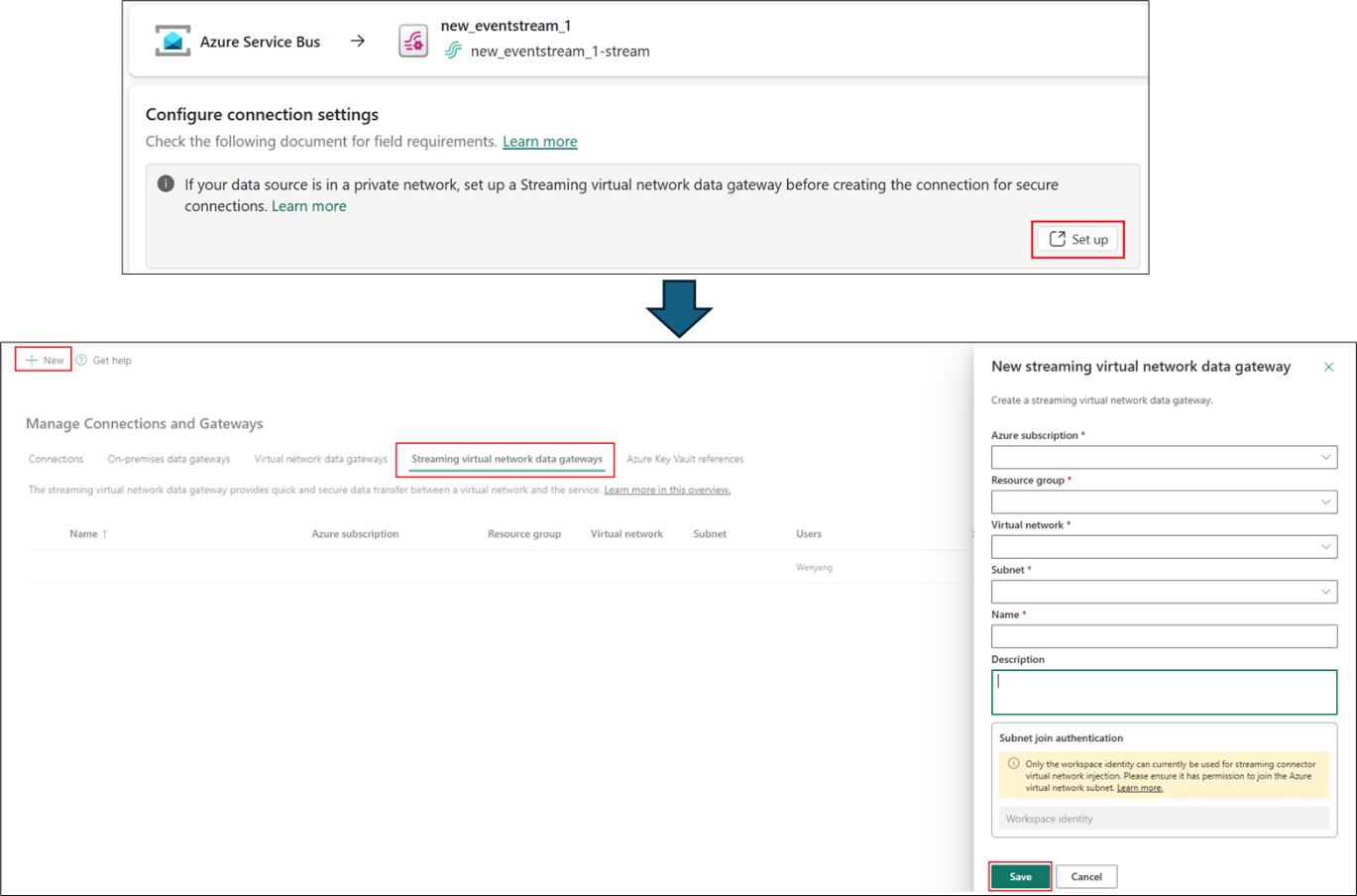
Figure: streaming virtual network data gateway
2. Create the connection with the data gateway
After the streaming virtual network data gateway is created, you can select it in Data gateway setting when creating the connection on the Get events wizard. The connection created with this gateway has a prefix ‘[vNet]’ to differentiate the normal connection that is used to connect the public accessible sources. You select this connection with gateway included for your source streaming connector use. By doing this, the bridge Azure virtual network resource is passed to the streaming connector service behind Eventstream.
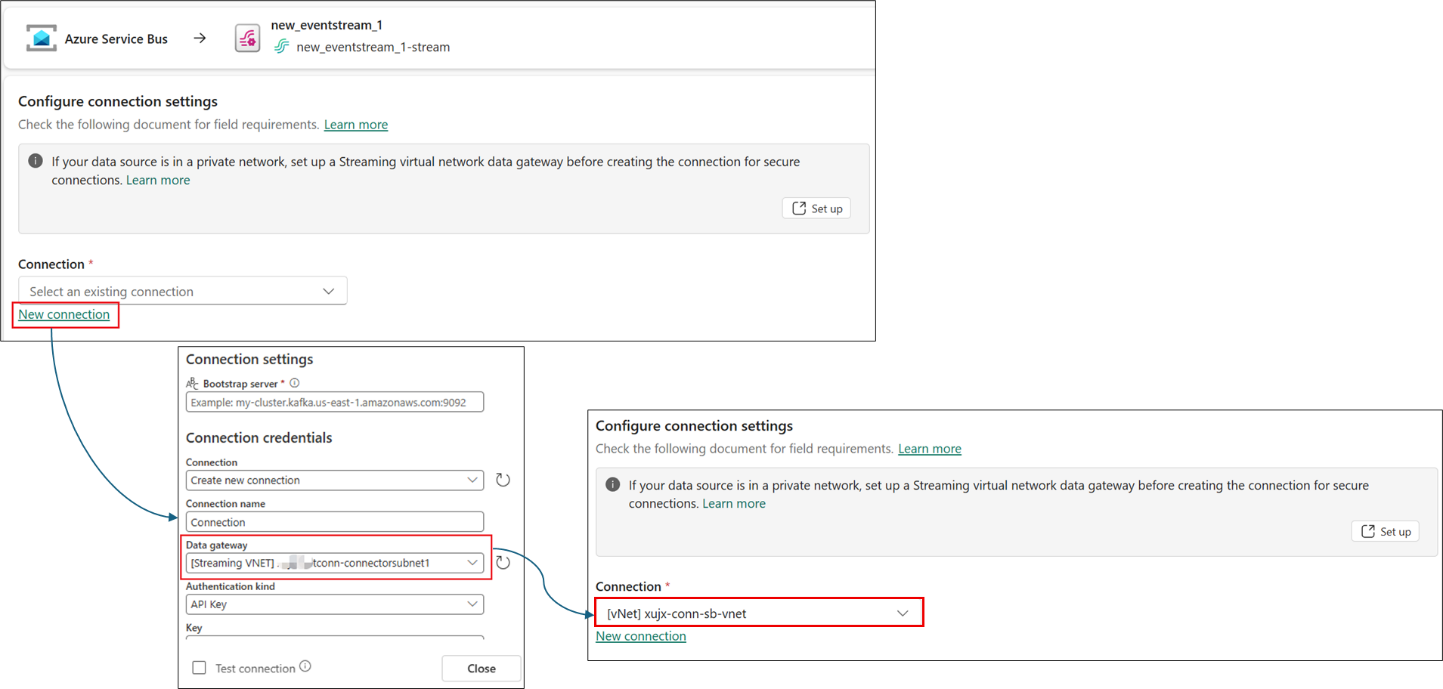
Figure 3: streaming data gateway in Get-events wizard
3. Finish the source configurations and publish your eventstream
The subsequent steps adhere to the standard source configuration procedures. Complete all remaining configurations, then proceed to create or publish the eventstream. Once this is accomplished, the streaming connector will be integrated into the bridge Azure virtual network, enabling it to access the source within the private network by leveraging the established connection between the bridge network and the source’s private network.
Once everything is set up, you should be able to preview the data in your eventstream if your source contains data there. When real-time data from your private network source is securely brought into Fabric Eventstream, you can fully leverage the rich suite of real-time analytics tools available in Fabric Real-Time Intelligence (RTI) to power your real-time scenarios with an enterprise-grade security level.
After completing the setup, you should be able to preview data within your eventstream if the source contains data. When real-time data from your private network source is securely ingested into Fabric Eventstream, you can use Fabric Real-Time Intelligence (RTI)’s comprehensive analytics tools to support real-time applications, all while maintaining enterprise-grade security standards.
To help familiarize yourself with the end-to- end flow of the feature, check out this detailed demo on powering secure private network streaming to Fabric with Eventstream connectors. For more detailed instructions and advanced configuration scenarios, check out this detailed guide.
Next steps and resources
This feature is now available in Fabric Real-Time Intelligence Eventstream (Preview). Try it with your Fabric account. If you don’t have one, sign up for Power BI with a new Microsoft 365 trial and start a free Fabric trial capacity. Learn more about Eventstream.
We welcome your feedback through the community forum, idea submission, or via email.
Related blog posts
Powering secure private network streaming to Fabric with Eventstream connectors (Preview)
From insight to action: Bringing Fabric Activator into Ontology with Rules
With the introduction of Rules in Ontology, Fabric IQ takes a step forward in connecting business operations to real-time action by integrating Fabric Activator directly into Ontology. Fabric IQ brings context to your data. Activator in Fabric IQ operationalizes your ontology. What are Ontology Rules with Fabric Activator? Ontology Rules let you define conditions and … Continue reading “From insight to action: Bringing Fabric Activator into Ontology with Rules”
Operationalizing Agentic Applications with Microsoft Fabric
Agentic apps are moving quickly from prototypes to real workloads. But once you go beyond a proof of concept (POC), the hard part isn’t getting an agent to respond; it’s knowing what the agent did, whether it was safe and correct, and how it’s impacting the business. Let’s explore what it takes to operationalize agentic … Continue reading “Operationalizing Agentic Applications with Microsoft Fabric”
Microsoft Fabric
Accelerate your data potential with a unified analytics solution that connects it all. Microsoft Fabric enables you to manage your data in one place with a suite of analytics experiences that seamlessly work together, all hosted on a lake-centric SaaS solution for simplicity and to maintain a single source of truth.
Get the latest news from Microsoft Fabric Blog
This will prompt you to login with your Microsoft account to subscribe
Visit our product blogs
View articles by category
- Activator
- AI
- Announcements
- Apache Iceberg
- Apache Spark
- Community
- Community Challenge
- Data Engineering
- Data Factory
- Data Lake
- Data Science
- Data Warehouse
- Databases
- Fabric IQ
- Fabric ML
- Fabric platform
- Fabric Public APIs
- Lakehouse
- Machine Learning
- Microsoft Fabric
- Monthly Update
- OneLake
- Power BI reports
- Real-Time Intelligence
- Roadmap
- semantic model
- Uncategorized
View articles by date
- March 2026
- February 2026
- January 2026
- December 2025
- November 2025
- October 2025
- September 2025
- August 2025
- July 2025
- June 2025
- May 2025
- April 2025
- March 2025
- February 2025
- January 2025
- December 2024
- November 2024
- October 2024
- September 2024
- August 2024
- July 2024
- June 2024
- May 2024
- April 2024
- March 2024
- February 2024
- January 2024
- December 2023
- November 2023
- October 2023
- September 2023
- August 2023
- July 2023
- June 2023
- May 2023
- April 2023
- March 2023
- February 2023
- January 2023
- December 2022
- November 2022
- October 2022
- September 2022
- August 2022
- July 2022
- June 2022
- May 2022
- April 2022
What's new
- Microsoft 365
- Games
- Surface Pro 9
- Surface Laptop 5
- Surface Laptop Studio
- Surface Laptop Go 2
- Windows 11 apps
Microsoft Store
Education
- Microsoft in education
- Devices for education
- Microsoft Teams for Education
- Microsoft 365 Education
- Office Education
- Educator training and development
- Deals for students and parents
- Azure for students
Business
- Microsoft Cloud
- Microsoft Security
- Azure
- Dynamics 365
- Microsoft 365
- Microsoft Advertising
- Microsoft Industry
- Microsoft Teams
Developer & IT
- Developer Centre
- Documentation
- Microsoft Learn
- Microsoft Tech Community
- Azure Marketplace
- AppSource
- Microsoft Power Platform
- Visual Studio
Company
- © 2026 Microsoft