As enterprises adopt OneLake as their unified data lake for analytics, securing how external services access data in OneLake becomes increasingly important—especially in environments where public internet access must be tightly controlled.
Today, we’re introducing resource instance rules for OneLake in preview. This new capability allows workspace admins to explicitly allow inbound access from trusted Azure resource instances, without relying on IP allowlists or requiring private networking in every scenario.
Resource instance rules provide a resource‑identity-based inbound access model for OneLake, designed specifically for secure service‑to‑service access from trusted Azure resource instances.
What are resource instance rules?
Resource instance rules allow a Fabric workspace admin to define an allowlist of trusted Azure resource instances that are permitted to access the workspace’s OneLake data. Access over public endpoint is allowed only for requests originating from approved Azure resource identities.
Resource Instance Rules can coexist with Private Link and IP firewall rules, allowing customers to combine identity‑based and network‑based controls based on their architecture.
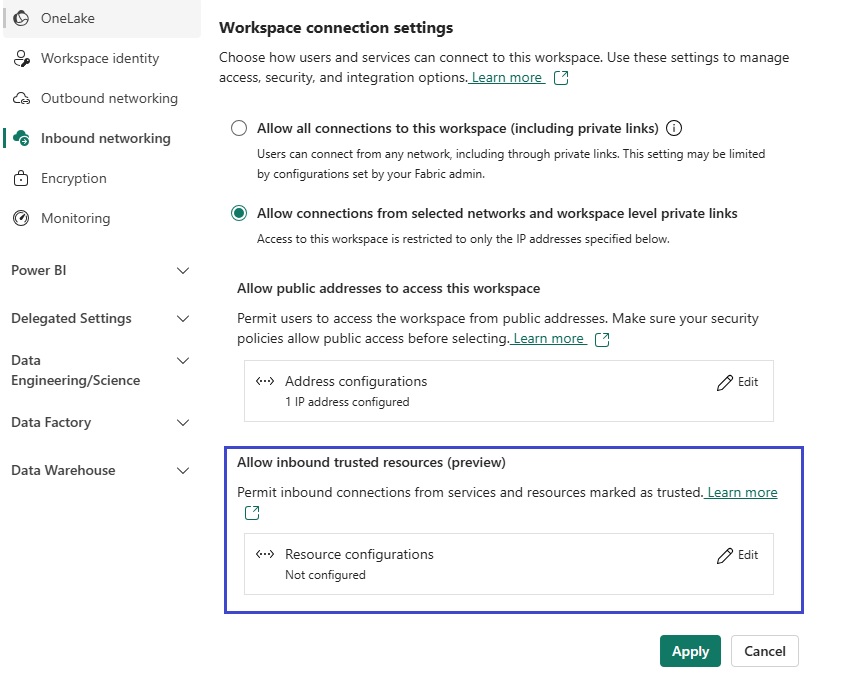
Figure: Workspace settings to add trusted resource instances.
Why Resource Instance Rules for OneLake?
OneLake already integrates with Fabric’s robust security capabilities, including Private Link, IP firewall rules, and identity‑based access controls. However, customers integrating Azure services with OneLake often encounter challenges such as dynamic or unknown outbound IP addresses from managed Azure services, the operational complexity of maintaining IP‑based allowlists, and scenarios where private connectivity is not practical for every service.
Resource Instance Rules address these challenges by allowing access to OneLake to be restricted based on Azure resource identity, rather than network location.
With resource instance rules, customers can block public access to OneLake while still enabling access from explicitly trusted Azure resource instances, with controls enforced at the network layer before data permissions are evaluated. This results in a more precise and manageable security model for OneLake access.
How to get started with resource instance rules
Tenant admin must enable Configure workspace-level IP firewall rules and trusted resource instances in the Fabric admin portal.
As a Fabric workspace admin
- Navigate to Workspace Settings in the target workspace and select Allow Connections from Selected Networks and Workspace Private Links.
- Select Edit under Allow Inbound trusted resources (Preview).
- Add one or more Azure resource instance ARM IDs as trusted resources and save.
When a request attempts to access OneLake over a public endpoint, it validates the calling resource’s identity against the configured allowlist and allows or blocks the request accordingly.
Try resource instance rules for OneLake today
Resource instance rules give you a new way to secure OneLake by trusting Azure resource identities instead of network locations, making it easier to integrate managed Azure services while keeping public access locked down. By combining resource instance rules with existing protections like Private Link and IP firewall rules, you can apply the right level of network security for each OneLake scenario.
If you’re looking to enable secure service‑to‑service access to OneLake while maintaining strong network controls, we encourage you to try resource instance rules and share your feedback.
Refer to Resource Instance rules for Inbound access to learn more.
Related blog posts
Resource instance rules for OneLake in Microsoft Fabric (Preview)
Nested folders support in shortcut transformations (Generally Available)
Nested folders, shortcut transformations, subfolder processing, OneLake, shortcuts, Lakehouse Data lakes rarely come in flat structures. In practice, data is organized across multi-level folder hierarchies, partitioned by date, region, source system, or business unit. Previously, shortcut transformations processed files at a single folder level, requiring users to set up separate transforms for each subdirectory. Moving … Continue reading “Nested folders support in shortcut transformations (Generally Available)”
Cross-workspace logging for MLflow in Microsoft Fabric: Build MLOps workflows with confidence (Generally Available)
Machine learning teams need more than a great model — they need a reliable way to move that model from experimentation to production. Cross-workspace logging for MLflow in Microsoft Fabric, is a capability that enables you to build end-to-end MLOps workflows using the standard MLflow APIs you already know. Figure: Animated gif of Log ML … Continue reading “Cross-workspace logging for MLflow in Microsoft Fabric: Build MLOps workflows with confidence (Generally Available)”
Microsoft Fabric
Accelerate your data potential with a unified analytics solution that connects it all. Microsoft Fabric enables you to manage your data in one place with a suite of analytics experiences that seamlessly work together, all hosted on a lake-centric SaaS solution for simplicity and to maintain a single source of truth.
Get the latest news from Microsoft Fabric Blog
This will prompt you to login with your Microsoft account to subscribe
Visit our product blogs
View articles by category
- Activator
- AI
- Announcements
- Apache Iceberg
- Apache Spark
- Community
- Community Challenge
- Data Engineering
- Data Factory
- Data Lake
- Data loss prevention
- Data Science
- Data Warehouse
- Databases
- Developer
- Fabric IQ
- Fabric ML
- Fabric platform
- Fabric Public APIs
- Fabric Workload
- Information protection
- Lakehouse
- Machine Learning
- Microsoft Fabric
- Monthly Update
- OneLake
- Power BI
- Power BI reports
- Real-Time Intelligence
- Roadmap
- Security and Compliance
- semantic model
- Uncategorized
View articles by date
- April 2026
- March 2026
- February 2026
- January 2026
- December 2025
- November 2025
- October 2025
- September 2025
- August 2025
- July 2025
- June 2025
- May 2025
- April 2025
- March 2025
- February 2025
- January 2025
- December 2024
- November 2024
- October 2024
- September 2024
- August 2024
- July 2024
- June 2024
- May 2024
- April 2024
- March 2024
- February 2024
- January 2024
- December 2023
- November 2023
- October 2023
- September 2023
- August 2023
- July 2023
- June 2023
- May 2023
- April 2023
- March 2023
- February 2023
- January 2023
- December 2022
- November 2022
- October 2022
- September 2022
- August 2022
- July 2022
- June 2022
- May 2022
- April 2022
What's new
- Microsoft 365
- Games
- Surface Pro 9
- Surface Laptop 5
- Surface Laptop Studio
- Surface Laptop Go 2
- Windows 11 apps
Microsoft Store
Education
- Microsoft in education
- Devices for education
- Microsoft Teams for Education
- Microsoft 365 Education
- Office Education
- Educator training and development
- Deals for students and parents
- Azure for students
Business
- Microsoft Cloud
- Microsoft Security
- Azure
- Dynamics 365
- Microsoft 365
- Microsoft Advertising
- Microsoft Industry
- Microsoft Teams
Developer & IT
- Developer Centre
- Documentation
- Microsoft Learn
- Microsoft Tech Community
- Azure Marketplace
- AppSource
- Microsoft Power Platform
- Visual Studio
Company
- © 2026 Microsoft