If you haven’t already, check out Arun Ulag’s hero blog “FabCon and SQLCon 2026: Unifying databases and Fabric on a single, complete platform” for a complete look at all of our FabCon and SQLCon announcements across both Fabric and our database offerings.
Microsoft Fabric API for GraphQL now supports Tenant Level Private Link, delivering enterprise-grade network security to your data APIs. This highly requested feature enables organizations to access their GraphQL APIs through private connectivity, ensuring that data traffic never traverses the public internet.
Secure your data access layer
Microsoft Fabric API for GraphQL has revolutionized how developers access data across warehouses, lakehouses, mirrored databases, and SQL databases. With its ability to query multiple data sources through a single, flexible API, it’s become an essential tool for building modern data applications. Now, with Private Link support, you can extend these capabilities with the security and compliance controls your organization’s demands.
When you enable Private Link for your Fabric tenant, your GraphQL API endpoints benefit from the same private network connectivity as other Fabric services. API traffic flows through Microsoft’s private backbone network instead of the public internet, providing an additional layer of protection for your sensitive data.
Why private link matters for API for GraphQL
- Enhanced security: Private Link ensures that all GraphQL API requests flow through a secured network path. This is particularly critical for organizations handling sensitive data, as it eliminates exposure to public internet threats and reduces your attack surface.
- Regulatory compliance: Many industries require private network connectivity for data access. With Private Link support, organizations in healthcare, finance, and government sectors can now leverage GraphQL APIs while meeting strict compliance requirements for data isolation and network security.
- Simplified network architecture: Rather than managing complex firewall rules, VPN configurations, or IP allowlists, Private Link provides a straightforward way to secure API access. Your network administrators can ensure that GraphQL API calls only come through approved private endpoints, making governance simpler and more reliable.
- Enterprise integration: For organizations already using Azure Private Link across their infrastructure, adding GraphQL APIs to your private network topology is seamless. Your APIs integrate naturally with your existing virtual networks, making it easier to build comprehensive data architectures that maintain consistent security standards.
Designed for enterprise workloads
This feature is built with enterprise needs in mind. Whether you’re building internal dashboards, powering business intelligence applications, or creating customer-facing analytics, Private Link support ensures your GraphQL APIs meet the security standards your organization requires.
When Private Link is enabled at the tenant level, your GraphQL APIs automatically participate in the secure network environment. Combined with Microsoft Entra ID authentication and the flexible security options already available—like single sign-on or saved credentials—you have a comprehensive security model for controlling data access.
Getting started
Enabling Private Link for your GraphQL APIs is straightforward through your Fabric tenant settings. Once configured at the tenant level, your existing GraphQL APIs will automatically leverage the private network connectivity. You can continue using the same API endpoints and authentication patterns you’ve already established, with the added confidence that traffic flows through your organization’s secured network path.
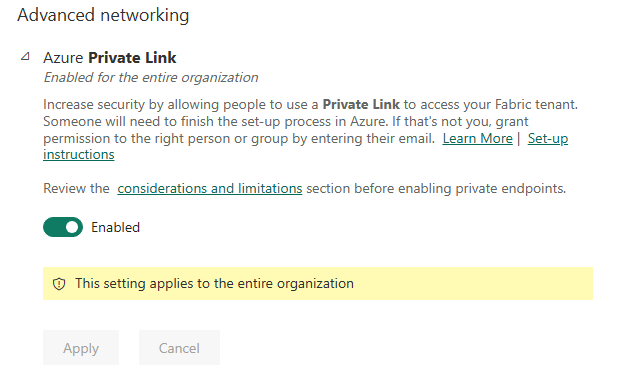
Figure: Enable tenant level setting for private link.
For organizations using the “Block Public Internet Access” tenant setting, GraphQL APIs now work seamlessly within your locked-down environment, giving you complete control over how data is accessed.
Current limitations
As we launch Private Link support for API for GraphQL, there are two limitations to be aware of:
- API monitoring dashboard and logging based on Workspace Monitoring is not currently supported. While your APIs will function securely through Private Link, workspace-level monitoring capabilities are not yet available in this configuration.
- Service Principal (SPN) access with saved credentials is not currently supported. Service Principals (SPN) are supported as clients however it’s not possible to use a service principal to create a saved credential for access between the API and data source.
Learn more
- About Private Links for Secure Access to Fabric
- What is Microsoft Fabric API for GraphQL?
- Connect Applications to Fabric API for GraphQL
Related blog posts
Tenant level private link support for Microsoft Fabric API for GraphQL (Generally Available)
dbt+ Microsoft Fabric: A strategic investment in the modern analytics stack
Modern analytics teams are adopting open, SQL-first data transformation, robust CI/CD and governance, and seamless integration across lakehouse and warehouse platforms. dbt is now the standard for analytics engineering, while Microsoft Fabric unifies data engineering, science, warehousing, and BI in OneLake.
Support for default arguments in Fabric User data functions
The Fabric user data functions (UDF) programmability model now includes the ability to define functions with default argument values. This feature allows you streamline your workflow by minimizing the need to specify every argument each time you call a function—any parameters you leave out will automatically use their default values. As a result, you can write cleaner, more concise code and focus on the logic that matters most.
Microsoft Fabric
Accelerate your data potential with a unified analytics solution that connects it all. Microsoft Fabric enables you to manage your data in one place with a suite of analytics experiences that seamlessly work together, all hosted on a lake-centric SaaS solution for simplicity and to maintain a single source of truth.
Get the latest news from Microsoft Fabric Blog
This will prompt you to login with your Microsoft account to subscribe
Visit our product blogs
View articles by category
- Activator
- AI
- Announcements
- Apache Iceberg
- Apache Spark
- Community
- Community Challenge
- Data Engineering
- Data Factory
- Data Lake
- Data loss prevention
- Data Science
- Data Warehouse
- Databases
- Developer
- Fabric IQ
- Fabric ML
- Fabric platform
- Fabric Public APIs
- Fabric Workload
- Information protection
- Lakehouse
- Machine Learning
- Microsoft Fabric
- Monthly Update
- OneLake
- Power BI
- Power BI reports
- Real-Time Intelligence
- Roadmap
- Security and Compliance
- semantic model
- Uncategorized
View articles by date
- March 2026
- February 2026
- January 2026
- December 2025
- November 2025
- October 2025
- September 2025
- August 2025
- July 2025
- June 2025
- May 2025
- April 2025
- March 2025
- February 2025
- January 2025
- December 2024
- November 2024
- October 2024
- September 2024
- August 2024
- July 2024
- June 2024
- May 2024
- April 2024
- March 2024
- February 2024
- January 2024
- December 2023
- November 2023
- October 2023
- September 2023
- August 2023
- July 2023
- June 2023
- May 2023
- April 2023
- March 2023
- February 2023
- January 2023
- December 2022
- November 2022
- October 2022
- September 2022
- August 2022
- July 2022
- June 2022
- May 2022
- April 2022
What's new
- Microsoft 365
- Games
- Surface Pro 9
- Surface Laptop 5
- Surface Laptop Studio
- Surface Laptop Go 2
- Windows 11 apps
Microsoft Store
Education
- Microsoft in education
- Devices for education
- Microsoft Teams for Education
- Microsoft 365 Education
- Office Education
- Educator training and development
- Deals for students and parents
- Azure for students
Business
- Microsoft Cloud
- Microsoft Security
- Azure
- Dynamics 365
- Microsoft 365
- Microsoft Advertising
- Microsoft Industry
- Microsoft Teams
Developer & IT
- Developer Centre
- Documentation
- Microsoft Learn
- Microsoft Tech Community
- Azure Marketplace
- AppSource
- Microsoft Power Platform
- Visual Studio
Company
- © 2026 Microsoft