If you haven’t already, check out Arun Ulag’s hero blog “FabCon and SQLCon 2026: Unifying databases and Fabric on a single, complete platform” for a complete look at all of our FabCon and SQLCon announcements across both Fabric and our database offerings.
As AI reshapes every industry, one reality is clear: data is no longer just an asset; it is your competitive advantage. The speed of AI innovation demands seamless data access, rapid insight generation, and the freedom to iterate without friction. Organizations that can unify and activate their data will move faster, build smarter applications, and unlock greater business value.
Yet many teams remain constrained by fragmented data estates and legacy architectures. Data is scattered across clouds, accounts, platforms, and on-premises systems, creating silos that slow progress. Instead of fueling AI initiatives, data teams often find themselves stitching together systems, maintaining brittle pipelines, and managing duplicated or outdated copies of critical information.
Microsoft OneLake was built for this moment. As an AI-ready data lake that unifies your entire multi-cloud estate, OneLake provides a single, logical foundation for enterprise data, similar to how OneDrive serves as a central home for files across Microsoft 365. Today, we’re introducing a new wave of enhancements to OneLake, including expanded shortcut and mirroring sources, shortcut transformations (Generally Available), new ways to find OneLake data in Windows and Microsoft Foundry, and additional security and governance capabilities.
Connect to and transform your entire data estate
With shortcuts and mirroring in OneLake, you get zero-copy, zero-ETL capabilities to connect your multi-cloud data estate. Whether your data sits in Azure, AWS, Google Cloud, or Oracle, on-premises, or across platforms like SAP, Dataverse, Snowflake, and Azure Databricks, you can connect it to OneLake without data movement or duplication. No more sprawling ETL pipelines. No more out-of-date copies. No more data silos.
Today, we’re expanding mirroring to now include SharePoint lists (Preview) and adding mirroring via shortcuts for Azure Monitor and Dremio (Preview). We are also releasing mirroring for Oracle and SAP Datasphere into general availability. Beyond these core mirroring capabilities, we are now introducing extended capabilities in mirroring designed to help you operationalize mirrored sources at scale. These capabilities include Change Data Feed (CDF) and the ability to create views on top of mirrored data, starting with Snowflake and will be offered as a paid option.
Additionally, we’d like to share that shortcut transformations (Generally Available), reaching the next milestone. Shortcut transformations let you automatically transform data as you bring it into OneLake or move it between OneLake data items. These transformations include converting your data format to Delta Lake or applying AI-powered transformations like summarization, translation, and document classification. We are also releasing a new Excel to Delta table transformation (Preview), allowing you to bring your Excel data directly into Fabric Lakehouse Delta tables with a few clicks.
Lastly, we are adding support for delegated shortcuts in OneLake, coming soon. With delegated shortcuts, OneLake now lets you create a shortcut to other data in OneLake using a delegated Entra identity. This includes OneLake data sitting even in another tenant.
Building interoperability between OneLake and other industry platforms
We are strengthening our interoperability with leading data platforms as part of our goal to empower our customers to access, analyze, and share data across platforms without duplication and without locking them into proprietary formats.
I’m excited to share that Azure Databricks is moving the ability to natively read data from OneLake through Unity Catalog from public beta to public preview. This interoperability enables seamless access without duplication or complex data movement and is now supported by production workloads. We are also jointly working to release Azure Databricks’ support for writing to and storing data directly in OneLake, allowing full two-way interoperability.
We also recently announced OneLake’s interoperability with Snowflake (Generally Available). This interoperability gives our joint customers the ability to bidirectionally read Iceberg data managed by Snowflake or Microsoft Fabric and the ability to natively store Snowflake-managed iceberg tables in Microsoft OneLake.
Finally, we are announcing that Auger, a rapidly growing supply chain platform designed to bring intelligence and automation to global operations, has built its platform on Fabric, with all data stored natively in OneLake. This architecture enables Auger customers to seamlessly access their operations data through OneLake shortcuts within their own Fabric environments and leverage the full power of the platform including Power BI, data agents and more.
Accessing your OneLake data from Windows and Microsoft Foundry
Once your data is connected to OneLake, it becomes easily discoverable in the apps you use every day like Power BI, Teams, Excel, Windows, and Microsoft Foundry.
Today, we are announcing deeper integration with Microsoft Foundry, our end-to-end platform for customizing, hosting, running, and managing AI solutions with ease. With this integration, you can access the OneLake catalog in Foundry, making it easy to discover and build knowledge directly from OneLake data. Foundry users can explore their data estate including rich metadata, endorsements, sensitivity labels, and descriptions and connect their OneLake items with a single click to add data to Knowledge.
Additionally, you can view and manage all your OneLake data directly from Windows with the OneLake file explorer for Windows, which will be generally available in the coming weeks. The file explorer lets you browse every workspace and data asset, and upload, download, or edit these files using the same familiar experience as OneDrive. By bringing data lakes into the Windows file system, the file explorer makes enterprise data more accessible to business users, download it today.
Share data securely with OneLake security (Generally Available)
Security and governance remain foundational to OneLake. OneLake security will be generally available in the coming weeks, enabling data owners to define roles, enforce row- and column-level controls, and manage permissions through a single unified model that follows the data. These permissions are then automatically enforced across all analytics experiences, so whether a user is querying data through a Spark notebook, viewing it in a Power BI report, or exploring it through a Fabric data agent, OneLake’s security model ensures they see only what they’re permitted.
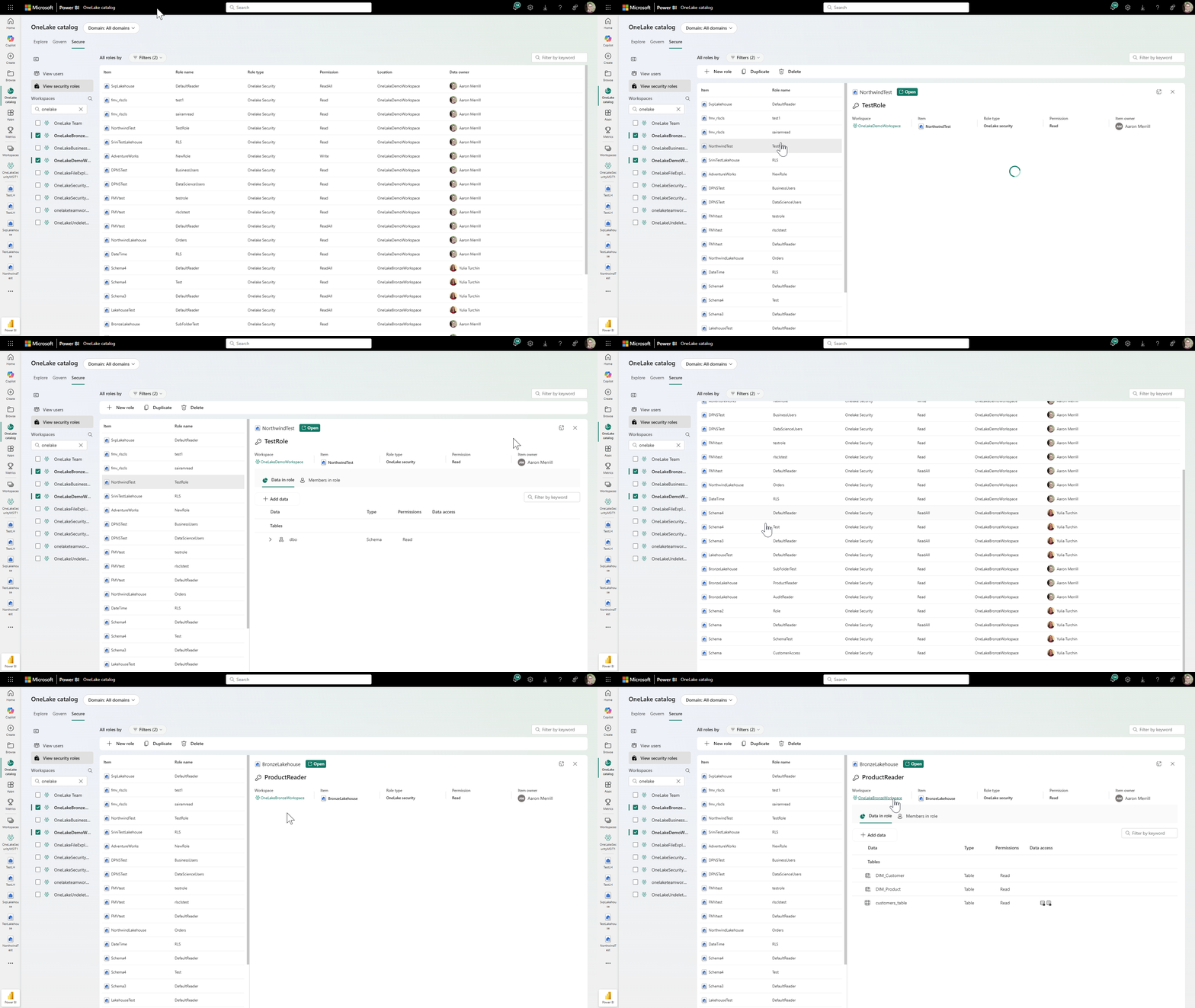
Figure – GIF of OneLake security and the OneLake catalog Secure tab experience.
We’re also adding several improvements and new features. Eventhouse now supports OneLake security, ensuring consistent protection for data queried through KQL. We’ve also introduced new APIs that enable third-party query engines to integrate with OneLake security, giving customers the freedom to choose the right engine for any workload. In addition, an improved role management experience simplifies role creation and now supports defining row-level and column-level security for new roles.
Additional network security in OneLake
In addition to the GA of OneLake security, we are launching new, flexible network security tools that further strengthen OneLake’s security posture. First, we are introducing Resource Instance Rules—a new way to control inbound access using trusted Azure resource identities, coming to preview soon. Resource Instance Rules allow workspace administrators to explicitly approve specific Azure resource instances, such as trusted Azure services, instead of relying solely on public IP allowlists. This enables organizations to block broad public access while still allowing essential Azure workloads to securely connect to OneLake. Resource Instance Rules work alongside Private Link and IP filtering, giving you a more flexible, precise, and secure way to protect OneLake while enabling critical Azure integrations.
Next, workspace-level IP firewall rules (Generally Available) enable organizations to enforce access controls for workspaces based on the IP address of incoming requests. By allowing administrators to define approved network boundaries, workspace IP filtering provides a precise way to safeguard access over public endpoints while maintaining tightly governed, secure entry points into Fabric workspaces.
We are also dramatically extending outbound access protection (OAP) to fifteen more items in Fabric including OneLake shortcuts and mirrored databases (Generally Available). Customer managed keys (CMK) now also work with workspaces in a capacity that is already protected by Power BI’s bring your own key (BYOK), making it easier to adopt CMK.
Take control of your data estate in the OneLake catalog
Since its launch, the OneLake catalog has evolved into the unified control plane for data across Microsoft Fabric. Now we are enhancing it further, helping you centralize discovery, governance, management, and security into a single layer.
Insights tailored for admins in the Govern tab (Generally Available) deliver immediate visibility into domains, capacity utilization, workspace activity, protection coverage, and data curation. Admins can move from high-level signals to detailed Power BI reports, apply contextual recommendations, or use Copilot to interpret trends and identify next steps. You can also access the underlying semantic model to create custom Power BI reporting better aligned to your needs.
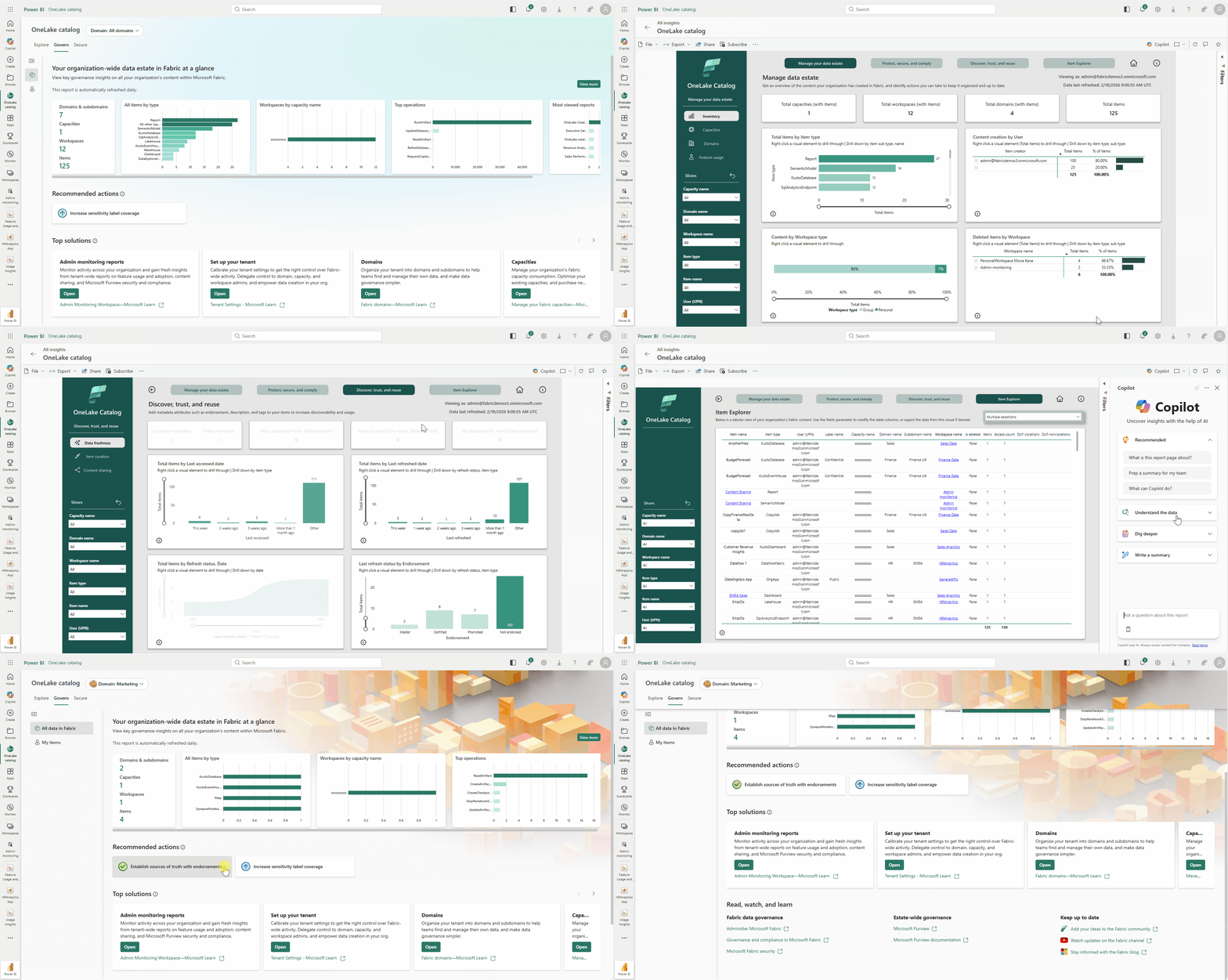
Figure 2 – GIF of the new insights for Admins in the OneLake catalog Govern tab.
We’ve added workspace tags, helping improve discoverability for users and AI agents, while Copilot can also now automatically generate descriptions for semantic models to enhance clarity and reuse. In addition, new public APIs for OneLake catalog search and discovery provide programmatic access to metadata, power relevancy-ranked search, and integrate natively with the Fabric MCP server—enabling intelligent, AI-driven content discovery across Fabric.
Finally, workspace admins can now get a full breakdown of their OneLake storage sizes by item, including soft-deleted data sizes. Admins can navigate to the workspace settings to find the new, granular report.
Explore more Microsoft Fabric innovation
Alongside these OneLake announcements, we are introducing several innovations across Fabric. For a broad overview of all these announcements, read Arun Ulag’s hero blog “FabCon and SQLCon 2026: Unifying databases and Fabric on a single, complete platform.” If you want more details, check out the Fabric March 2026 Feature summary blog, the Power BI March 2026 feature summary blog, and the latest posts on the Fabric Updates channel, including the following blogs:
- Database announcement blog
- Fabric Platform announcement blog
- Fabric Data Factory announcement blog
- Fabric Analytics announcement blog
- Real-Time Intelligence announcement blog
- Fabric IQ announcement blog
- Power BI announcement blog
- Planning in Fabric IQ blog
- Fabric AI announcement blog
- Fabric ISV announcement blog
Related blog posts
FabCon and SQLCon 2026: What’s new in Microsoft OneLake
Fabric Data Factory at FabCon Atlanta: Built for modern data integration
If you haven’t already, check out Arun Ulag’s hero blog “FabCon and SQLCon 2026: Unifying databases and Fabric on a single, complete platform” for a complete look at all of our FabCon and SQLCon announcements across both Fabric and our database offerings. At FabCon Atlanta, we’re doubling down on a simple truth: every successful analytics, … Continue reading “Fabric Data Factory at FabCon Atlanta: Built for modern data integration”
The power of the Microsoft Fabric ecosystem: ISVs building natively on Fabric
If you haven’t already, check out Arun Ulag’s hero blog “FabCon and SQLCon 2026: Unifying databases and Fabric on a single, complete platform” for a complete look at all of our FabCon and SQLCon announcements across both Fabric and our database offerings. At Microsoft, we’ve always believed that platforms win when ecosystems thrive. Each year, … Continue reading “The power of the Microsoft Fabric ecosystem: ISVs building natively on Fabric”
Microsoft Fabric
Accelerate your data potential with a unified analytics solution that connects it all. Microsoft Fabric enables you to manage your data in one place with a suite of analytics experiences that seamlessly work together, all hosted on a lake-centric SaaS solution for simplicity and to maintain a single source of truth.
Get the latest news from Microsoft Fabric Blog
This will prompt you to login with your Microsoft account to subscribe
Visit our product blogs
View articles by category
- Activator
- AI
- Announcements
- Apache Iceberg
- Apache Spark
- Community
- Community Challenge
- Data Engineering
- Data Factory
- Data Lake
- Data Science
- Data Warehouse
- Databases
- Developer
- Fabric IQ
- Fabric ML
- Fabric platform
- Fabric Public APIs
- Lakehouse
- Machine Learning
- Microsoft Fabric
- Monthly Update
- OneLake
- Power BI
- Power BI reports
- Real-Time Intelligence
- Roadmap
- semantic model
- Uncategorized
View articles by date
- March 2026
- February 2026
- January 2026
- December 2025
- November 2025
- October 2025
- September 2025
- August 2025
- July 2025
- June 2025
- May 2025
- April 2025
- March 2025
- February 2025
- January 2025
- December 2024
- November 2024
- October 2024
- September 2024
- August 2024
- July 2024
- June 2024
- May 2024
- April 2024
- March 2024
- February 2024
- January 2024
- December 2023
- November 2023
- October 2023
- September 2023
- August 2023
- July 2023
- June 2023
- May 2023
- April 2023
- March 2023
- February 2023
- January 2023
- December 2022
- November 2022
- October 2022
- September 2022
- August 2022
- July 2022
- June 2022
- May 2022
- April 2022
What's new
- Microsoft 365
- Games
- Surface Pro 9
- Surface Laptop 5
- Surface Laptop Studio
- Surface Laptop Go 2
- Windows 11 apps
Microsoft Store
Education
- Microsoft in education
- Devices for education
- Microsoft Teams for Education
- Microsoft 365 Education
- Office Education
- Educator training and development
- Deals for students and parents
- Azure for students
Business
- Microsoft Cloud
- Microsoft Security
- Azure
- Dynamics 365
- Microsoft 365
- Microsoft Advertising
- Microsoft Industry
- Microsoft Teams
Developer & IT
- Developer Centre
- Documentation
- Microsoft Learn
- Microsoft Tech Community
- Azure Marketplace
- AppSource
- Microsoft Power Platform
- Visual Studio
Company
- © 2026 Microsoft