If you haven’t already, check out Arun Ulag’s hero blog “FabCon and SQLCon 2026: Unifying databases and Fabric on a single, complete platform” for a complete look at all of our FabCon and SQLCon announcements across both Fabric and our database offerings.
To modernize workloads on Microsoft Fabric, bringing Synapse pipelines forward is a critical next step.
We’ll launch a built-in migration experience (Preview) soon to assess Synapse pipelines, check compatibility, and migrate supported pipelines to Fabric Data Factory.
What’s new
The new experience is designed to help you understand migration readiness before moving any workload.
Capabilities:
- Assess pipeline readiness directly in your Synapse workspace.
- Understand compatibility gaps at the pipeline and activity level.
- Migrate supported pipelines into a Fabric workspace.
- Plan next steps for items that need updates or are coming soon.
This approach helps you keep migrations intentional, transparent, and lower risk—especially when you’re planning phased validation.
Prerequisites
Before you start migrating, ensure the following requirements are met:
- You have an existing Synapse workspace that contains pipelines.
- You have access to a Microsoft Fabric tenant and a Fabric workspace.
How the migration experience works
The flow guides you through three stages: assessment, review, and migration.
- Run an assessment: In Azure Synapse Analytics, open the workspace you want to assess and from the Integrate menu option, select Migrate to Fabric (Preview), then choose Get started to evaluate pipelines and activities for migration readiness.
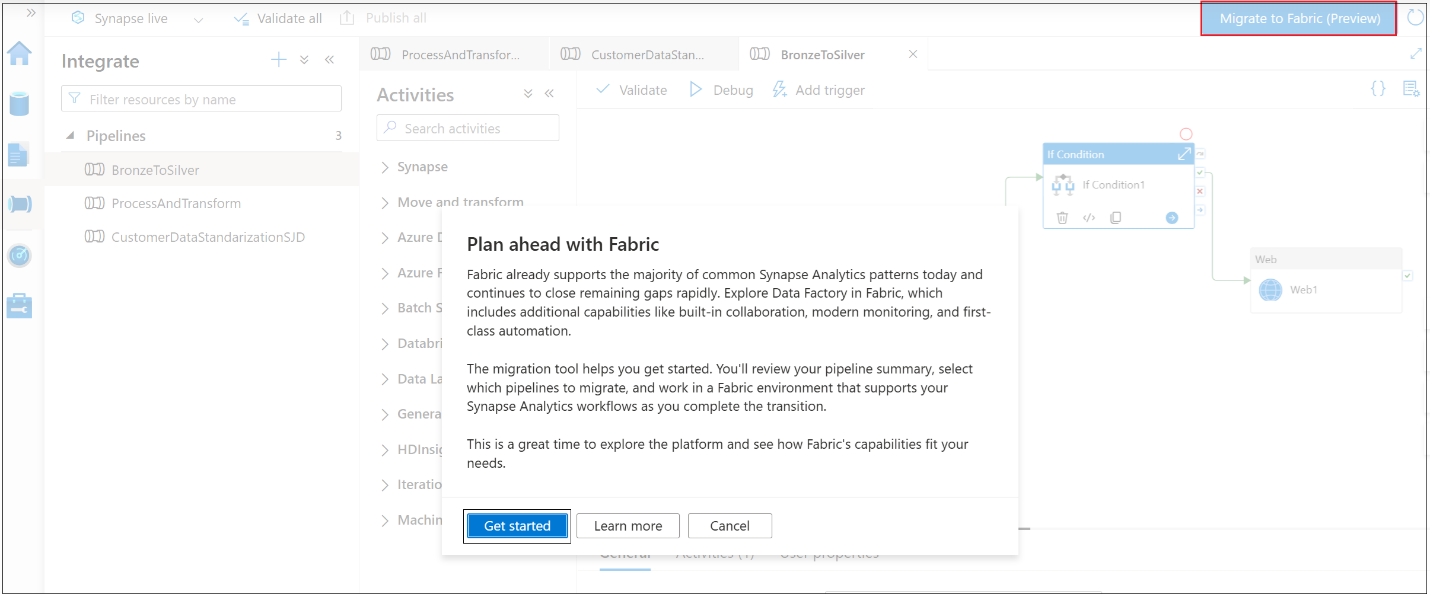
Figure: Screenshot of the Synapse authoring canvas showing Migrate to Fabric (Preview) on the toolbar.
2. Review assessment results and select pipelines for migration: Each Synapse pipeline will be categorized as Ready, needs review, Coming soon, or Unsupported. You can also export a CSV report to support offline review and remediation planning.
Use these results to plan your migration strategy:
When you’re ready, select the Synapse pipelines you want to migrate to a Fabric workspace.
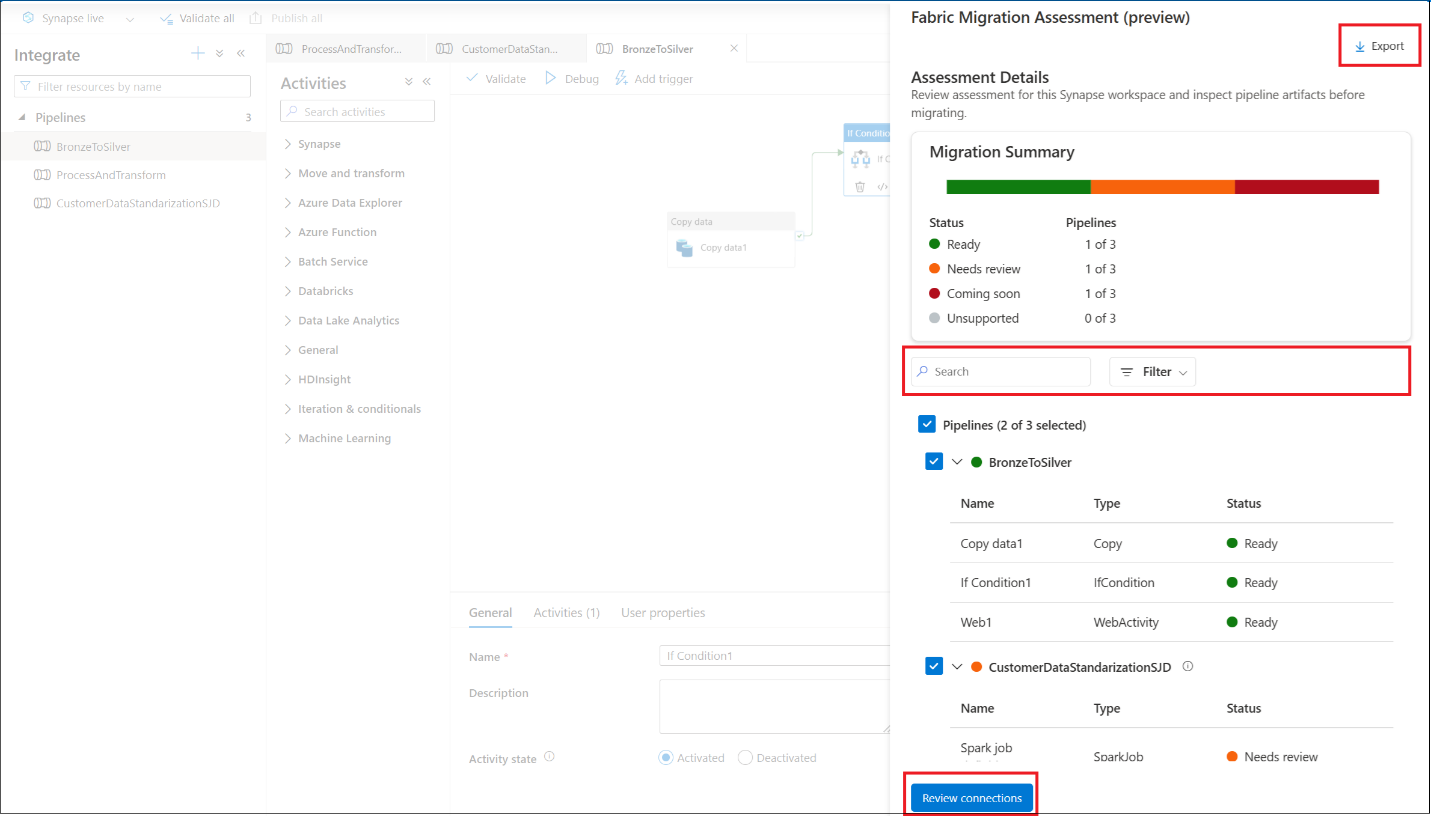
Figure: Screenshot of the assessment results showing pipeline readiness statuses and the Export option.
3. Review Connections and Migrate: Select a Fabric workspace for migrating your Synapse Analytics pipelines, then map Synapse linked services to Fabric connections.
If you have pre-created the connections in Fabric, you can choose them from the dropdown selection or create new Fabric connections from workspace settings.
For guidance on creating and managing connections in Fabric, explore Data source management.
Note: Pipelines migrate even if connections aren’t mapped—but the activities using those connections remain deactivated.
This ensures migrations are safe, controlled, and reversible.
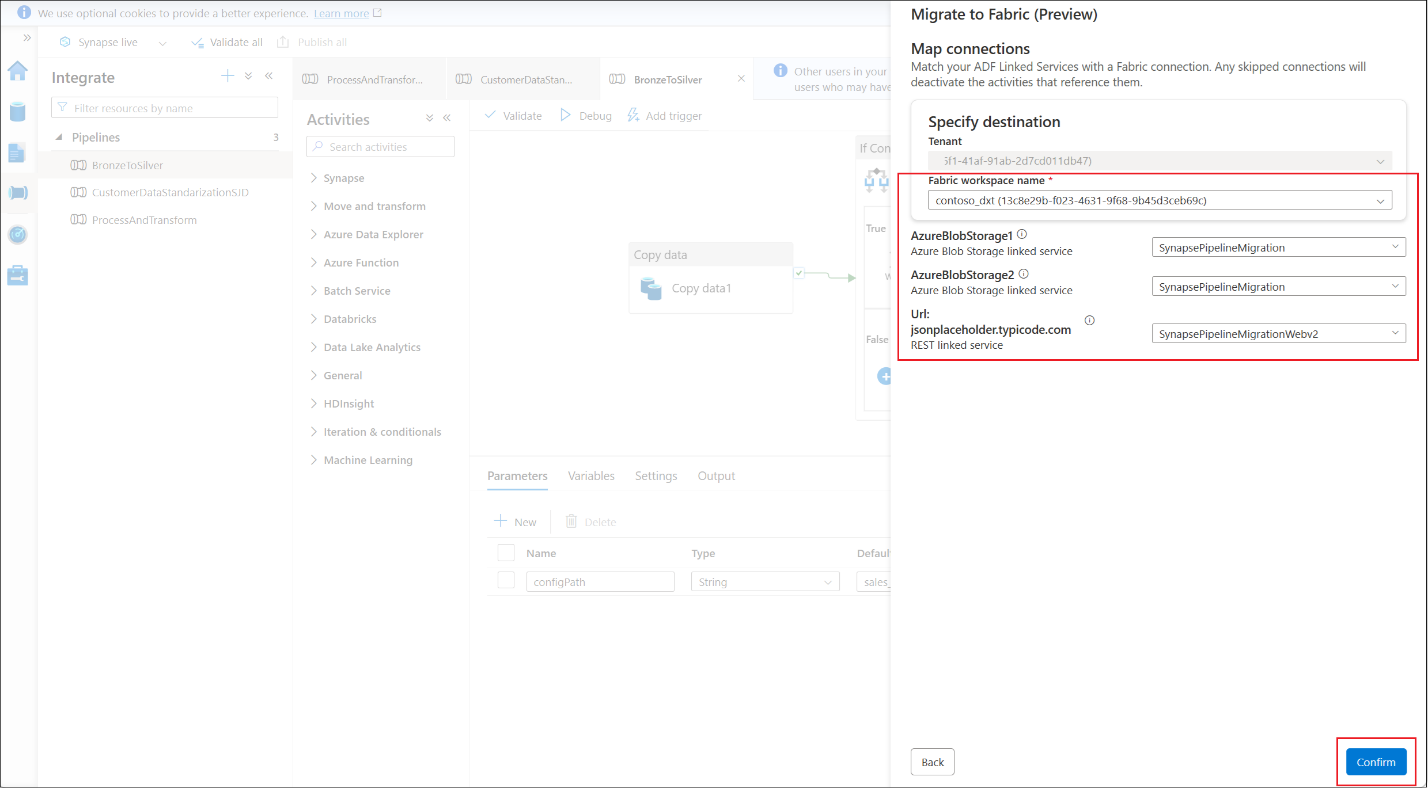
Figure: Screenshot of the workspace selection and connection mapping step, showing Synapse linked services on one side and Fabric connections on the other.
After mapping your linked services to Fabric connections, select Confirm.
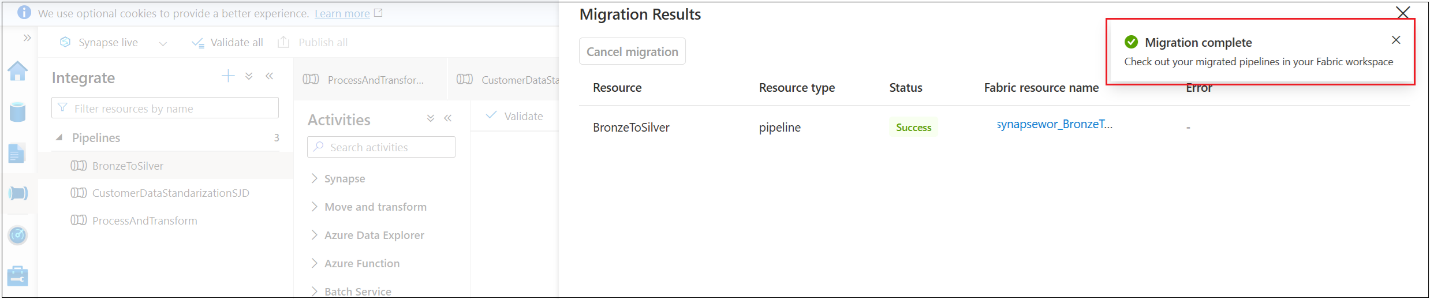
Figure: Screenshot showing successful migration of Synapse pipelines.
Pipelines migrate safely, with triggers disabled by default, so you remain in full control of execution.
Post-migration steps
- Validate connections and credentials.
- Run end-to-end tests to confirm behavior.
- Reconfigure and enable triggers as needed.
These steps help you transition smoothly and operate natively in Fabric’s unified environment.
Resources
Explore Assess your Azure Data Factory and Synapse pipelines for migration to Fabric.
Submit your feedback on Fabric Ideas and join the conversation in the Fabric Community.
If you have questions or want to share your feedback, please leave your thoughts in the comment section!
Related blog posts
Upgrade your Synapse pipelines to Microsoft Fabric with confidence (Preview)
Microsoft JDBC Driver for Microsoft Fabric Data Engineering (Generally Available)
The enterprise-grade JDBC driver enables secure, flexible, and performant connectivity to Spark SQL workloads running in Microsoft Fabric, using Fabric’s Livy APIs as the execution layer.
Fabric notebooks support Lakehouse auto-binding in Git (Preview)
Fabric notebooks now support lakehouse auto-binding when used with Git. It is designed to simplify multi-environment workflows and reduce the operational overhead of managing lakehouse references across development, test, and production workspaces.
Microsoft Fabric
Accelerate your data potential with a unified analytics solution that connects it all. Microsoft Fabric enables you to manage your data in one place with a suite of analytics experiences that seamlessly work together, all hosted on a lake-centric SaaS solution for simplicity and to maintain a single source of truth.
Get the latest news from Microsoft Fabric Blog
This will prompt you to login with your Microsoft account to subscribe
Visit our product blogs
View articles by category
- Activator
- AI
- Announcements
- Apache Iceberg
- Apache Spark
- Community
- Community Challenge
- Data Engineering
- Data Factory
- Data Lake
- Data loss prevention
- Data Science
- Data Warehouse
- Databases
- Developer
- Fabric IQ
- Fabric ML
- Fabric platform
- Fabric Public APIs
- Fabric Workload
- Information protection
- Lakehouse
- Machine Learning
- Microsoft Fabric
- Monthly Update
- OneLake
- Power BI
- Power BI reports
- Real-Time Intelligence
- Roadmap
- Security and Compliance
- semantic model
- Uncategorized
View articles by date
- March 2026
- February 2026
- January 2026
- December 2025
- November 2025
- October 2025
- September 2025
- August 2025
- July 2025
- June 2025
- May 2025
- April 2025
- March 2025
- February 2025
- January 2025
- December 2024
- November 2024
- October 2024
- September 2024
- August 2024
- July 2024
- June 2024
- May 2024
- April 2024
- March 2024
- February 2024
- January 2024
- December 2023
- November 2023
- October 2023
- September 2023
- August 2023
- July 2023
- June 2023
- May 2023
- April 2023
- March 2023
- February 2023
- January 2023
- December 2022
- November 2022
- October 2022
- September 2022
- August 2022
- July 2022
- June 2022
- May 2022
- April 2022
What's new
- Microsoft 365
- Games
- Surface Pro 9
- Surface Laptop 5
- Surface Laptop Studio
- Surface Laptop Go 2
- Windows 11 apps
Microsoft Store
Education
- Microsoft in education
- Devices for education
- Microsoft Teams for Education
- Microsoft 365 Education
- Office Education
- Educator training and development
- Deals for students and parents
- Azure for students
Business
- Microsoft Cloud
- Microsoft Security
- Azure
- Dynamics 365
- Microsoft 365
- Microsoft Advertising
- Microsoft Industry
- Microsoft Teams
Developer & IT
- Developer Centre
- Documentation
- Microsoft Learn
- Microsoft Tech Community
- Azure Marketplace
- AppSource
- Microsoft Power Platform
- Visual Studio
Company
- © 2026 Microsoft