Agentic apps are moving quickly from prototypes to real workloads. But once you go beyond a proof of concept (POC), the hard part isn’t getting an agent to respond; it’s knowing what the agent did, whether it was safe and correct, and how it’s impacting the business.
Let’s explore what it takes to operationalize agentic applications using Microsoft Fabric. Through a production minded reference implementation, we demonstrate how to capture agent behavior as governed data, monitor safety and performance in real time, and turn agent activity into measurable business insight. Although the example uses a banking experience, the architecture and patterns are applicable to any production agentic system.
The real challenge with agentic apps
Agentic AI apps generate rich operational data: user prompts, agent routing decisions, tool calls, model outputs, latency, token usage, and safety signals. Teams racing to deliver a POC often treat that data as “just logs,” which makes it hard to answer basic production questions:
- Which agents were invoked, in what order, and why?
- Did the system use the right tools and data sources?
- Where are failures happening (latency, safety blocks, tool errors), and how do we debug them?
- How do we evaluate answer quality and tie usage to measurable outcomes?
Orchestration is only half the problem. Operationalizing agents with governance, observability, evaluation, and analytics is where teams tend to struggle.
Why Microsoft Fabric changes the equation
Microsoft Fabric provides a unified, governed data plane for operational, analytical, and AI workloads. Instead of stitching together separate systems for transactions, telemetry, safety monitoring, and BI, Microsoft Fabric brings these capabilities together in a single, governed workspace. With OneLake as the shared data foundation, operational, analytical, and AI workloads work over the same data — making agent behavior easier to observe, evaluate, and optimize end to end.
Introducing the Agentic Banking App reference implementation
The Agentic Banking App is an open-source, full-stack, production-minded reference implementation. It’s designed to demonstrate real agentic patterns — not just prompt chaining — along with the data and operational plumbing you need to run agents responsibly at scale.
Explore the reference implementation:
- Repo: aka.ms/AgenticAppFabric
- Live app: aka.ms/HostedAgenticAppFabric
Architecture Overview
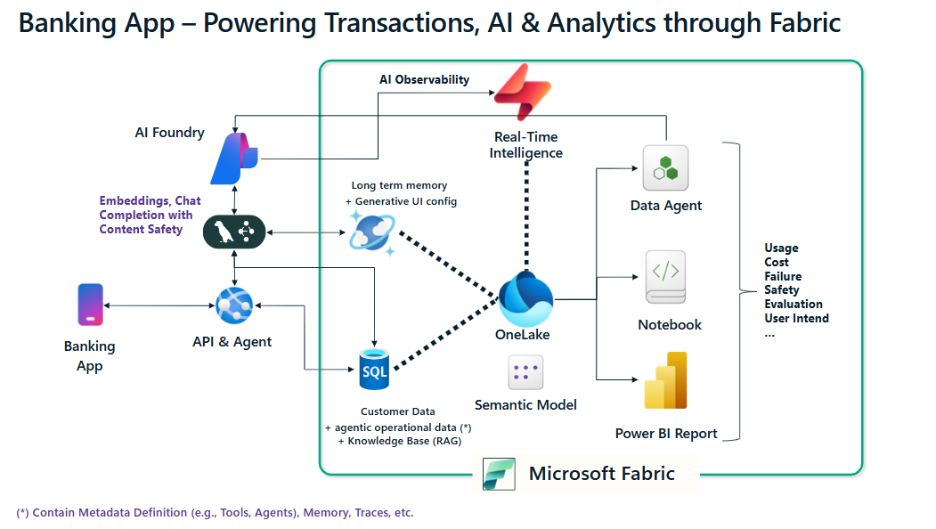 Figure: Agentic app’s architecture
Conceptually, the flow is simple: a React frontend calls a Python backend (LangGraph) to run a coordinator agent and specialist agents. As the app executes transactions, answers questions, and generates custom UI, it also captures agent interactions and telemetry. Fabric acts as the system of record for both the banking data and the agentic operational data; so, analytics, monitoring, and evaluation sit right next to the runtime.
What this reference implementation shows in practice
Multi-agent reasoning with traceability
The app uses a coordinator-and-specialists pattern so each request can be routed, executed, and inspected end-to-end:
- Coordinator agent routes each user request to the right specialist and provides a single-entry point for policy and intent checks.
- Account agent performs banking operations (reads/writes) via parameterized SQL.
- Support agent answers service questions using RAG grounded in bank documentation.
- Visualization agent enables generative UI by producing and persisting user-specific visualization configurations.
Agentic operational data as a first-class asset
In the reference implementation, SQL Database in Fabric plays two roles: it powers core transactional scenarios (user info, accounts, balances, transfers), and it stores structured operational data produced during agent execution.
Instead of treating chat transcripts as opaque blobs, the app captures agent sessions, routing decisions, tool usage, model metadata (tokens/latency), and safety outcomes as relational data. This makes it possible to trace agent behavior end-to-end, debug failures, and correlate agent behavior with business outcomes.
If you want the full telemetry schema and examples of reconstructed traces, the repo includes detailed documentation.
Generative UI and personalization driven by agents
To keep experiences stateful and personalized, the app persists session memory and user-specific UI artifacts. Cosmos DB in Fabric is a natural fit for this semi-structured, high-velocity data (this is also why OpenAI is using Azure Cosmos DB to optimize for write-heavy workloads!): conversation state can be restored instantly, and generated visualization configurations can be saved to a user profile and rehydrated on the next visit.
This pattern generalizes beyond banking: any app that needs durable agent sessions, preferences, and generated UI components can reuse the same approach.
Built-in content safety monitoring with real-time visibility
Every user prompt is evaluated for content safety, and the resulting signals can be streamed into Fabric in real time. In this sample, Eventstream routes those events into Eventhouse (KQL), where you can query, monitor, and alert on safety trends with low latency.
The repo includes example KQL queries you can use as a starting point for dashboards such as “safety flags over time” or “top categories of blocked content.”
From agent behavior to business insight
Once agentic operational data is captured and modeled, the next step is turning it into decisions. In this reference app, data can flow into a Lakehouse and semantic model, so teams can use Power BI and notebooks to evaluate quality, performance, and outcomes; connecting AI usage (tokens, tools, latency, safety flags) to product KPIs and business value.
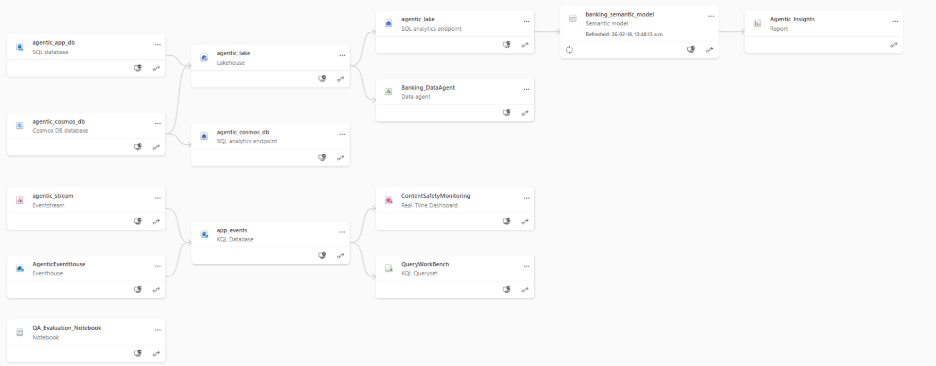
Figure: Fabric Components Lineage View
Power of OneLake, Lakehouse and Semantic Model
One key advantage that Microsoft Fabric provides is that all the data is stored in OneLake, which serves as the centralized data lake for the business, eliminating the need for siloed storage solutions while simplifying data sharing and access management.
Then, you can shape the data into a Lakehouse, with customizable schema, security and governance policy, and expose it through a semantic model that maps relationships and measures once, so Power BI, notebooks, and Data Agents can all work from a consistent definition. For this application, we have built a similar pipeline by pulling in all banking and agentic data (from both SQL and Cosmos databases).
Analyze and monitor in Power BI
With a semantic model in place, Power BI reports can surface operational insights such as token usage, tool usage, common intents, latency hotspots, and safety flags, making it easier to spot regressions and prioritize improvements.
Evaluate and iterate in notebooks
Fabric notebooks make it straightforward to run recurring data science and evaluation workflows. The sample includes a notebook that scores responses for qualities like intent resolution, relevance, coherence, and fluency using an LLM-as-judge approach (utilizing the Azure AI Evaluation SDK), so you can track quality over time, not just anecdotal feedback.
Data Agent
You can also layer in conversational experiences over the semantic model (for example, with a data agent) to provide governed “chat with your data” scenarios. Stay tuned for future updates showing how you can use the data agent as another agent in the application to enable a more secure and seamless NL2SQL experience.
Built for production and extensibility
The sample is intentionally “production-minded”: it separates responsibilities across services, keeps session memory durable, and keeps data products (tables, event streams, semantic models, reports, notebooks) inside the same Fabric governance boundary. And while the UI is a banking experience, the patterns apply to any domain where agents act on operational systems and must be observed and improved continuously.
Git-based deployment of Fabric artifacts
All required Fabric artifacts can be deployed from the GitHub repo using Fabric’s native Git integration. Clone, connect, sync, and the workspace resources (databases, Lakehouse, semantic model, reports, notebooks, and streaming components) can be created consistently.
Explore, adapt, and contribute
If you’re building agentic applications, this reference implementation provides a practical blueprint for moving from prototype to production — covering multi-agent patterns, traceability, safety monitoring, and a clear path from agent behavior to analytics and evaluation.
Get started by cloning the repo (aka.ms/AgenticAppFabric), running the app, and reusing the patterns in your own domain. We welcome your contributions and feedback; Feel free to open an issue in the GitHub repo!
Related blog posts
Operationalizing Agentic Applications with Microsoft Fabric
ExtractLabel: Schema-driven unstructured data extraction with Fabric AI Functions
Most enterprise data lives in free text – tickets, contracts, feedback, clinical notes, and more. It holds critical information but doesn’t fit into the structured tables that pipelines expect. Traditionally, extracting structure meant rule-based parsers that break with every format to change, or custom NLP models that take weeks to build. LLMs opened new possibilities, … Continue reading “ExtractLabel: Schema-driven unstructured data extraction with Fabric AI Functions”
Fabric February 2026 Feature Summary
Welcome to the February 2026 Microsoft Fabric update! This month brings a wide range of enhancements across the Fabric platform—from improvements to the OneLake Catalog and developer experiences, to meaningful updates in Data Engineering, Data Factory, Real‑Time Intelligence, and more. Whether you’re building, operating, or scaling solutions in Fabric, there’s plenty here to explore. And … Continue reading “Fabric February 2026 Feature Summary”
Microsoft Fabric
Accelerate your data potential with a unified analytics solution that connects it all. Microsoft Fabric enables you to manage your data in one place with a suite of analytics experiences that seamlessly work together, all hosted on a lake-centric SaaS solution for simplicity and to maintain a single source of truth.
Get the latest news from Microsoft Fabric Blog
This will prompt you to login with your Microsoft account to subscribe
Visit our product blogs
View articles by category
- Activator
- AI
- Announcements
- Apache Iceberg
- Apache Spark
- Community
- Community Challenge
- Data Engineering
- Data Factory
- Data Lake
- Data Science
- Data Warehouse
- Databases
- Fabric IQ
- Fabric ML
- Fabric platform
- Fabric Public APIs
- Lakehouse
- Machine Learning
- Microsoft Fabric
- Monthly Update
- OneLake
- Power BI reports
- Real-Time Intelligence
- Roadmap
- semantic model
- Uncategorized
View articles by date
- March 2026
- February 2026
- January 2026
- December 2025
- November 2025
- October 2025
- September 2025
- August 2025
- July 2025
- June 2025
- May 2025
- April 2025
- March 2025
- February 2025
- January 2025
- December 2024
- November 2024
- October 2024
- September 2024
- August 2024
- July 2024
- June 2024
- May 2024
- April 2024
- March 2024
- February 2024
- January 2024
- December 2023
- November 2023
- October 2023
- September 2023
- August 2023
- July 2023
- June 2023
- May 2023
- April 2023
- March 2023
- February 2023
- January 2023
- December 2022
- November 2022
- October 2022
- September 2022
- August 2022
- July 2022
- June 2022
- May 2022
- April 2022
What's new
- Microsoft 365
- Games
- Surface Pro 9
- Surface Laptop 5
- Surface Laptop Studio
- Surface Laptop Go 2
- Windows 11 apps
Microsoft Store
Education
- Microsoft in education
- Devices for education
- Microsoft Teams for Education
- Microsoft 365 Education
- Office Education
- Educator training and development
- Deals for students and parents
- Azure for students
Business
- Microsoft Cloud
- Microsoft Security
- Azure
- Dynamics 365
- Microsoft 365
- Microsoft Advertising
- Microsoft Industry
- Microsoft Teams
Developer & IT
- Developer Centre
- Documentation
- Microsoft Learn
- Microsoft Tech Community
- Azure Marketplace
- AppSource
- Microsoft Power Platform
- Visual Studio
Company
- © 2026 Microsoft