If you haven’t already, check out Arun Ulag’s hero blog “FabCon and SQLCon 2026: Unifying databases and Fabric on a single, complete platform” for a complete look at all of our FabCon and SQLCon announcements across both Fabric and our database offerings.
Modern organizations generate countless signals as customers interact with applications; operations evolve, and market conditions change—but most of these signals remain locked in data and are often discovered too late for action. With Business Events in Microsoft Fabric (Preview), organizations can move from observing what happened to acting on what matters, in real time.
Business Events captures critical business moments and enables actions for immediate response and better decision‑making so that organizations can operate more intelligently, and scale real‑time decision‑making across analytics, automation, and AI.
Turning business signals into intelligent action
A Business Event represents a significant occurrence or change-in-state that matters to the business. Unlike raw telemetry or diagnostic data, Business Events are intentionally modeled around business outcomes and decisions. This capability provides a unified way to define, generate, and consume business‑critical events directly within Microsoft Fabric.
With this release, customers can emit business events while running custom logic (via User Data Functions) and compute‑intensive analytics (via Notebooks), then immediately use those events to trigger alerts, automate business processes, run analytics, and enrich AI experiences.
Business Events integrate natively across Fabric, allowing multiple consumers to respond independently and in parallel. Once generated, a single Business Event can power multiple downstream actions such as:
- Alert and automate downstream processes using Activator.
- Execute custom business logic through User Data Functions.
- Run analytical workflows in Notebooks.
- Provide real time context to AI and ML models.
- Run distributed processing with Spark jobs.
- Prepare and move data using Dataflows.
- Automate business processes with Power Automate.
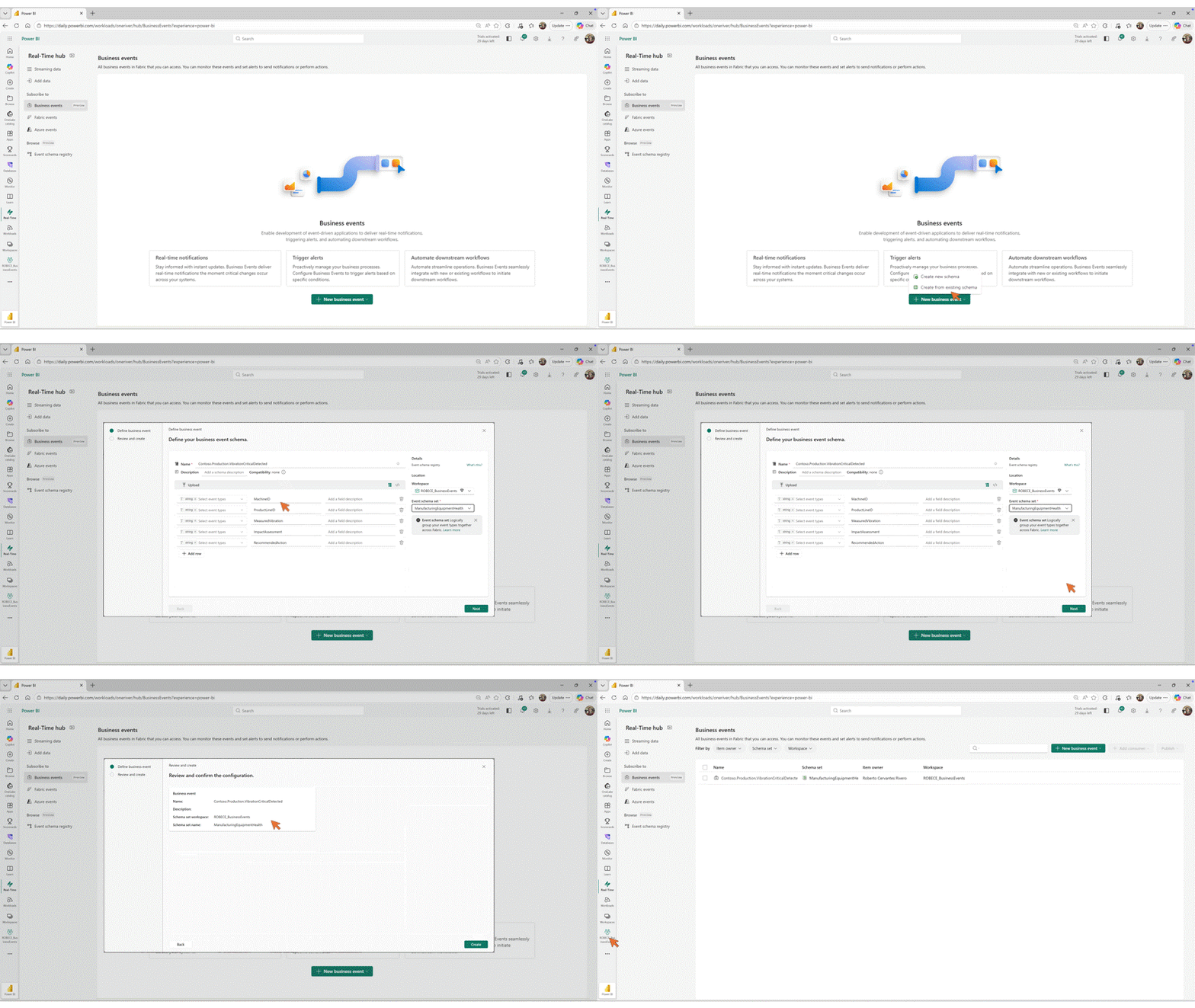
Figure: Business Event Creation Experience.
Decoupled, scalable event driven architecture
Business Events enable a fully decoupled architecture across Microsoft Fabric. Event publishers emit events independently, and event consumers can be added without requiring changes to the event publisher. This approach enables teams to introduce new consumers, such as analytics pipelines, automation, or external integrations, without modifying the original publisher’s code. As systems evolve, the architecture remains flexible and scalable.
Consistent modeling with a shared business language
As organizations scale event driven systems, consistency and reusability becomes critical for faster time to value. Business Events are governed through the Schema Registry in Real Time hub, which serves as a centralized repository for defining and managing event schemas.
By using the Schema Registry as the single source of truth of field names, data types and semantics, common integration challenges such as schema drift can be eliminated. It makes it easy to explore and utilize the business event as schemas are discoverable and versioned centrally. The result is a shared business language that scales across teams, ensuring Business Events are not only real time, but also reliable and interpretable.
Comprehensive overview: A manufacturing case study
Consider a manufacturing solution monitoring vibration levels across critical equipment. A Notebook analyzes incoming telemetry and detects abnormal vibration patterns. When an abnormal pattern is detected, the Notebook publishes a CriticalVibrationDetected Business Event.
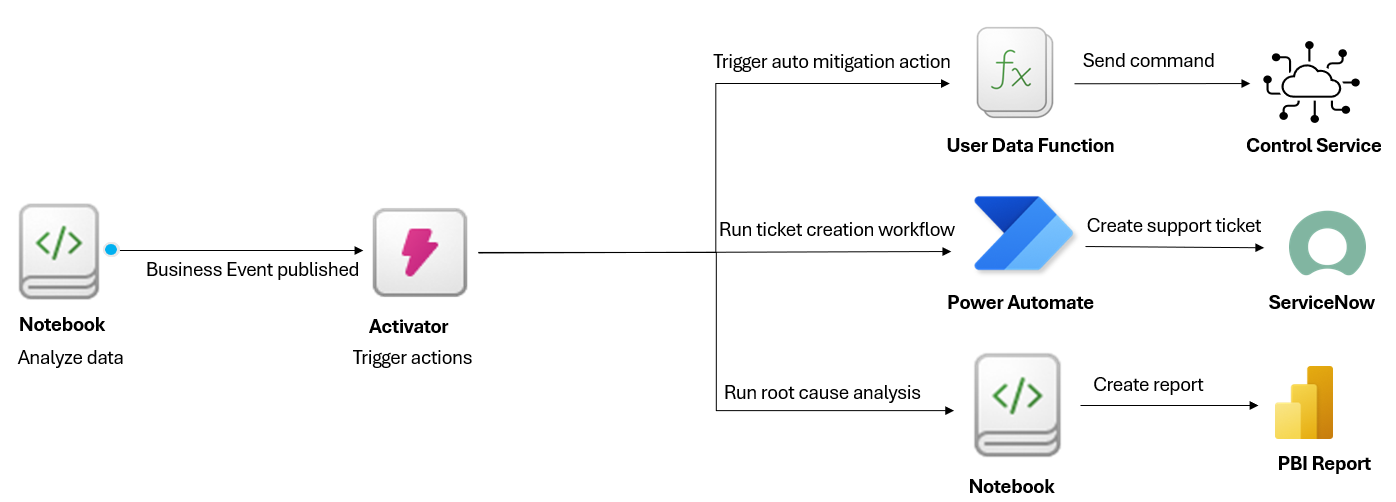
Figure: Sample architecture using Business Events.
That event immediately triggers multiple actions via Activator to shift equipment to operate in safe mode, create a service ticket, and perform root cause analysis for future investment decisions. This flow allows the organization to react instantly to critical business conditions, without stitching together separate systems or introducing operational complexity.
Try Business Events (Preview)
Start turning business signals into action with Business Events in Microsoft Fabric and help shape what comes next with your feedback through Fabric Ideas for the Real-Time Hub.
Stay tuned for new capabilities that will further expand event-driven solutions through Business Events. Learn more about Business Events.
Related blog posts
Business Events in Microsoft Fabric (Preview)
Instantly Run and Preview Functions in Microsoft Fabric Eventhouse: No Code Required
If you haven’t already, check out Arun Ulag’s hero blog “FabCon and SQLCon 2026: Unifying databases and Fabric on a single, complete platform” for a complete look at all of our FabCon and SQLCon announcements across both Fabric and our database offerings. Before, using an Eventhouse function required you to write KQL queries by hand. … Continue reading “Instantly Run and Preview Functions in Microsoft Fabric Eventhouse: No Code Required”
Building real-time, event-driven applications with Database CDC feeds and Fabric Eventstreams DeltaFlow (Preview)
Modern business applications win by reacting immediately, serving recommendations as users interact, alerting teams when anomalies occur, or updating dashboards the second business events happen. At the heart of these experiences are operational databases, where every insert, update, or delete represents a meaningful event.
Microsoft Fabric
Accelerate your data potential with a unified analytics solution that connects it all. Microsoft Fabric enables you to manage your data in one place with a suite of analytics experiences that seamlessly work together, all hosted on a lake-centric SaaS solution for simplicity and to maintain a single source of truth.
Get the latest news from Microsoft Fabric Blog
This will prompt you to login with your Microsoft account to subscribe
Visit our product blogs
View articles by category
- Activator
- AI
- Announcements
- Apache Iceberg
- Apache Spark
- Community
- Community Challenge
- Data Engineering
- Data Factory
- Data Lake
- Data loss prevention
- Data Science
- Data Warehouse
- Databases
- Developer
- Fabric IQ
- Fabric ML
- Fabric platform
- Fabric Public APIs
- Fabric Workload
- Information protection
- Lakehouse
- Machine Learning
- Microsoft Fabric
- Monthly Update
- OneLake
- Power BI
- Power BI reports
- Real-Time Intelligence
- Roadmap
- Security and Compliance
- semantic model
- Uncategorized
View articles by date
- March 2026
- February 2026
- January 2026
- December 2025
- November 2025
- October 2025
- September 2025
- August 2025
- July 2025
- June 2025
- May 2025
- April 2025
- March 2025
- February 2025
- January 2025
- December 2024
- November 2024
- October 2024
- September 2024
- August 2024
- July 2024
- June 2024
- May 2024
- April 2024
- March 2024
- February 2024
- January 2024
- December 2023
- November 2023
- October 2023
- September 2023
- August 2023
- July 2023
- June 2023
- May 2023
- April 2023
- March 2023
- February 2023
- January 2023
- December 2022
- November 2022
- October 2022
- September 2022
- August 2022
- July 2022
- June 2022
- May 2022
- April 2022
What's new
- Microsoft 365
- Games
- Surface Pro 9
- Surface Laptop 5
- Surface Laptop Studio
- Surface Laptop Go 2
- Windows 11 apps
Microsoft Store
Education
- Microsoft in education
- Devices for education
- Microsoft Teams for Education
- Microsoft 365 Education
- Office Education
- Educator training and development
- Deals for students and parents
- Azure for students
Business
- Microsoft Cloud
- Microsoft Security
- Azure
- Dynamics 365
- Microsoft 365
- Microsoft Advertising
- Microsoft Industry
- Microsoft Teams
Developer & IT
- Developer Centre
- Documentation
- Microsoft Learn
- Microsoft Tech Community
- Azure Marketplace
- AppSource
- Microsoft Power Platform
- Visual Studio
Company
- © 2026 Microsoft