Coordinating dbt runs with upstream ingestion and downstream consumption often requires complex solutions and different tools. You can now add a dbt job activity (Preview) directly to your Fabric pipelines. This lets you orchestrate dbt transformations alongside other pipeline activities, so you can build end-to-end data workflows without switching tools.
Why this matters
- Run dbt jobs as part of your pipeline — chain dbt with other activities using dependency conditions.
- Create or select dbt jobs inline — select an existing dbt job or create one without leaving the pipeline canvas.
- Parameterized workflows — pass dynamic runtime parameters from your pipeline to the dbt job, enabling reusable, parameterized workflows.
- Get notified when jobs finish — send Teams or email notifications after each dbt run.
- Monitor progress in one place — track dbt job status directly within your pipeline run history.
How to use dbt job activity
- Open or create a data pipeline in your Fabric workspace.
- Add the dbt job activity from the activity pane.
- On the Settings tab, configure or select a connection to the workspace that contains your dbt job. You can use an existing connection or create a new one through the Get data page.
- Select the target workspace and dbt job item. If you don’t have a dbt job yet, select + New to create one inline.
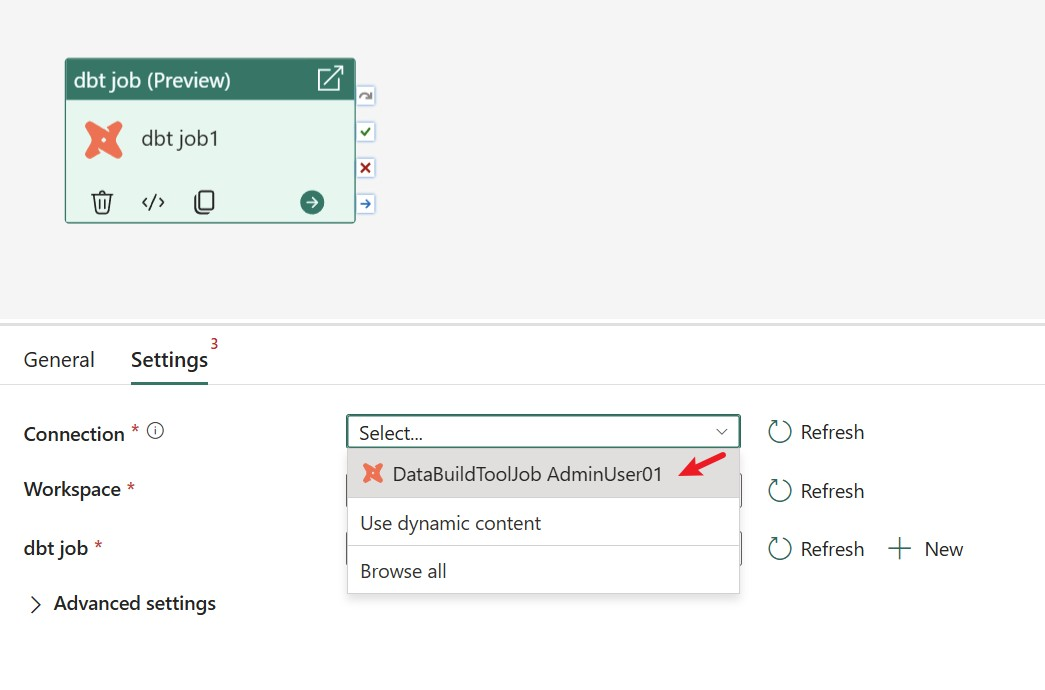
Figure: Add dbt job activity.
Parameterized workflows in dbt job
Dynamic content can be used to parameterize all columns in the Settings tab. By adding dynamic content, you can set parameters for any dbt job activity property. All columns in the Settings tab support dynamic content.
For instance, you can pass a parameter to the Select field, allowing each pipeline run to execute only the models that meet the specified rules.
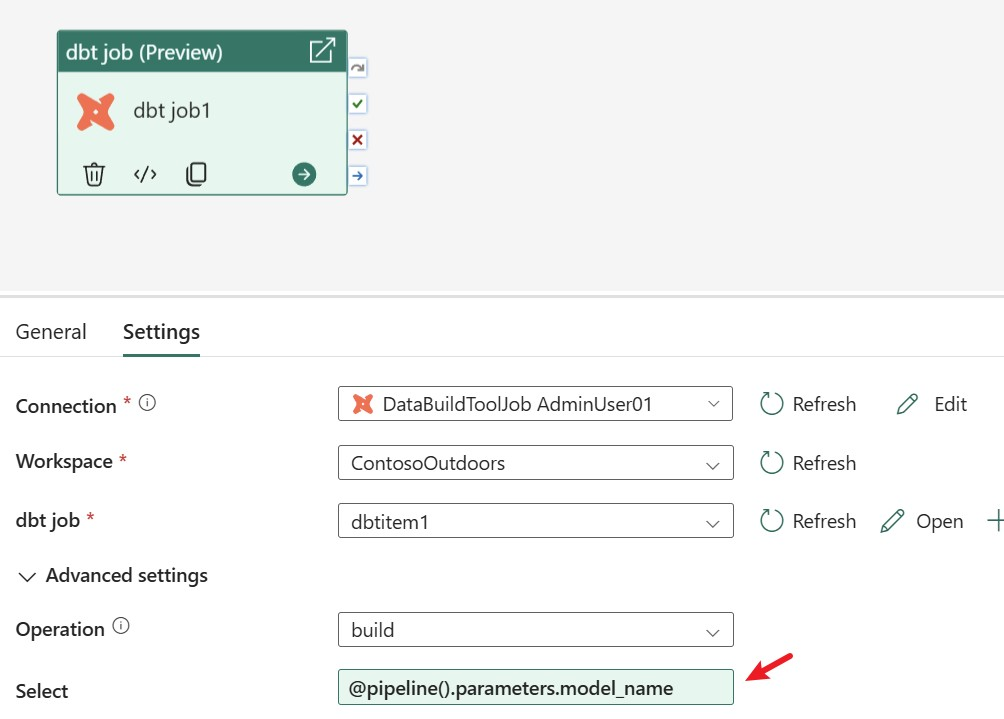
Figure: Configure dynamic content for dbt job.
Advanced settings for dbt job
- The Settings tab provides access to advanced options for dbt command settings, node selection, and execution behavior.
- Select your dbt command (build, run, compile, snapshot, or test) and set filters such as select, exclude, full refresh, or fail fast as needed.
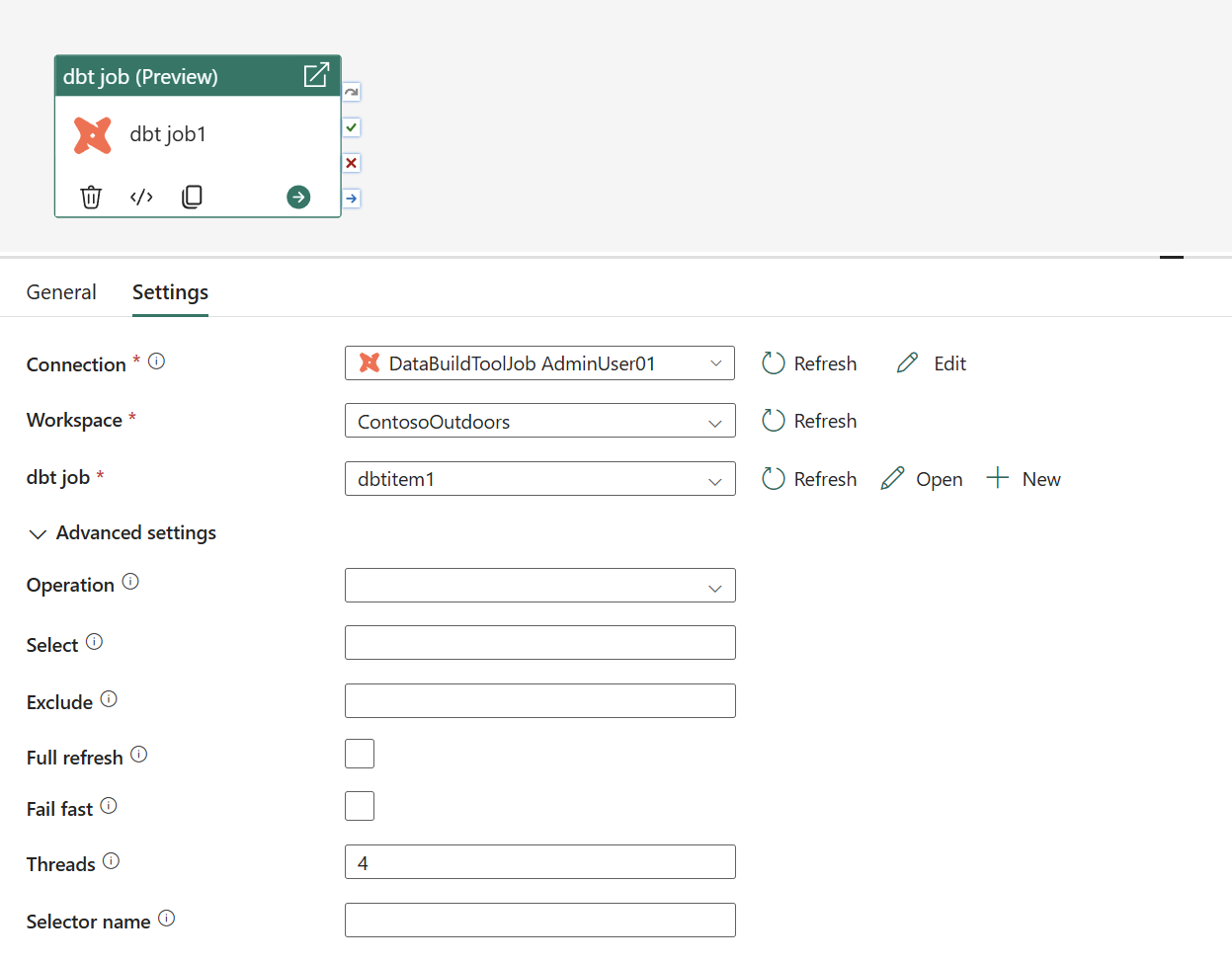
Figure dbt job advanced settings.
Next steps
By integrating dbt jobs into Fabric pipelines, you can orchestrate transformations alongside other pipeline activities and manage orchestration logic in a single workflow. This Preview capability is designed to reduce complexity while giving you more control and visibility over dbt execution. Try it out in your pipelines and share feedback in the comment section to help guide what comes next.
- Orchestrate dbt jobs in Fabric data pipelines — explore the full setup and configuration guide.
- Monitor pipeline runs in Microsoft Fabric — track your dbt job runs.
Related blog posts
Orchestrate dbt jobs activity in your Fabric pipelines (Preview)
Outbound access protection for Data Factory (Generally Available)
Co-author: Abhishek Narain Workspace outbound access protection (OAP) is widely accessible for Data Factory workloads—including Pipelines, Copy Job, and Dataflows—as well as for Mirrored Databases such as Mirrored SQL Database and Mirrored Snowflake. Key benefits Enhanced outbound security: By leveraging OAP rules, organizations can ensure that the Data Factory items from the protected workspace can … Continue reading “Outbound access protection for Data Factory (Generally Available)”
Agentic Fabric: How MCP is turning your data platform into an AI-native operating system
Something fundamental is changing in how developers interact with data platforms. Not a feature update, not a UI refresh, but a shift in the interface itself.
Microsoft Fabric
Accelerate your data potential with a unified analytics solution that connects it all. Microsoft Fabric enables you to manage your data in one place with a suite of analytics experiences that seamlessly work together, all hosted on a lake-centric SaaS solution for simplicity and to maintain a single source of truth.
Get the latest news from Microsoft Fabric Blog
This will prompt you to login with your Microsoft account to subscribe
Visit our product blogs
View articles by category
- Activator
- AI
- Announcements
- Apache Iceberg
- Apache Spark
- Community
- Community Challenge
- Data Engineering
- Data Factory
- Data Lake
- Data loss prevention
- Data Science
- Data Warehouse
- Databases
- Developer
- Fabric IQ
- Fabric ML
- Fabric platform
- Fabric Public APIs
- Fabric Workload
- Information protection
- Lakehouse
- Machine Learning
- Microsoft Fabric
- Monthly Update
- OneLake
- Power BI
- Power BI reports
- Real-Time Intelligence
- Roadmap
- Security and Compliance
- semantic model
- Uncategorized
View articles by date
- April 2026
- March 2026
- February 2026
- January 2026
- December 2025
- November 2025
- October 2025
- September 2025
- August 2025
- July 2025
- June 2025
- May 2025
- April 2025
- March 2025
- February 2025
- January 2025
- December 2024
- November 2024
- October 2024
- September 2024
- August 2024
- July 2024
- June 2024
- May 2024
- April 2024
- March 2024
- February 2024
- January 2024
- December 2023
- November 2023
- October 2023
- September 2023
- August 2023
- July 2023
- June 2023
- May 2023
- April 2023
- March 2023
- February 2023
- January 2023
- December 2022
- November 2022
- October 2022
- September 2022
- August 2022
- July 2022
- June 2022
- May 2022
- April 2022
What's new
- Microsoft 365
- Games
- Surface Pro 9
- Surface Laptop 5
- Surface Laptop Studio
- Surface Laptop Go 2
- Windows 11 apps
Microsoft Store
Education
- Microsoft in education
- Devices for education
- Microsoft Teams for Education
- Microsoft 365 Education
- Office Education
- Educator training and development
- Deals for students and parents
- Azure for students
Business
- Microsoft Cloud
- Microsoft Security
- Azure
- Dynamics 365
- Microsoft 365
- Microsoft Advertising
- Microsoft Industry
- Microsoft Teams
Developer & IT
- Developer Centre
- Documentation
- Microsoft Learn
- Microsoft Tech Community
- Azure Marketplace
- AppSource
- Microsoft Power Platform
- Visual Studio
Company
- © 2026 Microsoft