In today’s data-driven world, the ability to capture and act on data changes in real time is a competitive necessity. From financial services processing millions of transactions per second to e-commerce platforms tracking inventory and customer behavior, real-time data streaming has become the backbone of modern decision-making—and nowhere is this more critical than in the database tier, where every insert, update, and delete represents a business event happening right now.
Traditionally, Change Data Capture (CDC) has been the go-to mechanism for tracking SQL Server data changes. However, CDC relies on polling-based capture with intermediate change tables, introducing latency and operational overhead, such as managing polling, offsets, and replaying windows in connector. Change Event Streaming (CES), introduced in SQL Server 2025, Azure SQL Database, and Azure SQL Managed Instance, takes a fundamentally different approach: it pushes data change events directly from the database engine to external streaming platforms in real time. Built on the CloudEvents specification, CES delivers structured JSON messages with the operation type and full row data – eliminating intermediate tables and reducing end-to-end latency to near zero.
On the receiving end, Microsoft Fabric Eventstream provides a fully managed platform for ingesting, transforming, and routing real-time data streams. Its source custom endpoint—an Event Hubs–compatible ingestion point supporting AMQP and Kafka protocols—is a natural fit for CES. Because Eventstream automatically provisions an Event Hubs namespace, CES can deliver change events straight into Fabric without any additional middleware, creating a seamless, zero-infrastructure bridge from your relational database to Fabric Real-Time Intelligence.
The integration: SQL CES meets Eventstream’s custom endpoint
The integration between SQL CES and Fabric Eventstream leverages existing, production-ready capabilities in both platforms—no new services to deploy, no custom connectors to build. On the SQL side, CES streams change events via AMQP or Kafka protocol directly to an Event Hubs – compatible endpoint. On the Fabric side, Eventstream’s source custom endpoint exposes exactly this kind of endpoint, complete with connection strings, shared access key token, and Microsoft Entra authentication support.
This is how the pieces fit together: when you add a custom endpoint source to your eventstream, Fabric provisions an Event Hub and surfaces its connection details—the namespace endpoint, event hub name, shared access key name, and primary key. You then take these credentials into your Azure SQL Database (or SQL Server 2025 or SQL Managed Instance) and configure a CES event stream group that targets this endpoint. Once enabled, every data modification on the monitored tables—inserts, updates, and deletes—flows as structured CloudEvents messages into your eventstream in real time.
The solution supports both AMQP and Kafka protocols and offers three authentication methods: Microsoft Entra (managed identity), SAS token, and SAS key. Microsoft Entra authentication is the most secure option, using your Azure SQL Database’s or Managed instance’s system-assigned managed identity to authenticate directly with the Fabric workspace, eliminating the need to manage secrets or rotate keys. For environments where managed identity is not available, SAS token and SAS key authentication provide flexible alternatives. It is important to rotate keys regularly.
Once the data arrives in Eventstream, you can use the built-in SQL operator to parse and transform the CloudEvents payload. The SQL operator’s json_parse() function makes it straightforward to extract the actual table data from the nested JSON structure of change events, filter by operation type (insert, update, or delete), and project individual columns into a clean, structured output—ready to flow to any downstream destination.
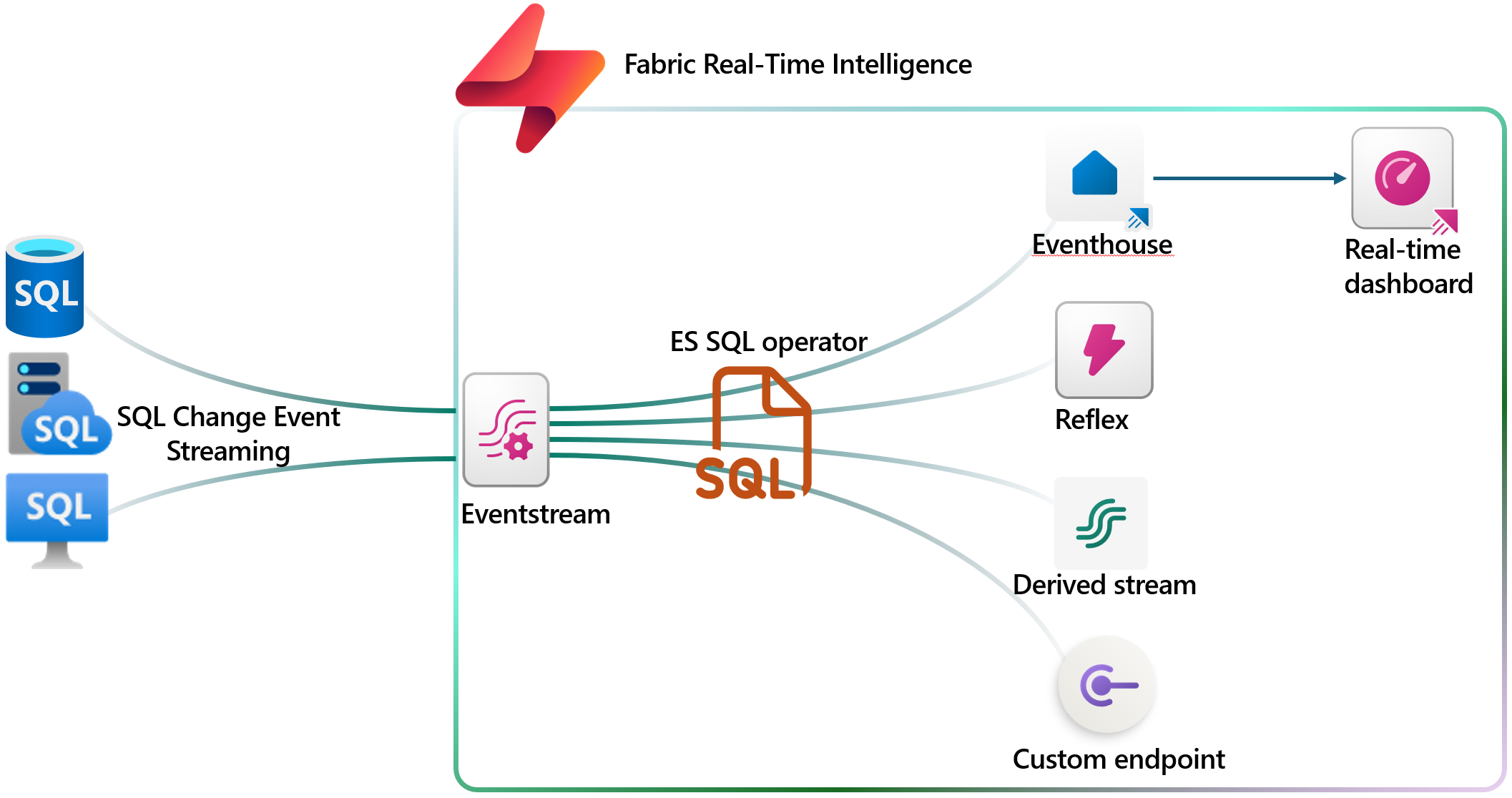
Figure: The typical integration of CES data flow.
Get started: Connecting SQL CES to Eventstream in minutes
Setting up this integration is straightforward and involves just two sides of configuration: creating the ingestion endpoint in Fabric Eventstream and enabling CES in your SQL database.
On the Eventstream side
Create a new eventstream in your Fabric workspace, then add a custom endpoint source. Once you publish the eventstream, select the custom endpoint source tile to reveal the connection details: the Event Hub namespace endpoint, event hub name, shared access key name, and primary key. These are the credentials you will bring to the SQL configuration.
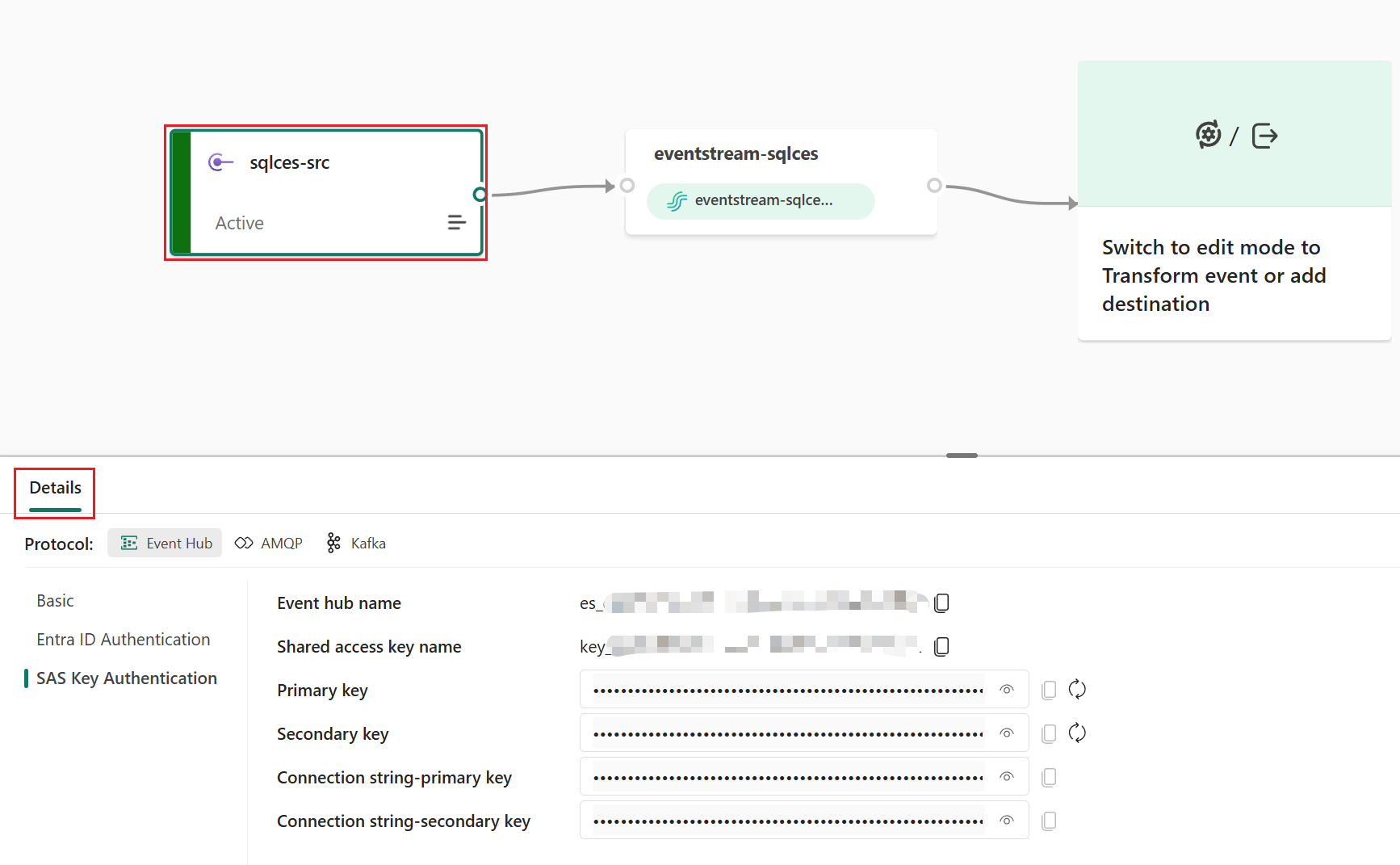
Figure: Eventstream source custom endpoint to receive CES data.
On the SQL Database side
In your Azure SQL Database, complete five key steps to start streaming change events:
1. Set the recovery model to FULL if SQL Server 2025 – CES requires the full recovery model to read from the transaction log. For Azure SQL DB and Managed Instance, this is always “FULL”. This step can be skipped.
2. Create a master key and database scoped credential – Use Microsoft Entra (managed identity) for maximum security, or SAS token as an alternative.
3. Enable event streaming – Run sp_enable_event_stream to activate the CES engine on your database.
4. Create the event stream group – Point it to your Eventstream’s custom endpoint using the connection details you collected, choosing AMQP or Kafka protocol.
5. Add tables to the stream group – Specify which tables to monitor. Changes to these tables will immediately flow to your eventstream.
Once configured, navigate to your eventstream in Fabric and select the default stream node to verify that change events are flowing in. You should see real-time data arriving as you insert, update, or delete records in your monitored tables.
For the detailed step-by-step tutorial with SQL scripts and advanced configuration scenarios, refer to the Stream SQL Change Events to Eventstream documentation.
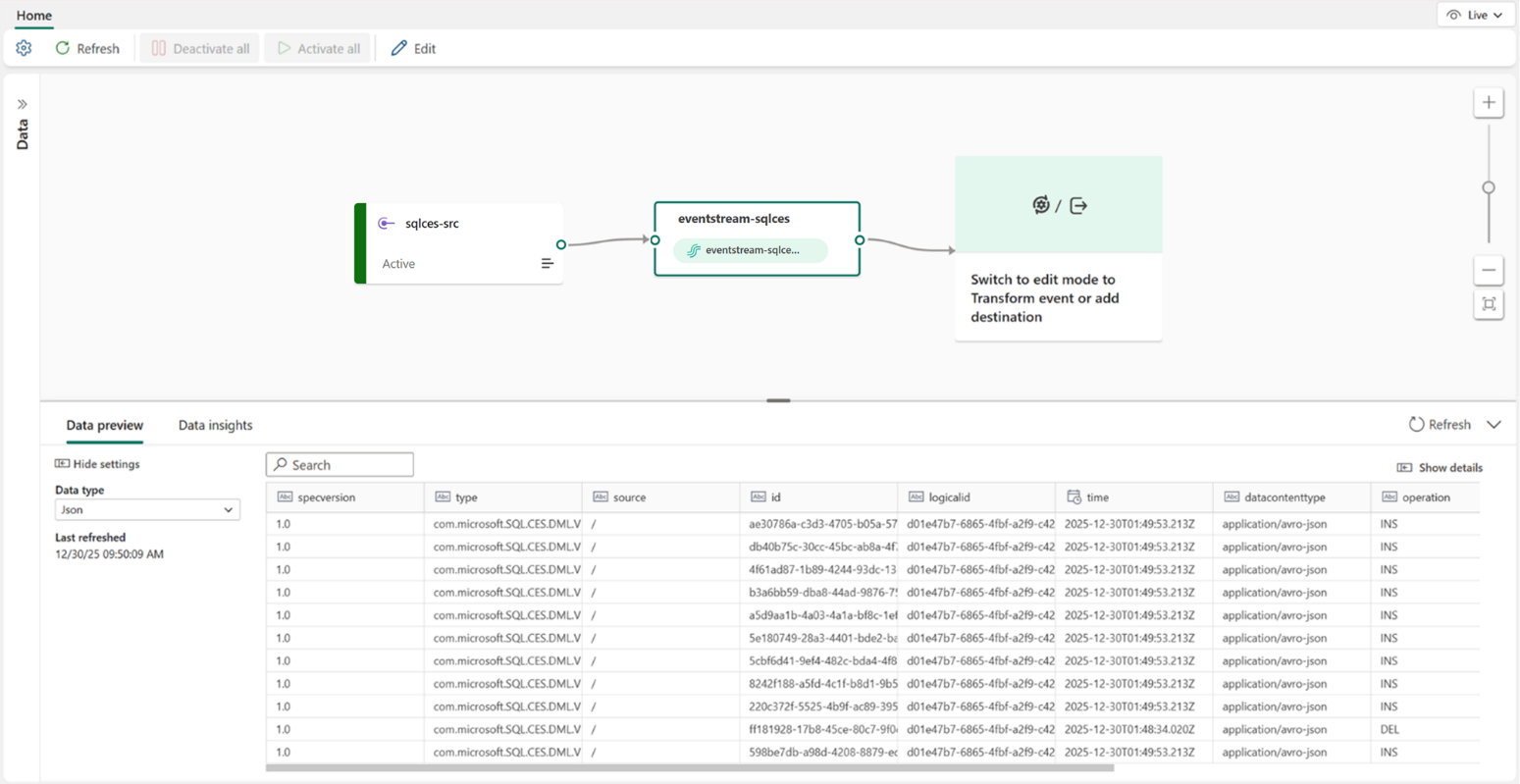
Figure: CES data arrives at Eventstream.
What you can build: Scenarios powered by this integration
Once SQL change events are flowing into Eventstream, the real power emerges from the downstream destinations available in Fabric Real-Time Intelligence. Using the SQL operator, you can extract and transform the raw change events into structured, business-ready data—and then route it to the right destination for your scenario.
Real-time data refinement with derived streams
Route the extracted change events to a derived stream to create a clean, continuously updated data feed that other eventstreams, applications, or teams can subscribe to. For example, extract only new order inserts from a transactions table and publish them as a refined “New Orders” stream that downstream consumers can use for order tracking dashboards, notification services, or supply chain coordination—without needing to parse raw change events themselves.
Real-time analytics and exploration with Eventhouse
Send the transformed change events to an Eventhouse (Fabric’s real-time analytics database) to enable interactive exploration and ad-hoc querying with KQL (Kusto Query Language). This is ideal for scenarios such as monitoring order trends in real time, detecting anomalies in financial transactions, tracking inventory changes across warehouses, or building live operational dashboards that reflect the latest state of your database. With Eventhouse’s high-performance query engine, you can run complex aggregations over millions of change events in seconds.
Proactive alerts and automated actions
Combine Eventstream’s event processing capabilities with Fabric’s broader ecosystem to trigger alerts and automated workflows based on specific database changes. For instance, detect when a high-value order exceeds a threshold, when a critical record is deleted, or when an unusual pattern of updates occurs—and trigger notifications, escalation workflows, or automated remediation in near real time.
Cross-system data synchronization
Use Eventstream as a real-time data distribution hub to fan out SQL change events to multiple destinations simultaneously. Keep your data lakehouse, data warehouse, and analytics databases synchronized with the latest changes from your source SQL database, ensuring that reporting, machine learning models, and operational systems are always working with the freshest data available.
Next steps and resources
The integration between SQL Change Event Streaming and Fabric Eventstream is available now with SQL Server 2025, Azure SQL Database, and Azure SQL Managed Instance. Try it with your Fabric account.
If you don’t have one, sign up for Power BI with a new Microsoft 365 trial and start a free Fabric trial capacity. Learn more about Eventstream.
We welcome your feedback through the community forum, idea submission, or via email.
Related blog posts
Stream SQL Change Events to Microsoft Fabric Eventstream with Change Event Streaming for Real-Time Analytics
Customer Managed Keys (CMK) for Eventhouse (Preview)
Empowering customers with enhanced security and control. This milestone marks a significant step forward in empowering our customers to take control of their data security and compliance needs within the Eventhouse platform. With CMK, you can manage your own encryption keys, providing an added layer of security and flexibility. This feature allows you to meet … Continue reading “Customer Managed Keys (CMK) for Eventhouse (Preview)”
Evolving Agentic Applications on Microsoft Fabric: From Automated Deployment to Integrating Data Agents
In our previous post, Operationalizing Agentic Applications with Microsoft Fabric, we focused on a core challenge teams encounter once an agentic application moves beyond a proof of concept: operational reality. Specifically, how do you observe, govern, evaluate, and analyze what agents are doing once they interact with real users, data, and business processes at scale? … Continue reading “Evolving Agentic Applications on Microsoft Fabric: From Automated Deployment to Integrating Data Agents”
Microsoft Fabric
Accelerate your data potential with a unified analytics solution that connects it all. Microsoft Fabric enables you to manage your data in one place with a suite of analytics experiences that seamlessly work together, all hosted on a lake-centric SaaS solution for simplicity and to maintain a single source of truth.
Get the latest news from Microsoft Fabric Blog
This will prompt you to login with your Microsoft account to subscribe
Visit our product blogs
View articles by category
- Activator
- AI
- Announcements
- Apache Iceberg
- Apache Spark
- Community
- Community Challenge
- Data Engineering
- Data Factory
- Data Lake
- Data loss prevention
- Data Science
- Data Warehouse
- Databases
- Developer
- Fabric IQ
- Fabric ML
- Fabric platform
- Fabric Public APIs
- Fabric Workload
- Information protection
- Lakehouse
- Machine Learning
- Microsoft Fabric
- Monthly Update
- OneLake
- Power BI
- Power BI reports
- Real-Time Intelligence
- Roadmap
- Security and Compliance
- semantic model
- Uncategorized
View articles by date
- April 2026
- March 2026
- February 2026
- January 2026
- December 2025
- November 2025
- October 2025
- September 2025
- August 2025
- July 2025
- June 2025
- May 2025
- April 2025
- March 2025
- February 2025
- January 2025
- December 2024
- November 2024
- October 2024
- September 2024
- August 2024
- July 2024
- June 2024
- May 2024
- April 2024
- March 2024
- February 2024
- January 2024
- December 2023
- November 2023
- October 2023
- September 2023
- August 2023
- July 2023
- June 2023
- May 2023
- April 2023
- March 2023
- February 2023
- January 2023
- December 2022
- November 2022
- October 2022
- September 2022
- August 2022
- July 2022
- June 2022
- May 2022
- April 2022
What's new
- Microsoft 365
- Games
- Surface Pro 9
- Surface Laptop 5
- Surface Laptop Studio
- Surface Laptop Go 2
- Windows 11 apps
Microsoft Store
Education
- Microsoft in education
- Devices for education
- Microsoft Teams for Education
- Microsoft 365 Education
- Office Education
- Educator training and development
- Deals for students and parents
- Azure for students
Business
- Microsoft Cloud
- Microsoft Security
- Azure
- Dynamics 365
- Microsoft 365
- Microsoft Advertising
- Microsoft Industry
- Microsoft Teams
Developer & IT
- Developer Centre
- Documentation
- Microsoft Learn
- Microsoft Tech Community
- Azure Marketplace
- AppSource
- Microsoft Power Platform
- Visual Studio
Company
- © 2026 Microsoft