Machine learning teams need more than a great model — they need a reliable way to move that model from experimentation to production. Cross-workspace logging for MLflow in Microsoft Fabric, is a capability that enables you to build end-to-end MLOps workflows using the standard MLflow APIs you already know.
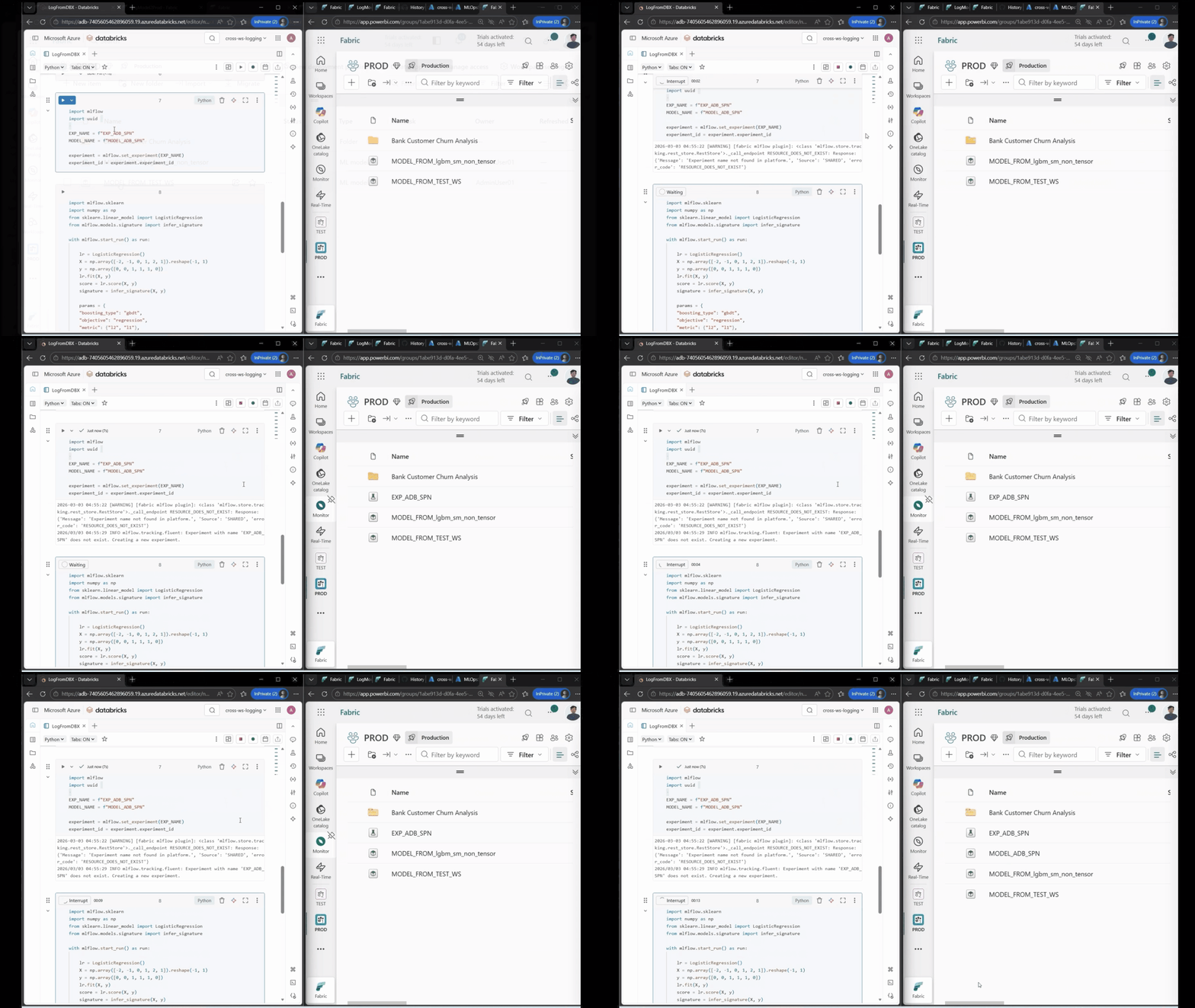
Figure: Animated gif of Log ML models from Databricks to Fabric.
The challenge: Bridging the gap between experimentation and production
If you’ve ever trained a model in a development notebook and then struggled to get it safely into production, you’re not alone. Most ML teams face a common set of pain points:
- No environment separation -Experiments, validated models, and production models all live in the same workspace, making it hard to enforce quality gates or maintain audit trails.
No way to move ML artifacts between workspaces – Before cross-workspace logging, Fabric had no export/import capability for ML experiments and models. The only way to get a model into another workspace was to sync the notebook code and training data, then retrain the model from scratch in the target workspace — a time-consuming, error-prone process that wasted compute and introduced reproducibility risk.
- Scattered ML assets – Teams training models in Azure Databricks, Azure Machine Learning, or local environments have no easy way to consolidate those assets into Fabric for unified governance and deployment.
Cross-workspace logging solves these problems by letting you log MLflow experiments and models to any Fabric workspace — from any environment.
What’s new
Cross-workspace logging works through the synapseml-mlflow package, which provides a Fabric-compatible MLflow tracking plugin. The core idea is simple: set the MLFLOW_TRACKING_URI* to point at your target workspace and use standard MLflow commands. Your experiments, metrics, parameters, and registered models land in the workspace you choose — not just the one you’re running in.
That’s it. From here, every mlflow.set_experiment(), mlflow.log_metric(), and mlflow.register_model() call writes to the target workspace.
Please note: If your current workspace has OAP enabled, you must config a cross-workspace managed private endpoint from the source workspace to the target workspace and route the tracking URI through the private endpoint.
Cross-workspace logging capabilities
Dev → Test → Prod MLOps workflows
Separate your ML lifecycle into distinct workspaces — Development for experimentation, Test for validation, and Production for serving. Train and iterate freely in a development workspace. When a model passes your quality bar, promote it to Test by logging it cross-workspace. After validation, promote to a production workspace. Each workspace maintains its own experiments, models, and access controls, giving you clear audit trails and governance boundaries.
Bring existing ML assets into Fabric
Already training models in Azure Databricks, Azure Machine Learning, or on your local machine? You don’t need to rebuild your training pipelines. Install synapseml-mlflow, authenticate with your Fabric workspace, and log your experiments and models directly into Fabric. This consolidates your ML assets in one place for unified governance and downstream deployment — without changing your existing training code.
Train where the data lives, serve from a separate workspace
Many enterprise customers have strict data governance policies that dictate production data can only be accessed within a locked-down workspace with tightly controlled permissions. Before cross-workspace logging, this meant serving and training had to happen in the same workspace, limiting who could access the deployed model. Now, data scientists can train models in the secured workspace with access to production data and log the trained model to a separate serving workspace with broader access — keeping sensitive data contained while making models available for downstream consumption.
Built for enterprise security
For organizations with strict network security requirements, cross-workspace logging works in workspaces with Outbound Access Protection (OAP) enabled. Cross-workspace logging to a different workspace requires a managed private endpoint, while logging within the same workspace and from outside Fabric works without additional configuration. Your data stays protected while your ML workflows stay productive.
Get started
Getting started takes three steps:
- Install the plugin in your Fabric notebook:
2. Set the tracking URI to your target workspace.
3. Use standard MLflow APIs — set_experiment, log_metric, log_model, register_model — exactly as you do today.
For environments outside Fabric (Databricks, local, Azure ML), install synapseml-mlflow and authenticate using DefaultAzureCredential, DeviceCodeCredential, or a service principal.
Learn more
Explore the Cross-workspace logging documentation for step-by-step instructions for Fabric notebooks, Azure Databricks, local environments, and OAP-enabled workspaces.
Share your feedback with us through the Fabric Community or reach out on Reddit.
Related blog posts
Cross-workspace logging for MLflow in Microsoft Fabric: Build MLOps workflows with confidence (Generally Available)
Outbound access protection for Data Factory (Generally Available)
Co-author: Abhishek Narain Workspace outbound access protection (OAP) is widely accessible for Data Factory workloads—including Pipelines, Copy Job, and Dataflows—as well as for Mirrored Databases such as Mirrored SQL Database and Mirrored Snowflake. Key benefits Enhanced outbound security: By leveraging OAP rules, organizations can ensure that the Data Factory items from the protected workspace can … Continue reading “Outbound access protection for Data Factory (Generally Available)”
Fabric notebooks support Lakehouse auto-binding in Git (Preview)
Fabric notebooks now support lakehouse auto-binding when used with Git. It is designed to simplify multi-environment workflows and reduce the operational overhead of managing lakehouse references across development, test, and production workspaces.
Microsoft Fabric
Accelerate your data potential with a unified analytics solution that connects it all. Microsoft Fabric enables you to manage your data in one place with a suite of analytics experiences that seamlessly work together, all hosted on a lake-centric SaaS solution for simplicity and to maintain a single source of truth.
Get the latest news from Microsoft Fabric Blog
This will prompt you to login with your Microsoft account to subscribe
Visit our product blogs
View articles by category
- Activator
- AI
- Announcements
- Apache Iceberg
- Apache Spark
- Community
- Community Challenge
- Data Engineering
- Data Factory
- Data Lake
- Data loss prevention
- Data Science
- Data Warehouse
- Databases
- Developer
- Fabric IQ
- Fabric ML
- Fabric platform
- Fabric Public APIs
- Fabric Workload
- Information protection
- Lakehouse
- Machine Learning
- Microsoft Fabric
- Monthly Update
- OneLake
- Power BI
- Power BI reports
- Real-Time Intelligence
- Roadmap
- Security and Compliance
- semantic model
- Uncategorized
View articles by date
- April 2026
- March 2026
- February 2026
- January 2026
- December 2025
- November 2025
- October 2025
- September 2025
- August 2025
- July 2025
- June 2025
- May 2025
- April 2025
- March 2025
- February 2025
- January 2025
- December 2024
- November 2024
- October 2024
- September 2024
- August 2024
- July 2024
- June 2024
- May 2024
- April 2024
- March 2024
- February 2024
- January 2024
- December 2023
- November 2023
- October 2023
- September 2023
- August 2023
- July 2023
- June 2023
- May 2023
- April 2023
- March 2023
- February 2023
- January 2023
- December 2022
- November 2022
- October 2022
- September 2022
- August 2022
- July 2022
- June 2022
- May 2022
- April 2022
What's new
- Microsoft 365
- Games
- Surface Pro 9
- Surface Laptop 5
- Surface Laptop Studio
- Surface Laptop Go 2
- Windows 11 apps
Microsoft Store
Education
- Microsoft in education
- Devices for education
- Microsoft Teams for Education
- Microsoft 365 Education
- Office Education
- Educator training and development
- Deals for students and parents
- Azure for students
Business
- Microsoft Cloud
- Microsoft Security
- Azure
- Dynamics 365
- Microsoft 365
- Microsoft Advertising
- Microsoft Industry
- Microsoft Teams
Developer & IT
- Developer Centre
- Documentation
- Microsoft Learn
- Microsoft Tech Community
- Azure Marketplace
- AppSource
- Microsoft Power Platform
- Visual Studio
Company
- © 2026 Microsoft