If you haven’t already, check out Arun Ulag’s hero blog “FabCon and SQLCon 2026: Unifying databases and Fabric on a single, complete platform” for a complete look at all of our FabCon and SQLCon announcements across both Fabric and our database offerings.
Customers use Eventstream in Microsoft Fabric to ingest and process streaming data at scale. They use Fabric Activator to monitor conditions and initiate actions when thresholds are met or specific patterns are detected. Now, we’re bringing these experiences closer together.
You have the ability to create and manage Activator rules directly within Eventstream in just few clicks, making it faster and simpler to turn events into action. Previously, setting up an alert required switching from Eventstream to Activator. While powerful, this meant moving between experiences to complete a single workflow. Now, alert creation is embedded directly into Eventstream. To learn more, refer to our Set alert on an eventstream with Activator destination documentation.
What’s new
- Create Activator rules directly inside Eventstream.
- Define rule conditions to specify the values you want to monitor in your events.
- Configure actions such as notifications or workflows.
- View and manage all rules associated with that Eventstream.
Why this matters
- Faster setup & reduced context switching – No more navigating between items. Create alerts while setting up your Eventstream.
- Full visibility – Easily see all rules tied to a specific Eventstream, improving operational clarity.
How it works – When building or editing your Eventstream, you can:
- Select the stream you want to monitor
- Choose Set Alert
- Define your condition (thresholds, aggregations, patterns)
- Configure the action
- Create the rule
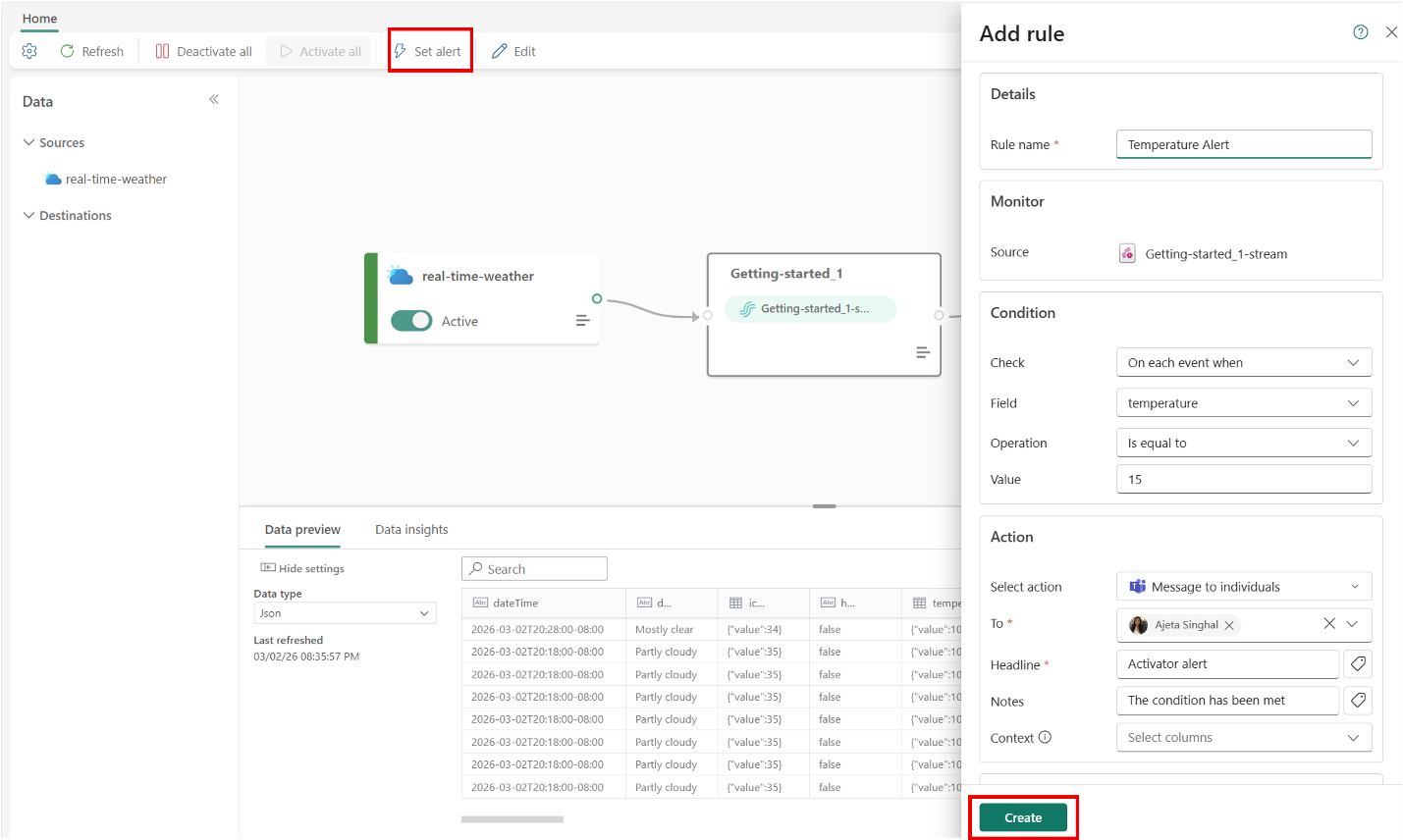
Figure: Set alert inside Eventstream
If you have Activator destination created on Eventstream, you can:
- Select Activator node
- Select Rule icon
- Create the rule
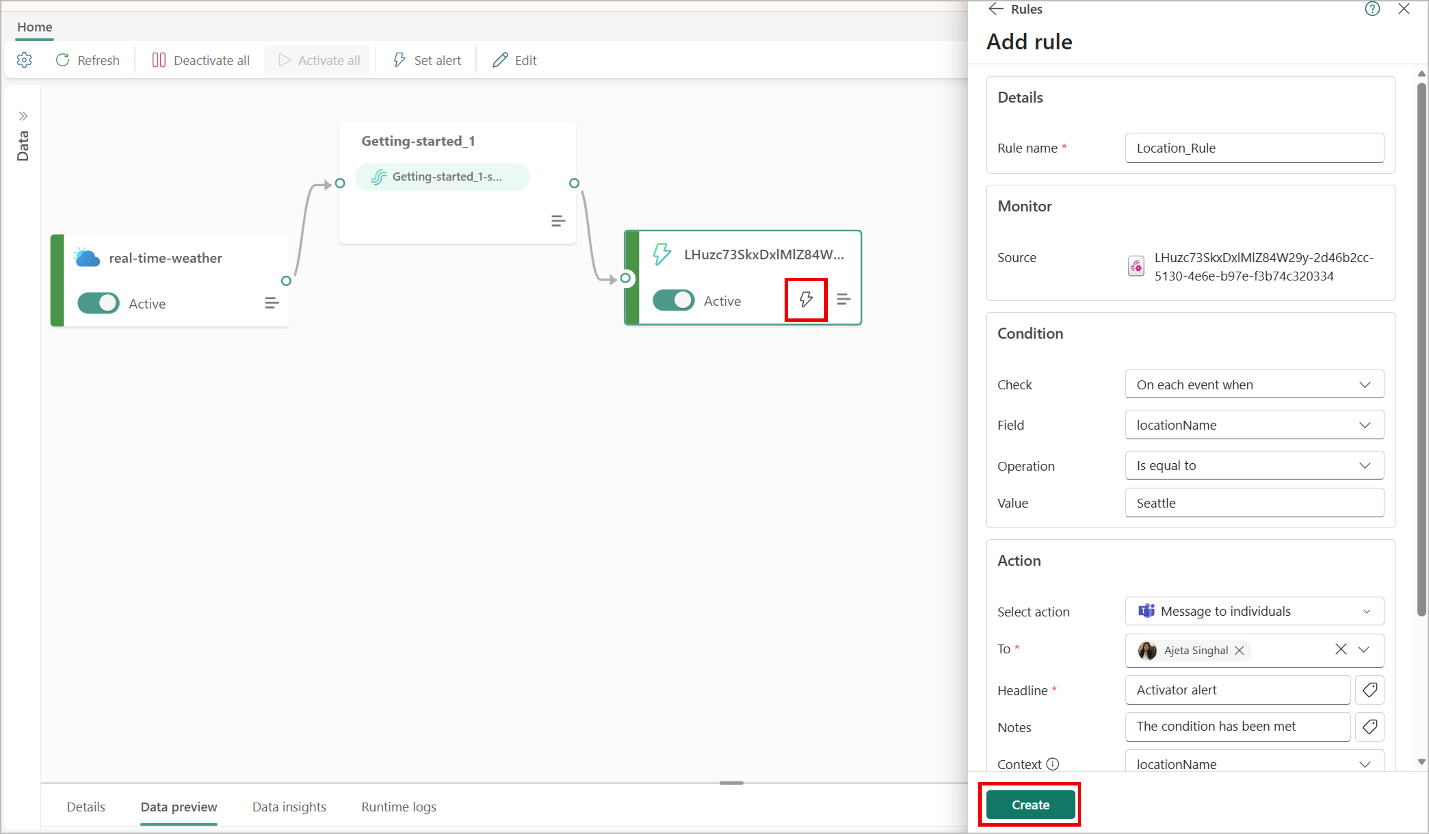
Figure: Add rule inside Eventstream in Activator destination
Once you have the rule(s) created on your Eventstream, you can manage them by editing, deleting or opening in Activator.
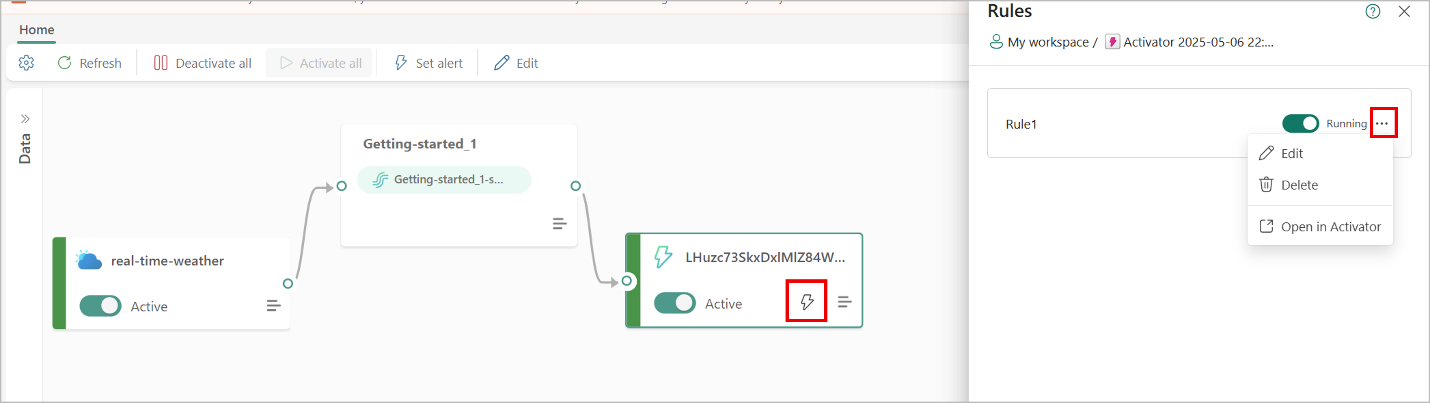
Figure: Manage rules inside Eventstream
By opening the rule in Activator:
- Manage the rule: View and manage all rules and actions created on your data, build additional business objects to validate hypothesis, and modify and delete them.
- Edit the rule: Tweak the settings and get an instant preview of how your edits affect the activations.
- Monitor and analyze the rule: View step-by-step how this rule is computed. Review its history of activations.
- Test/activate the rule: Send yourself a test alert and check your chat messages in Teams.
Share your feedback
To try these features now, head over to Fabric. We look forward to hearing from you, if you have any feedback or ideas, join the discussion in the Activator community.
Related blog posts
Configure and manage Activator rules directly in Eventstream (Preview)
What’s new with Fabric Activator: more connected and capabilities
In our data-centric society, immediate responses have become a necessity rather than a choice. Fabric Activator for Microsoft Fabric enables organizations to move from passive monitoring to proactive action. By continuously monitoring streaming and event data, Activator helps you to automatically execute actions or send alerts whenever specific data conditions are met, ensuring timely and efficient operations.
SQL Telemetry & Intelligence – How we built a Petabyte-scale Data Platform with Fabric
Building a Petabyte-scale Data Platform with Fabric and SQL Telemetry and Intelligence Engineering team.
Microsoft Fabric
Accelerate your data potential with a unified analytics solution that connects it all. Microsoft Fabric enables you to manage your data in one place with a suite of analytics experiences that seamlessly work together, all hosted on a lake-centric SaaS solution for simplicity and to maintain a single source of truth.
Get the latest news from Microsoft Fabric Blog
This will prompt you to login with your Microsoft account to subscribe
Visit our product blogs
View articles by category
- Activator
- AI
- Announcements
- Apache Iceberg
- Apache Spark
- Community
- Community Challenge
- Data Engineering
- Data Factory
- Data Lake
- Data loss prevention
- Data Science
- Data Warehouse
- Databases
- Developer
- Fabric IQ
- Fabric ML
- Fabric platform
- Fabric Public APIs
- Fabric Workload
- Information protection
- Lakehouse
- Machine Learning
- Microsoft Fabric
- Monthly Update
- OneLake
- Power BI
- Power BI reports
- Real-Time Intelligence
- Roadmap
- Security and Compliance
- semantic model
- Uncategorized
View articles by date
- March 2026
- February 2026
- January 2026
- December 2025
- November 2025
- October 2025
- September 2025
- August 2025
- July 2025
- June 2025
- May 2025
- April 2025
- March 2025
- February 2025
- January 2025
- December 2024
- November 2024
- October 2024
- September 2024
- August 2024
- July 2024
- June 2024
- May 2024
- April 2024
- March 2024
- February 2024
- January 2024
- December 2023
- November 2023
- October 2023
- September 2023
- August 2023
- July 2023
- June 2023
- May 2023
- April 2023
- March 2023
- February 2023
- January 2023
- December 2022
- November 2022
- October 2022
- September 2022
- August 2022
- July 2022
- June 2022
- May 2022
- April 2022
What's new
- Microsoft 365
- Games
- Surface Pro 9
- Surface Laptop 5
- Surface Laptop Studio
- Surface Laptop Go 2
- Windows 11 apps
Microsoft Store
Education
- Microsoft in education
- Devices for education
- Microsoft Teams for Education
- Microsoft 365 Education
- Office Education
- Educator training and development
- Deals for students and parents
- Azure for students
Business
- Microsoft Cloud
- Microsoft Security
- Azure
- Dynamics 365
- Microsoft 365
- Microsoft Advertising
- Microsoft Industry
- Microsoft Teams
Developer & IT
- Developer Centre
- Documentation
- Microsoft Learn
- Microsoft Tech Community
- Azure Marketplace
- AppSource
- Microsoft Power Platform
- Visual Studio
Company
- © 2026 Microsoft