If you haven’t already, check out Arun Ulag’s hero blog “FabCon and SQLCon 2026: Unifying databases and Fabric on a single, complete platform” for a complete look at all of our FabCon and SQLCon announcements across both Fabric and our database offerings.
The SharePoint Site Picker simplifies the process by replacing the manual URL entry with a browsable and searchable dropdown menu. By enabling site discovery directly within Fabric, it helps prevent URL format errors, reduces connection issues, and allows you to concentrate on building your data integration instead of searching through SharePoint.
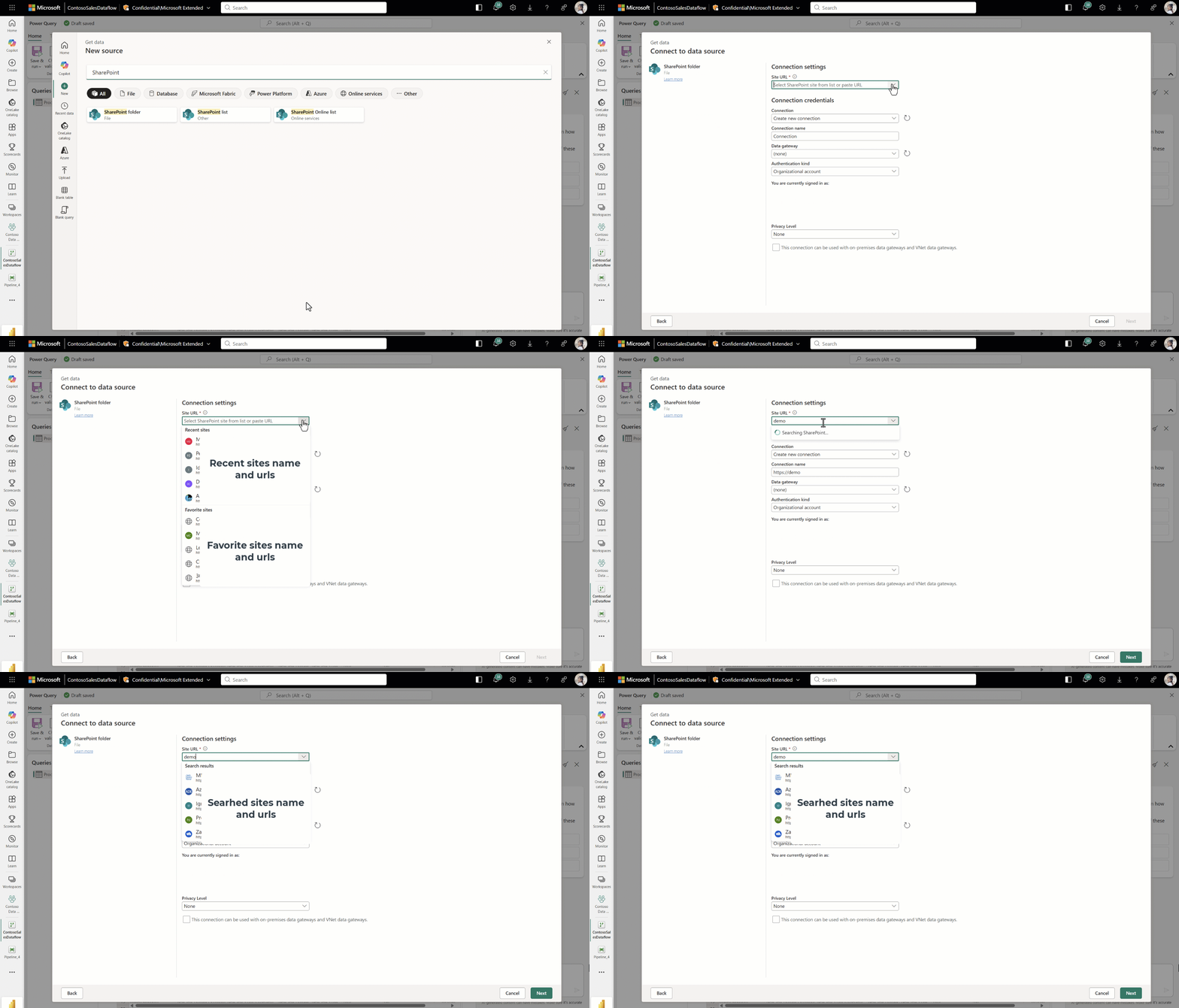
Figure: SharePoint site picker functions overview.
With SharePoint Site Picker you can use the same browsable dropdown across the following Fabric experiences and connectors:
- Dataflow Gen2 — SharePoint Folder, SharePoint Online List, and SharePoint List sources, plus SharePoint destination.
- Pipelines — SharePoint Online List in source.
- Copy job — SharePoint Online List in source.
- Lakehouse shortcut — SharePoint Folder.
Simplified SharePoint site selection
When you connect to a SharePoint source or destination, the Site URL field now includes a dropdown with two categories: Recent sites and Favorite sites. Select the dropdown, choose a site, and the connector populates the correct site URL automatically.
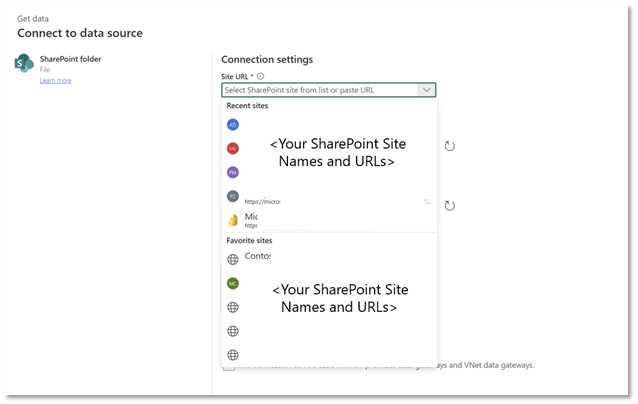
Figure: SharePoint Site Picker drop down.
Quick search capability
When your target site isn’t in your Recent or Favorite list, type a keyword in the dropdown search box. The Site Picker searches across all SharePoint sites in your tenant and returns matching results in real time. Select a result, and the correct URL is entered for you.
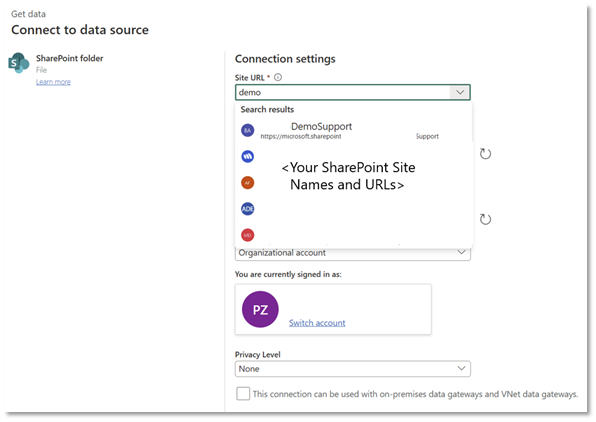
Figure: SharePoint Site Picker search results.
Next steps
You can start using the SharePoint Site Picker the next time you connect to SharePoint data in Microsoft Fabric.
- Explore the SharePoint Folder connector documentation.
- Explore the SharePoint Online List connector documentation.
- Explore the SharePoint List connector documentation.
Have feedback on the SharePoint Site Picker? Share your thoughts in the Fabric Data Factory IDEAS community.
Related blog posts
SharePoint Site Picker for easily connecting SharePoint data in Microsoft Fabric (Preview)
Incremental copy gets more flexible: New watermark column types in Copy job in Fabric Data Factory (Generally Available)
Copy job is the go-to solution in Microsoft Fabric Data Factory for simplified data movement across multiple clouds. With native support for bulk copy, incremental copy, and change data capture (CDC) replication, it can handle a wide range of movement scenarios through an intuitive, easy-to-use experience.
Graph-powered AI reasoning (Preview)
As enterprises’ use of large language models (LLMs) evolve from generating text to driving decisions, the path to the answer has come to matter as much as the answer itself. Enterprises are moving beyond AI that merely generates responses toward systems for that reason, justify, and allow for inspection. This shift drives the need for AI that can ground explanations in each enterprise’s complex information environment, which requires the system to perform explicit reasoning over organizational, transactional, and behavioral relationships.
Microsoft Fabric
Accelerate your data potential with a unified analytics solution that connects it all. Microsoft Fabric enables you to manage your data in one place with a suite of analytics experiences that seamlessly work together, all hosted on a lake-centric SaaS solution for simplicity and to maintain a single source of truth.
Get the latest news from Microsoft Fabric Blog
This will prompt you to login with your Microsoft account to subscribe
Visit our product blogs
View articles by category
- Activator
- AI
- Announcements
- Apache Iceberg
- Apache Spark
- Community
- Community Challenge
- Data Engineering
- Data Factory
- Data Lake
- Data loss prevention
- Data Science
- Data Warehouse
- Databases
- Developer
- Fabric IQ
- Fabric ML
- Fabric platform
- Fabric Public APIs
- Fabric Workload
- Information protection
- Lakehouse
- Machine Learning
- Microsoft Fabric
- Monthly Update
- OneLake
- Power BI
- Power BI reports
- Real-Time Intelligence
- Roadmap
- Security and Compliance
- semantic model
- Uncategorized
View articles by date
- March 2026
- February 2026
- January 2026
- December 2025
- November 2025
- October 2025
- September 2025
- August 2025
- July 2025
- June 2025
- May 2025
- April 2025
- March 2025
- February 2025
- January 2025
- December 2024
- November 2024
- October 2024
- September 2024
- August 2024
- July 2024
- June 2024
- May 2024
- April 2024
- March 2024
- February 2024
- January 2024
- December 2023
- November 2023
- October 2023
- September 2023
- August 2023
- July 2023
- June 2023
- May 2023
- April 2023
- March 2023
- February 2023
- January 2023
- December 2022
- November 2022
- October 2022
- September 2022
- August 2022
- July 2022
- June 2022
- May 2022
- April 2022
What's new
- Microsoft 365
- Games
- Surface Pro 9
- Surface Laptop 5
- Surface Laptop Studio
- Surface Laptop Go 2
- Windows 11 apps
Microsoft Store
Education
- Microsoft in education
- Devices for education
- Microsoft Teams for Education
- Microsoft 365 Education
- Office Education
- Educator training and development
- Deals for students and parents
- Azure for students
Business
- Microsoft Cloud
- Microsoft Security
- Azure
- Dynamics 365
- Microsoft 365
- Microsoft Advertising
- Microsoft Industry
- Microsoft Teams
Developer & IT
- Developer Centre
- Documentation
- Microsoft Learn
- Microsoft Tech Community
- Azure Marketplace
- AppSource
- Microsoft Power Platform
- Visual Studio
Company
- © 2026 Microsoft