If you haven’t already, check out Arun Ulag’s hero blog “FabCon and SQLCon 2026: Unifying databases and Fabric on a single, complete platform” for a complete look at all of our FabCon and SQLCon announcements across both Fabric and our database offerings.
Customer-managed keys (CMK) in Fabric SQL Database is a major step forward in empowering organizations to take control of their data security and compliance.
Why customer-managed keys matter
Microsoft Fabric already encrypts all data-at-rest using Microsoft-managed keys. But for organizations with strict data governance policies or regulatory requirements, CMK offers an additional layer of control and flexibility.
With CMK, you can use your own Azure Key Vault keys to encrypt SQL database data in Fabric workspaces, giving you:
- Key ownership and rotation control.
- Granular access management.
- Auditability of key usage.
- Compliance with industry-specific encryption standards.
Seamless integration with Transparent Data Encryption
Once CMK is configured for a Fabric workspace, Transparent Data Encryption is automatically enabled for all SQL databases (including tempdb) in that workspace. This means:
- Real-time encryption and decryption of data, backups, and transaction logs.
- Encryption at the page level using a symmetric Database Encryption Key (DEK).
- DEK protection via the customer-managed asymmetric key from Azure Key Vault.
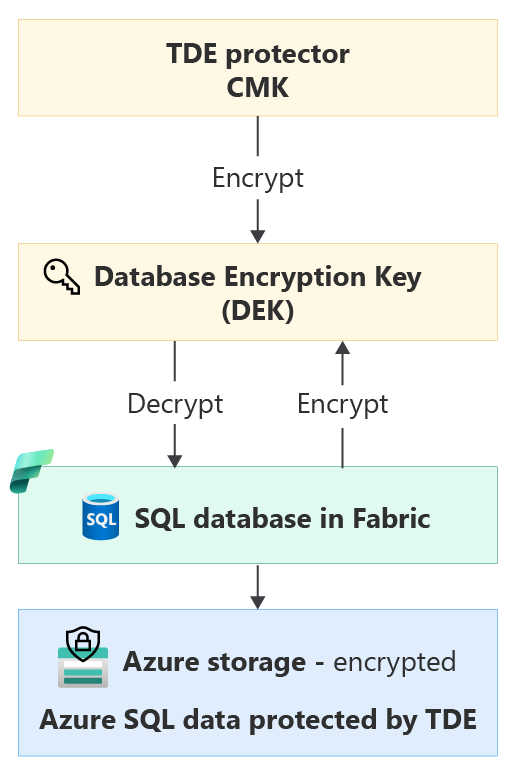
Figure: Encryption process for Azure SQL data protected by TDE.
No manual steps are required. Encryption begins automatically and applies to both existing and newly created databases.
Get started
Follow the steps on Customer-managed keys for Fabric workspaces to enable encryption using customer-managed keys.
Query to verify successful CMK encryption
After you enable CMK for the workspace, Fabric automatically encrypts (1) any existing SQL databases in that workspace and (2) any new SQL databases you create in that workspace going forward. To confirm that a specific database is encrypted, run the following query:
SELECT DB_NAME(database_id) as DatabaseName, *
FROM sys.dm_database_encryption_keys
WHERE database_id <> 2
A database is encrypted if the encryption_state_desc field displays “ENCRYPTED” (or “ENCRYPTION_IN_PROGRESS” during encryption) with ASYMMETRIC_KEY as encryptor_type; otherwise, it will not show up in this DMV if the database is not encrypted.

Figure: Result set of the query to verify if your database is successfully encrypted.
Learn more
- Data encryption in SQL database
- Customer-managed keys for Fabric workspaces
- How to encrypt Fabric SQL Database with Customer Managed Keys
We hope you enjoy this new offer; we look forward to your feedback as we continue to enhance data security in Microsoft Fabric. Please leave your thoughts in the comment section!
Related blog posts
Customer-managed keys (CMK) in Fabric SQL Database (Generally Available)
SQL Server Management Studio (SSMS) 22.4.1 and GitHub Copilot in SSMS (Generally Available)
GitHub Copilot in SQL Server Management Studio (SSMS) now offers a few highly requested features and several bug fixes based on feedback items. Check out the full release notes to learn about the complete list of updates in the 22.4.1 release. We appreciate you taking time to file issues, share your requests, and upvote items; you’ll notice your feedback helped us shape this release, and will help us continue to evolve the GitHub Copilot in SSMS integration.
Batteries included: Database DevOps with SQL projects
Database changes shouldn’t be the last manual step in your release process. As teams adopt DevOps practices to ship application code faster and more reliably, the database has remained a sticking point—manual scripts, inconsistent deployments, and limited visibility into what changed and when. SQL projects change that by making database schema a first-class citizen in source control, CI/CD pipelines, and collaborative development workflows.
Microsoft Fabric
Accelerate your data potential with a unified analytics solution that connects it all. Microsoft Fabric enables you to manage your data in one place with a suite of analytics experiences that seamlessly work together, all hosted on a lake-centric SaaS solution for simplicity and to maintain a single source of truth.
Get the latest news from Microsoft Fabric Blog
This will prompt you to login with your Microsoft account to subscribe
Visit our product blogs
View articles by category
- Activator
- AI
- Announcements
- Apache Iceberg
- Apache Spark
- Community
- Community Challenge
- Data Engineering
- Data Factory
- Data Lake
- Data loss prevention
- Data Science
- Data Warehouse
- Databases
- Developer
- Fabric IQ
- Fabric ML
- Fabric platform
- Fabric Public APIs
- Fabric Workload
- Information protection
- Lakehouse
- Machine Learning
- Microsoft Fabric
- Monthly Update
- OneLake
- Power BI
- Power BI reports
- Real-Time Intelligence
- Roadmap
- Security and Compliance
- semantic model
- Uncategorized
View articles by date
- March 2026
- February 2026
- January 2026
- December 2025
- November 2025
- October 2025
- September 2025
- August 2025
- July 2025
- June 2025
- May 2025
- April 2025
- March 2025
- February 2025
- January 2025
- December 2024
- November 2024
- October 2024
- September 2024
- August 2024
- July 2024
- June 2024
- May 2024
- April 2024
- March 2024
- February 2024
- January 2024
- December 2023
- November 2023
- October 2023
- September 2023
- August 2023
- July 2023
- June 2023
- May 2023
- April 2023
- March 2023
- February 2023
- January 2023
- December 2022
- November 2022
- October 2022
- September 2022
- August 2022
- July 2022
- June 2022
- May 2022
- April 2022
What's new
- Microsoft 365
- Games
- Surface Pro 9
- Surface Laptop 5
- Surface Laptop Studio
- Surface Laptop Go 2
- Windows 11 apps
Microsoft Store
Education
- Microsoft in education
- Devices for education
- Microsoft Teams for Education
- Microsoft 365 Education
- Office Education
- Educator training and development
- Deals for students and parents
- Azure for students
Business
- Microsoft Cloud
- Microsoft Security
- Azure
- Dynamics 365
- Microsoft 365
- Microsoft Advertising
- Microsoft Industry
- Microsoft Teams
Developer & IT
- Developer Centre
- Documentation
- Microsoft Learn
- Microsoft Tech Community
- Azure Marketplace
- AppSource
- Microsoft Power Platform
- Visual Studio
Company
- © 2026 Microsoft