If you haven’t already, check out Arun Ulag’s hero blog “FabCon and SQLCon 2026: Unifying databases and Fabric on a single, complete platform” for a complete look at all of our FabCon and SQLCon announcements across both Fabric and our database offerings.
Modern analytics platforms demand modern DevOps practices. As organizations standardize Azure DevOps for CI/CD, they expect seamless integration with the services that power their data and analytics workloads. With Microsoft Fabric, that expectation is fully met.
The Fabric CLI—built for CI/CD
The Fabric CLI (fab) enables teams to automate and manage Fabric environments through simple, scriptable commands. When used through the Fabric Azure DevOps extension, the CLI is automatically provisioned in the pipeline runtime environment.
With the Fabric ADO Extension and its built-in Fabric CLI task, your pipelines can:
- Deploy and promote artifacts across environments
- Manage workspaces and items
- Trigger and orchestrate operations
- Integrate Fabric deployments into CI/CD flows
The CLI is automatically provisioned in the pipeline runtime environment, removing one of the most common sources of CI/CD friction: tool installation and environment preparation.
Zero setup, zero friction
Traditionally, using a CLI in CI/CD requires explicit installation steps embedded in every pipeline definition. With automatic CLI availability in Azure DevOps, the pipeline becomes dramatically simpler.
With the Fabric ADO Extension—clean and declarative:
– task: FabricCLI@1
inputs:
inputs:
scriptType: ‘ps’
scriptLocation: ‘inlineScript’
inlineScript: ‘Fab ls’
FabricCLIVersion: ‘v1.2.0’
This streamlined experience delivers immediate benefits:
- No dependency scripting
- No agent-level configuration
- No external binary downloads
- No repetitive setup steps in every pipeline
The CLI is simply there when you need it.
Flexible scripting: your language, your style
The Fabric CLI task is not limited to a single scripting language. It supports four script types to match whatever is standard in your team or required by your agent OS.
Choose the script type that fits your agent pool and team conventions. Cross-platform teams typically use PowerShell Core (pscore) so the same pipeline YAML runs on both Windows and Linux agents without modification.
Script Location: inline or file path
The task also gives you full control over where your script lives. The script Location input accepts two modes:
- inlineScript—write the script directly inside the YAML definition
- scriptPath—point to a .ps1, .sh, or .bat file checked into your repository
Option A: inline script
Ideal for short, self-contained automation that lives alongside the pipeline definition. The entire script is embedded in the YAML:
– task: FabricCLI@1
displayName: ‘Fabric CLI script with env vars’
inputs:
scriptType: ‘bash’
scriptLocation: ‘inlineScript’
inlineScript: |
fab ls
fab create ws3-test.Workspace -P capacityname=FabCapacity
fab cd ws3-test.Workspace
fab cd ..
fab rm ws3-test.Workspace -f
FabricCLIVersion: ‘v1.2.0’
FabricCLIEncryption: true
Option B: script file path
Best for complex automation or scripts shared across multiple pipelines. The script is stored in source control and referenced by path:
– task: FabricCLI@1
displayName: ‘Run Fabric deployment script’
inputs:
scriptType: ‘pscore’
scriptLocation: ‘scriptPath’
scriptPath: ‘$(Build.SourcesDirectory)/scripts/deploy-fabric.ps1’
FabricCLIVersion: ‘v1.2.0’
Streamlined pipelines, improved upkeep
Enterprise environments often manage dozens or hundreds of pipelines.
Automatic CLI installation eliminates that boilerplate and keeps YAML definitions clean and readable. Pipelines focus on business logic and deployment intent—not environment preparation.
This directly improves:
- Pipeline clarity and readability
- Long-term maintainability
- Ease of troubleshooting and debugging
- Onboarding for new engineers
Deterministic and consistent execution
One of the biggest challenges in CI/CD is version drift. Different agents, environments, or teams may accidentally use different CLI versions, leading to unpredictable behavior and hard-to-reproduce bugs.
By embedding the CLI within the Azure DevOps extension:
- Pipelines use a supported and validated CLI version
- Behavior is consistent across all environments
- Deployments become more deterministic
- Operational risk is reduced
Consistency is foundational to enterprise DevOps maturity. With the Fabric ADO Extension, this is built into not bolted on.
Get Started
The Fabric Azure DevOps Extension is available on the Azure DevOps Marketplace. Install the extension once, add the FabricCLI@1 task to your pipeline, and let the platform handle the rest.
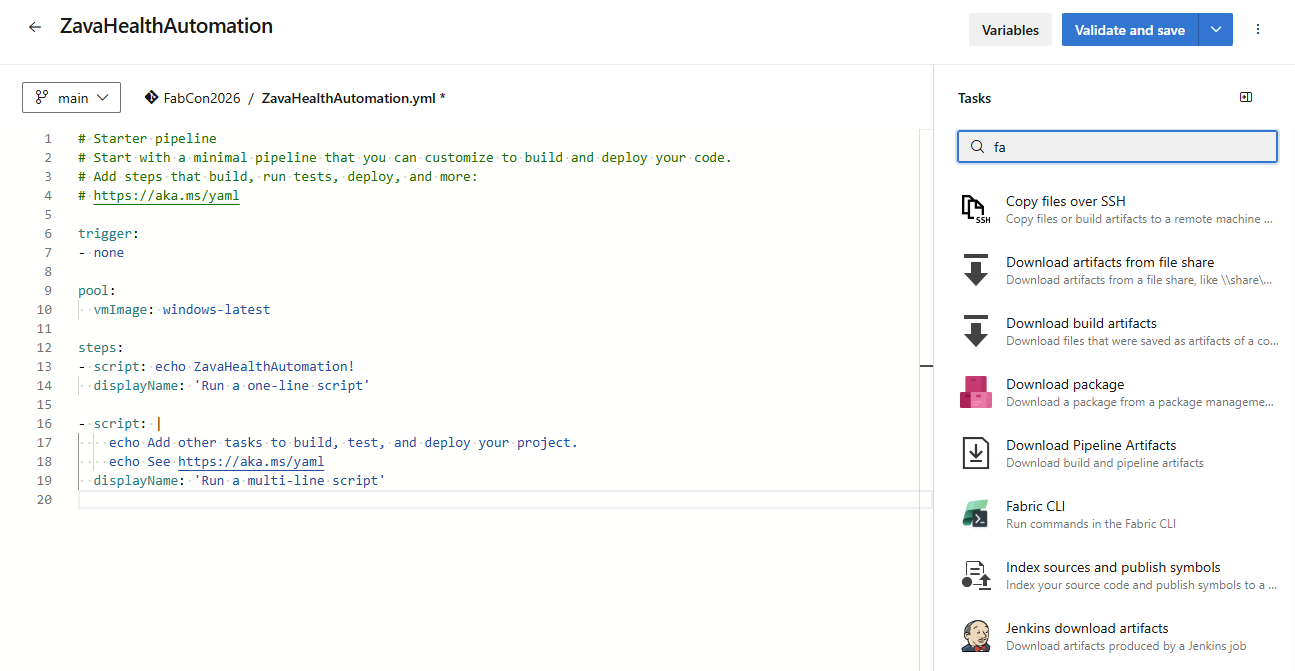
Figure 1 Fabric ADO extension – CLI task.
– task: FabricCLI@13
inputs:
scriptType: ‘ps’
scriptLocation: ‘inlineScript’
inlineScript: ‘Fab ls’
FabricCLIVersion: ‘v1.2.0’
No installation. No friction. From pipeline trigger to Fabric command, it all runs in a single task.
The Fabric CLI task extension is available now on the Visual Studio Marketplace. Add it to your Azure DevOps organization and start managing Fabric resources directly from your pipelines.
Share your feedback!
Your feedback is essential in guiding future improvements. Please share your experience with the engineering team:
- What scenarios are you using the Fabric CLI task for?
- What additional tasks with an extension do you need support for?
- What limitations are most impactful for your workflow?
Related blog posts
Fabric CLI in Azure DevOps: automation without friction (Preview)
Public APIs – bulk import and export items definition (Preview)
Every Fabric item—whether a Notebook, Report, Semantic Model, Pipeline, or KQL Dashboard—has an underlying item definition: a portable, structured payload containing the item’s full configuration and content encoded in Base64. Bulk Import & Export APIs enables.
New data protection capabilities in Microsoft Fabric: Native security for the modern data estate
As organizations continue to scale analytics and AI initiatives, protecting sensitive data has never been more critical. With Microsoft Fabric, we are building data security directly into the analytics platform—so protection is consistent, automated, and enforced wherever data lives and travels. Today, we’re sharing several new data protection capabilities in Microsoft Fabric, powered by deep … Continue reading “New data protection capabilities in Microsoft Fabric: Native security for the modern data estate”
Microsoft Fabric
Accelerate your data potential with a unified analytics solution that connects it all. Microsoft Fabric enables you to manage your data in one place with a suite of analytics experiences that seamlessly work together, all hosted on a lake-centric SaaS solution for simplicity and to maintain a single source of truth.
Get the latest news from Microsoft Fabric Blog
This will prompt you to login with your Microsoft account to subscribe
Visit our product blogs
View articles by category
- Activator
- AI
- Announcements
- Apache Iceberg
- Apache Spark
- Community
- Community Challenge
- Data Engineering
- Data Factory
- Data Lake
- Data loss prevention
- Data Science
- Data Warehouse
- Databases
- Developer
- Fabric IQ
- Fabric ML
- Fabric platform
- Fabric Public APIs
- Fabric Workload
- Information protection
- Lakehouse
- Machine Learning
- Microsoft Fabric
- Monthly Update
- OneLake
- Power BI
- Power BI reports
- Real-Time Intelligence
- Roadmap
- Security and Compliance
- semantic model
- Uncategorized
View articles by date
- March 2026
- February 2026
- January 2026
- December 2025
- November 2025
- October 2025
- September 2025
- August 2025
- July 2025
- June 2025
- May 2025
- April 2025
- March 2025
- February 2025
- January 2025
- December 2024
- November 2024
- October 2024
- September 2024
- August 2024
- July 2024
- June 2024
- May 2024
- April 2024
- March 2024
- February 2024
- January 2024
- December 2023
- November 2023
- October 2023
- September 2023
- August 2023
- July 2023
- June 2023
- May 2023
- April 2023
- March 2023
- February 2023
- January 2023
- December 2022
- November 2022
- October 2022
- September 2022
- August 2022
- July 2022
- June 2022
- May 2022
- April 2022
What's new
- Microsoft 365
- Games
- Surface Pro 9
- Surface Laptop 5
- Surface Laptop Studio
- Surface Laptop Go 2
- Windows 11 apps
Microsoft Store
Education
- Microsoft in education
- Devices for education
- Microsoft Teams for Education
- Microsoft 365 Education
- Office Education
- Educator training and development
- Deals for students and parents
- Azure for students
Business
- Microsoft Cloud
- Microsoft Security
- Azure
- Dynamics 365
- Microsoft 365
- Microsoft Advertising
- Microsoft Industry
- Microsoft Teams
Developer & IT
- Developer Centre
- Documentation
- Microsoft Learn
- Microsoft Tech Community
- Azure Marketplace
- AppSource
- Microsoft Power Platform
- Visual Studio
Company
- © 2026 Microsoft