If you haven’t already, check out Arun Ulag’s hero blog “FabCon and SQLCon 2026: Unifying databases and Fabric on a single, complete platform” for a complete look at all of our FabCon and SQLCon announcements across both Fabric and our database offerings.
Platform
Since the open-source launch in October, the Fabric CLI has gained one-command deployments, first-class Power BI support, an AI agent execution layer, interactive REPL mode, Python 3.13 support, and contributions from community members whose code ships in the CLI you install today.
What’s new in a nutshell
- CI/CD deployments from the CLI — A new deployment command integrates the fabric-cicd library directly into the CLI, enabling full workspace deployments from a single command.
- Power BI scenario support — Report rebinding, Semantic model refresh, and property management through CLI commands, no portal required.
- CLI in Fabric Notebooks — Pre-installed and pre-authenticated in PySpark notebooks — turning notebooks into a remote execution surface for CLI scripts.
- AI agent execution layer — Agent instructions, custom agent-skills, REPL mode, and improved error messages and documentation make the CLI the most efficient way for AI agents to operate Fabric.
Plus: Python 3.13 support, JMESPath filtering, item export/import in multiple formats, REPL mode, 30+ item types now supported, and a wave of community contributions across v1.2–v1.5.
Let’s dig in.
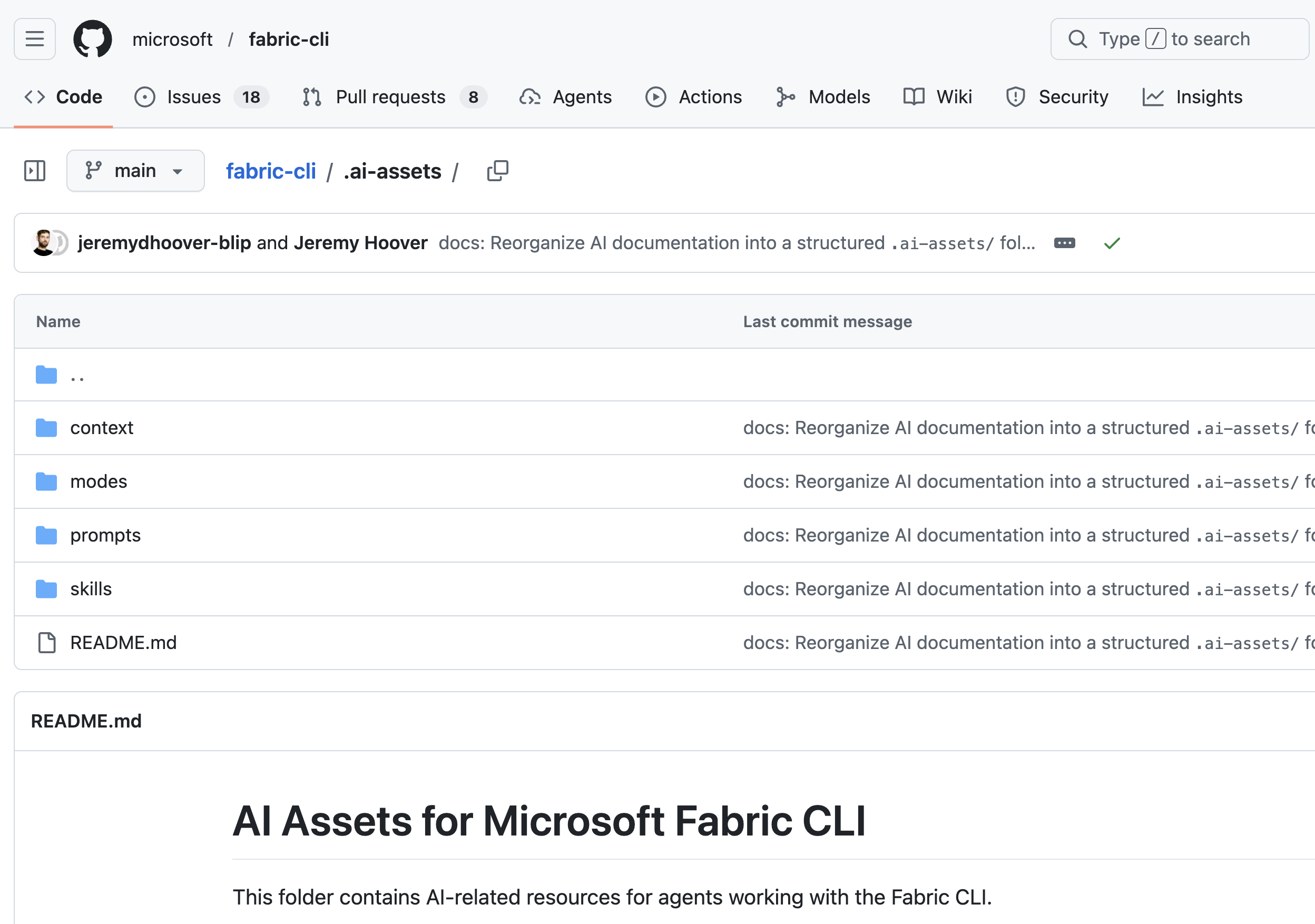 Figure: The .ai-assets folder in the GitHub repo of the Fabric CLI, featuring context, agent modes, prompts, and skills.
CI/CD: Deploy workspaces in one command
One of the most-requested capabilities has been a first-class deployment story. Many of you have been stitching together export, import, and cp commands into custom scripts to promote items across workspaces. It works, but it shouldn’t require that much effort.
v1.5 introduces the deploy command, which wraps the fabric-cicd Python library and exposes it as a single CLI operation. The CLI integrates with fabric-cicd so deploying items from a Git-connected workspace to a target workspace is as straightforward as:
fab deploy –config deployment-config.yaml
This works in local terminals, in GitHub Actions, in Azure DevOps Pipelines, and anywhere else the CLI runs. Combined with Service Principal authentication (fab auth login -u <client_id> -p <secret> –tenant <tenant_id>) and federated credentials for GitHub OIDC), you can set up automated deployments that fit modern DevOps practices.
What this unlocks:
- Git-based promotion — Connect your development workspace to a Git repo, author items there, and use the CLI to push changes to staging or production. Or import items that were exported via the CLI by providing a parametrization or deployment config file.
- Pipeline-native deployments — Integrate deployment commands into your CI/CD YAML and get Fabric deployments that run alongside your application deployments — same pipeline, same triggers, same audit trail.
- Config-file consistency — Users who already have fabric-cicd configuration files can reuse them directly with the CLI.
Refer to the fabric-cicd documentation, and CI/CD examples and setup guide to learn more.
Power BI: First-class scenario support
The Fabric CLI was built on Fabric APIs, which means it’s always strong for notebooks, lakehouses, pipelines, and the broader data engineering surface. The CLI now supports the full Power BI API surface through the API command and expands existing commands to include additional Power BI capabilities:
- Rebind reports via set — The enhanced set command (v1.3.1+) supports any settable property path within an item’s definition and metadata structure. Use it to rebind a report to a different semantic model.
- Power BI properties via set — Update semantic model properties, refresh schedules, and other settings using the same set command you use for other item types.
- Semantic model refresh — Trigger a semantic model refresh and wait for completion right from the CLI. See the semantic model refresh documentation for instructions.
What this unlocks:
Imagine this scenario: you’re a Power BI developer. You update a measure in your semantic model, deploy it, and refresh the model all from your terminal, in under a minute. No portal clicks, no context switching.
For teams that manage dozens of semantic models, the ability to script refresh workflows across models — and run them from a pipeline — eliminates hours of manual work.
Refer to the job command documentation, and set command documentation to learn more.
CLI in Fabric notebooks
The Fabric CLI is now pre-installed and pre-authenticated in PySpark notebooks — no setup, no login, no pip install. Just open a notebook cell, run !fab commands, and you’re managing Fabric resources directly from your notebook.
# List all workspaces
!fab ls
# List items in a specific workspace
!fab ls “My Workspace.Workspace”
| #Trigger a pipeline after your Spark job completes !fab job run “My Workspace.Workspace/Daily-ETL.DataPipeline” |
| #Combine CLI output with Python logic import json, subprocess result = subprocess.run( for ws in workspaces: |
This is a meaningful unlock: it turns notebooks into a remote execution surface for CLI scripts. Automation workflows that previously required manual setup, a local terminal, or a CI/CD pipeline can now run inside Fabric itself. Trigger a downstream pipeline after your Spark job completes. Combine notebook scheduling with CLI commands for recurring automation — nightly backups, weekly permission audits, environment sync. Or build self-contained runbooks that document your operational procedures alongside the CLI commands that execute them.
Whether you’re a data engineer who lives in notebooks or a platform team that wants a lightweight remote execution option — the CLI is there.
AI agents: CLI as an execution layer
Something that’s been shifting beneath the surface since we open-sourced the CLI is that AI agents have become one of the fastest-growing consumer groups of the CLI. Developers are connecting Fabric CLI to GitHub Copilot, Claude, Cursor, and other AI coding assistants and using natural language to operate Fabric.
We’ve been investing to make this work well. Not as an afterthought, but as a design consideration.
What we’ve built for agents
AI assets folder — The repository includes skills, context files, prompts, and modes designed for AI assistants. These resources help agents understand execution patterns (variable extraction, chaining commands, error handling), guardrails (what not to do), and scenario templates.
Contributor agent instructions — The CLI repository includes a structured instructions file that AI agents can consume to understand the CLI’s capabilities, command syntax, and critical rules. When you point your AI assistant at this file, it can generate correct fab commands from natural-language requests — without hallucinating flags or inventing commands that don’t exist.
Improved error messages — When a command fails, the CLI now surfaces actionable error information that helps both humans and AI agents understand what went wrong and how to fix it. This improves the agent’s ability to self-correct and resolve problems faster.
Why CLI as an execution layer?
Using a CLI as the execution layer for AI agents is an emerging industry pattern. Instead of agents calling raw REST APIs (which require extensive token-heavy context about endpoints, auth, and payloads), agents issue concise CLI commands that encapsulate that complexity. This makes AI-driven Fabric automation more practical and reliable.
Recent research from Anthropic demonstrates this clearly. When agents interact with tools through code execution rather than raw API calls, they can reduce token usage by up to 98.7%. Instead of processing hundreds of thousands of tokens upfront, agents load only the definitions they need for the current task. The Fabric CLI provides this same efficiency benefit, allowing agents to fluently operate Fabric without needing full API specs in context.
Picture what becomes possible when an AI agent operates Fabric fluently:
Your prompts:
- “Set up a new lakehouse, upload this CSV, and create a notebook that reads from it.” The agent creates the lakehouse, pushes the file to OneLake, scaffolds the notebook code, and wires everything together. Four operations, one sentence.
- “Deploy the latest changes to production and refresh all downstream models.” The agent chains fab deploys and fab job run into a single verified workflow. No portal. No context switching.
- “Check which notebooks failed last night and re-run them.” The agent pulls the job history with fab job run-list, filters to failures, and re-triggers each one with fab job run. What used to be fifteen minutes of clicking through the portal becomes one request.
Find all of the AI assets on GitHub.
Release highlights: v1.2 – v1.5
The big features tell the headline story, but developer experience lives in the details. Here are our picks from across v1.2 through v1.5:
We’ve also significantly expanded item type coverage. The CLI supports the most used Fabric item types, including CosmosDB Databases, User Data Functions, Digital Twin Builders, Graph Query Sets, Dataflows, GraphQL APIs, Variable Libraries, Copy Jobs, SQL Databases, and more, with full CRUD (mkdir, get, set, rm, cp, mv, import, export) for the majority. We’re constantly adding support for new item types as Fabric expands.
Find the full release notes.
Built by the community
When we open-sourced the CLI in October 2025, we hoped the community would contribute. What happened exceeded our expectations.
Since the open-source launch, community members have authored pull requests that shipped in production releases. Their code is part of the CLI you install today. This isn’t minor. This includes features, bug fixes, optimizations, and documentation improvements that make the tool better for everyone.
Contributors whose code shipped in v1.0 – v1.5
And to the community members who opened issues, reported bugs, and proposed ideas — @edkreuk, @RuiRomano, @iampeterdaniels, @dzsquared, @konjac, @akhilannan, @KoenVerbeeck, @nadavs123, and many others — you shape the roadmap just as much as code contributions do. Thank you.
Upcoming steps and desired outcomes
We’re not slowing down. Here’s what we’re thinking about, exploring, and hearing from you:
- Azure Identity Support — Authenticate with fab using your existing az login session — no separate login required.
- Multi-tenancy support — Ability to switch between tenants in a CLI session — an enterprise customer request we’re prioritizing.
- Soft delete support — Commands to list, restore, and permanently delete soft-deleted items.
- Docker image — A containerized fab image for consistent CI/CD environments.
- Community scripts library — A curated catalog of reusable scripts for common scenarios — backup-and-restore, cross-workspace migration, and bulk permission updates.
- A way to run CLI scripts remotely — some of you want a Fabric Cloud Shell or a browser-based terminal. Others want deeper notebook integration. We’re exploring what makes the most sense.
- IntelliSense in VS Code — autocomplete for CLI commands in your editor.
We want to hear from you. What would make you use the CLI more? What’s missing? What workflow is still too manual? Open an issue, start a discussion, or submit a PR. We build the roadmap in the open, and the best ideas come from the people who use the tool every day.
Get started
# Install or upgrade
pip install ms-fabric-cli –upgrade
# Start the interactive repl
fab
# Inside the shell — explore your workspaces
ls
We built this CLI because of what you told us matters. The roadmap isn’t a document we write and ship. It’s a conversation happening across issues, PRs, and discussions in the open. If you’ve read this far, you’re already part of it.
Keep telling us what’s missing. The best tools aren’t just built for developers. They’re built with them.
Related blog posts
Fabric CLI v1.5 is here (Generally Available)
Tenant level private link support for Microsoft Fabric API for GraphQL (Generally Available)
Microsoft Fabric API for GraphQL now supports Tenant Level Private Link, delivering enterprise-grade network security to your data APIs. This highly requested feature enables organizations to access their GraphQL APIs through private connectivity, ensuring that data traffic never traverses the public internet.
SharePoint Site Picker for easily connecting SharePoint data in Microsoft Fabric (Preview)
The SharePoint Site Picker simplifies the process by replacing the manual URL entry with a browsable and searchable dropdown menu. By enabling site discovery directly within Fabric, it helps prevent URL format errors, reduces connection issues, and allows you to concentrate on building your data integration instead of searching through SharePoint.
Microsoft Fabric
Accelerate your data potential with a unified analytics solution that connects it all. Microsoft Fabric enables you to manage your data in one place with a suite of analytics experiences that seamlessly work together, all hosted on a lake-centric SaaS solution for simplicity and to maintain a single source of truth.
Get the latest news from Microsoft Fabric Blog
This will prompt you to login with your Microsoft account to subscribe
Visit our product blogs
View articles by category
- Activator
- AI
- Announcements
- Apache Iceberg
- Apache Spark
- Community
- Community Challenge
- Data Engineering
- Data Factory
- Data Lake
- Data loss prevention
- Data Science
- Data Warehouse
- Databases
- Developer
- Fabric IQ
- Fabric ML
- Fabric platform
- Fabric Public APIs
- Fabric Workload
- Information protection
- Lakehouse
- Machine Learning
- Microsoft Fabric
- Monthly Update
- OneLake
- Power BI
- Power BI reports
- Real-Time Intelligence
- Roadmap
- Security and Compliance
- semantic model
- Uncategorized
View articles by date
- March 2026
- February 2026
- January 2026
- December 2025
- November 2025
- October 2025
- September 2025
- August 2025
- July 2025
- June 2025
- May 2025
- April 2025
- March 2025
- February 2025
- January 2025
- December 2024
- November 2024
- October 2024
- September 2024
- August 2024
- July 2024
- June 2024
- May 2024
- April 2024
- March 2024
- February 2024
- January 2024
- December 2023
- November 2023
- October 2023
- September 2023
- August 2023
- July 2023
- June 2023
- May 2023
- April 2023
- March 2023
- February 2023
- January 2023
- December 2022
- November 2022
- October 2022
- September 2022
- August 2022
- July 2022
- June 2022
- May 2022
- April 2022
What's new
- Microsoft 365
- Games
- Surface Pro 9
- Surface Laptop 5
- Surface Laptop Studio
- Surface Laptop Go 2
- Windows 11 apps
Microsoft Store
Education
- Microsoft in education
- Devices for education
- Microsoft Teams for Education
- Microsoft 365 Education
- Office Education
- Educator training and development
- Deals for students and parents
- Azure for students
Business
- Microsoft Cloud
- Microsoft Security
- Azure
- Dynamics 365
- Microsoft 365
- Microsoft Advertising
- Microsoft Industry
- Microsoft Teams
Developer & IT
- Developer Centre
- Documentation
- Microsoft Learn
- Microsoft Tech Community
- Azure Marketplace
- AppSource
- Microsoft Power Platform
- Visual Studio
Company
- © 2026 Microsoft