Most enterprise data lives in free text – tickets, contracts, feedback, clinical notes, and more. It holds critical information but doesn’t fit into the structured tables that pipelines expect. Traditionally, extracting structure meant rule-based parsers that break with every format to change, or custom NLP models that take weeks to build. LLMs opened new possibilities, but on their own they bring inconsistent outputs, no type of enforcement, and results that vary between runs. What production workflows need is LLM intelligence with structured-output guarantees, delivered inside the data platform teams already use.
Microsoft Fabric AI Functions deliver exactly that. Functions like ai.summarize, ai.classify, ai.translate, and ai.extract let you transform and enrich unstructured data at scale with a single line of code – no model deployment or ML infrastructure needed. For the full list, see Transform and enrich data with AI functions.
ai.extract is the easiest starting point. Pass in labels like “name” or “city” and get back structured columns with extracted values. The basic usage works great for exploration. But production workflows usually need more: typed outputs, constrained vocabulary, nested objects, or arrays of related items delivered in a consistent shape that downstream systems can reliably consume.
That is where ExtractLabel can help. In this post, we’ll cover how to design extraction schemas with ExtractLabel, when to use each feature, and how field descriptions help the model return better, more reliable results.
Staring point: .ai.extract()
The simplest way to extract entities from text is .ai.extract() with label names passed as strings:
You get back columns with extracted values, which work well for simple use cases: a handful of independent fields, no constraints on values, and no relationships between fields.
ExtractLabel
ExtractLabel is a class in AI Functions library that lets you define a schema contract for what you want to extract. Instead of loose key-value pairs, you get structured objects that match your specification. You define field types, allowed values, and how missing information is handled. The output conforms to that schema every time.
ExtractLabel becomes valuable when you need:
- Multiple attributes grouped together (for example, a product with its name and component)
- Constrained values from a fixed set (a category must be one of five options)
- Arrays of items, rather than parsing comma-separated strings later
- Guidance on how to interpret ambiguous text by providing more context for each field to be extracted. This can include positive and negative examples, edge cases, etc.
With basic extraction, you end up writing post-processing code to validate, restructure, and normalize the results. With ExtractLabel, the structure is enforced at extraction time.
Example: Processing warranty claims
To make this concrete, consider a warranty-claims scenario. Each claim arrives as a block of free text, but the downstream systems need structured fields: the product, the issue, attempted troubleshooting, and the requested resolution. Consider this customer claim as an example:
“The smart thermostat stopped turning on after 12 days. I tried a reset and new batteries. Please replace it.”:
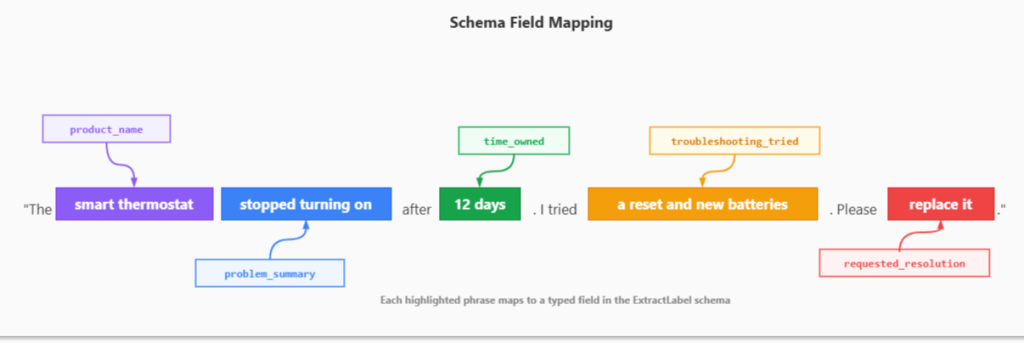
Figure: Schema field mapping
The challenge is getting an LLM to do this reliably across hundreds of thousands of claims – returning every result in the same shape, with the same field names, the same value types, and constrained to valid categories. That’s exactly what ExtractLabel is designed for. You define a schema that captures all these elements in a single structured object. The model reads the text, identifies each piece of information, and returns it in the exact shape you specified.
Building the schema
The AI Functions documentation covers the basic parameters (label, max_items, type, etc.). The real power is in the property’s parameter, which takes a JSON Schema definition. Think of it as a contract: you specify the fields, their types, and acceptable values. The extraction engine enforces that contract on every row.
Here is the structure:
The max_items=1 setting returns a single object instead of an array. See the ExtractLabel documentation for the full parameter reference.
Let’s review the features that matter most inside the properties object.
Schema features that make extraction reliable
Inside the properties object, each field is defined using JSON Schema. Here are the features that matter most:
Field Types
Specify what kind of value you expect:
Common types: string, boolean, number, array, object. For optional fields, use an array: [“string”, “null”] so the model knows it’s okay to leave a field empty when the information isn’t in the text.
Enums for constrained values
When a field should only have specific values, use an enum:
This ensures your downstream analytics and routing logic can rely on a known set of values. No more cleaning up “Defective”, “defect”, “DEFECT”, and “broken” into a single category.
Arrays for multiple items
When the text contains multiple related items, like the troubleshooting steps a customer tried, you need an array, not a comma-separated string you’ll have to parse later:
The output will be a proper array like [“reset”, “new batteries”] rather than a comma-separated string you need to parse.
Descriptions for guidance
Types and enums define the structure, but descriptions tell the model how to think about the content. This is where you handle the ambiguity that real-world text always brings:
Descriptions help with:
- Clarifying enum values: Explain what each option means so the model picks the right one
- Handling missing data: “Null if not mentioned” tells the model when to leave a field empty
- Setting constraints: “Max 15 words” or “Use common name, not brand”
- Resolving ambiguity: “Use ‘other’ if the request is unclear”
- Examples & edge cases: Include examples (positive/negative) or edge cases
Putting it all together
Here is the complete schema applied to warranty claims. It combines every feature covered above: typed fields, enums for constrained categories, arrays for multi-item lists, nullable fields for optional data, and descriptions to guide the model on edge cases. The full schema definition and sample data are available in the example notebook in fabric-toolbox repository. Once the schema is defined, the extraction call is a single line:
The following is a complete schema for warranty claim extraction:
For the thermostat claim, you get back:
A few things to note about the schema structure. The properties parameter wraps the field definitions inside a nested object with its own type, properties, required, and additionalProperties. All fields must be listed in the required array, and additionalProperties should be set to False. This is not optional; ExtractLabel will return an error if any field is missing from required.
Generating schemas from Pydantic
Writing JSON Schema by hand works, but it gets painful as schemas grow. Pydantic, an open-source library, lets you define your data shape as normal Python classes with type hints, and then:
- Validates incoming data (types, required fields, constraints).
- Parses/coerces values (e.g., “3” to 3 when appropriate).
- Gives clear error messages.
- You can export JSON Schema automatically when you need it.
You write Python models once, and Pydantic handles validation (and schema generation) for you.
Instead of writing JSON Schema by hand, you define a Pydantic model class where each field gets a type of hint, a description, and constraints like Literal for enums or Optional for nullable fields. Then convert it to a JSON Schema with model_json_schema() and pass it to ExtractLabel. The example notebook shows both approaches.
Notice how Pydantic gives you:
- Type hints instead of JSON type strings
- Literal for enums
- Optional for nullable fields
- Field(…, description=) for guidance
- default_factory for default values like empty lists
To use the Pydantic model with ExtractLabel, convert it using model_json_schema() and ensure all properties are marked as required.
This approach keeps your schema definition in Python, makes it easier to maintain, and lets you reuse the same Pydantic models for validation elsewhere in your code.
Wrapping up
ExtractLabel fills a specific gap between quick label extraction and production-grade structured output. You define the shape you need, and the extraction conforms to it. The schema becomes a contract that both the extraction step and your downstream systems can depend on.
Everything shown here works with both pandas DataFrames and PySpark DataFrames. For PySpark, import from synapse.ml.spark.aifunc instead of synapse.ml.aifunc. The schema definition and extraction call stay the same. The difference is what happens under the hood. With PySpark, Fabric distributes the extraction across your cluster, so you can process large DataFrames without changing your code. If you are working with large volumes of data, PySpark lets you scale the same extraction pattern without having to batch things manually.
As with any AI-powered process, validate results against labeled samples and refine your schema descriptions to improve accuracy and reliability over time.
Get started
For the full reference on AI Functions and other extraction patterns, explore the official AI Functions documentation and notebook samples.
Related blog posts
ExtractLabel: Schema-driven unstructured data extraction with Fabric AI Functions
Operationalizing Agentic Applications with Microsoft Fabric
Agentic apps are moving quickly from prototypes to real workloads. But once you go beyond a proof of concept (POC), the hard part isn’t getting an agent to respond; it’s knowing what the agent did, whether it was safe and correct, and how it’s impacting the business. Let’s explore what it takes to operationalize agentic … Continue reading “Operationalizing Agentic Applications with Microsoft Fabric”
Fabric February 2026 Feature Summary
Welcome to the February 2026 Microsoft Fabric update! This month brings a wide range of enhancements across the Fabric platform—from improvements to the OneLake Catalog and developer experiences, to meaningful updates in Data Engineering, Data Factory, Real‑Time Intelligence, and more. Whether you’re building, operating, or scaling solutions in Fabric, there’s plenty here to explore. And … Continue reading “Fabric February 2026 Feature Summary”
Microsoft Fabric
Accelerate your data potential with a unified analytics solution that connects it all. Microsoft Fabric enables you to manage your data in one place with a suite of analytics experiences that seamlessly work together, all hosted on a lake-centric SaaS solution for simplicity and to maintain a single source of truth.
Get the latest news from Microsoft Fabric Blog
This will prompt you to login with your Microsoft account to subscribe
Visit our product blogs
View articles by category
- Activator
- AI
- Announcements
- Apache Iceberg
- Apache Spark
- Community
- Community Challenge
- Data Engineering
- Data Factory
- Data Lake
- Data Science
- Data Warehouse
- Databases
- Fabric IQ
- Fabric ML
- Fabric platform
- Fabric Public APIs
- Lakehouse
- Machine Learning
- Microsoft Fabric
- Monthly Update
- OneLake
- Power BI reports
- Real-Time Intelligence
- Roadmap
- semantic model
- Uncategorized
View articles by date
- March 2026
- February 2026
- January 2026
- December 2025
- November 2025
- October 2025
- September 2025
- August 2025
- July 2025
- June 2025
- May 2025
- April 2025
- March 2025
- February 2025
- January 2025
- December 2024
- November 2024
- October 2024
- September 2024
- August 2024
- July 2024
- June 2024
- May 2024
- April 2024
- March 2024
- February 2024
- January 2024
- December 2023
- November 2023
- October 2023
- September 2023
- August 2023
- July 2023
- June 2023
- May 2023
- April 2023
- March 2023
- February 2023
- January 2023
- December 2022
- November 2022
- October 2022
- September 2022
- August 2022
- July 2022
- June 2022
- May 2022
- April 2022
What's new
- Microsoft 365
- Games
- Surface Pro 9
- Surface Laptop 5
- Surface Laptop Studio
- Surface Laptop Go 2
- Windows 11 apps
Microsoft Store
Education
- Microsoft in education
- Devices for education
- Microsoft Teams for Education
- Microsoft 365 Education
- Office Education
- Educator training and development
- Deals for students and parents
- Azure for students
Business
- Microsoft Cloud
- Microsoft Security
- Azure
- Dynamics 365
- Microsoft 365
- Microsoft Advertising
- Microsoft Industry
- Microsoft Teams
Developer & IT
- Developer Centre
- Documentation
- Microsoft Learn
- Microsoft Tech Community
- Azure Marketplace
- AppSource
- Microsoft Power Platform
- Visual Studio
Company
- © 2026 Microsoft